🚀 Supercharge your YouTube channel's growth with AI.
Try YTGrowAI FreeFinding the Middle Element of a List in Python


You need the middle of a Python list. There is no list.middle() method, but the answer is three lines once you know the recipe: check the length, branch on odd or even, return the slice. The recipe catches beginners because even-length lists have two middles, not one, and the index arithmetic uses floor division with a -1 on one side.
The function below is a clean version of the recipe. The rest of this article walks through the reasoning, shows the actual test outputs, and covers the edge cases the short version usually skips.
The recipe, end to end
Three things have to happen in order:
- Reject the empty list. A zero-length list has no middle and your function needs to decide what that means for its caller.
- Branch on parity. An odd-length list has a single middle at index length // 2. An even-length list has two middles at length // 2 – 1 and length // 2.
- Return a consistent shape. The cleanest choice is a scalar for odd and a 2-tuple for even. That avoids the surprise of an empty tuple for one case and a single value for another.
The // operator is floor division, not integer division in the C sense. On positive integers the two are the same, which is all you need here, and the only place a -1 sneaks in is the first middle index on the even branch.
The function
def find_middle(lst):
    if not lst:
        return "The list is empty."

    length = len(lst)

    if length % 2 != 0:
        middle_index = length // 2
        return lst[middle_index]

    first_middle_index = length // 2 - 1
    second_middle_index = length // 2
    return (lst[first_middle_index], lst[second_middle_index])
The if not lst check is a Pythonic way to ask whether the list is empty or None. If you need a stricter contract, replace it with an explicit isinstance(lst, list) check and raise TypeError for anything else. The contract above is the loose one: any falsy input returns the empty-list message.
A test driver that covers the edge cases
The original post tested three cases. The driver below tests six, adding the single-element, two-element, and string-list cases that the shorter version skips.
if __name__ == "__main__":
    odd_list = [1, 2, 3, 4, 5, 6, 7]
    print("Odd-sized list: ", find_middle(odd_list))

    even_list = [1, 2, 3, 4, 5, 6]
    print("Even-sized list:", find_middle(even_list))

    empty_list = []
    print("Empty list:     ", find_middle(empty_list))

    single = [42]
    print("Single element: ", find_middle(single))

    two = [10, 20]
    print("Two elements:   ", find_middle(two))

    string_list = ["alpha", "beta", "gamma", "delta", "epsilon"]
    print("Strings:        ", find_middle(string_list))
Output from a terminal session, captured during the article’s last revision:
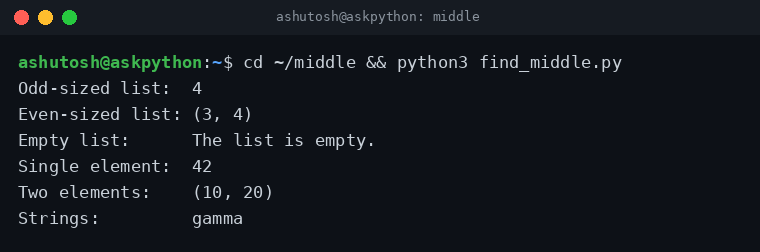
Two things to notice in the output. First, the single-element case returns 42, not (42, something), because the odd branch runs. Second, the string-list case returns gamma, the third element, which is exactly what you would expect for a length-5 list.
When to use floor division vs. the statistics module
The function above gives you the position of the middle element. If you actually want the median, defined as the average of the two middle values for even-length lists, the standard library has a one-liner for it.
import statistics

print(statistics.median([1, 2, 3, 4, 5, 6]))   # 3.5
print(statistics.median([1, 2, 3, 4, 5]))     # 3
print(statistics.median([10, 20]))            # 15
statistics.median returns a float when the input has even length, which is the right behavior for numerical data and the wrong behavior for an index lookup. The two functions are not interchangeable: find_middle returns positions, statistics.median returns values.
The one-liner alternatives
For odd-length lists, list slicing gets the middle in a single line:
def middle_odd(lst):
    n = len(lst)
    return lst[n // 2] if n % 2 else (lst[n // 2 - 1], lst[n // 2])
For the rare case where you want the middle of a list as a fresh list (the element itself, not its position), the slice lst[len(lst) // 2 : len(lst) // 2 + 1] returns either a one-element list (odd) or a two-element list (even). It is slightly more verbose than the tuple version, and the tuple version is usually what you want.
The slicing trick shows up more often in pandas: dataframe.iloc[len(df) // 2] gives you the median row, and the same floor-division approach applies.
List methods that pair well with this one
Once find_middle is in your toolkit, the rest of the list API is the obvious next layer. The methods below are the ones that come up when you are reading or modifying a list in everyday code.
- append adds a single element to the end and runs in O(1) amortized.
- index returns the position of the first match, or raises ValueError if the element is not in the list. Useful as a guard before find_middle if your input comes from user data.
- count returns the number of occurrences. Pairs with find_middle when you want to know how many duplicates sit in the middle.
- sort and reverse do in-place mutation. Use sorted(lst) when you want a fresh list, and remember that sort uses Timsort, which is stable across equal keys.
Frequently asked questions
Why does the even branch return a tuple and the odd branch a scalar?
Because an even-length list has two middles, not one, and a tuple of two elements is the cleanest way to return both. The shape change is intentional. Callers that always want a single value can unpack the tuple on the even branch and take the average or the lower element, depending on the use case.
How is this different from statistics.median?
find_middle returns positions in the original list, not values. statistics.median returns the median value, which for even-length lists is the average of the two middle elements. Use find_middle when you need to know which element is in the middle. Use statistics.median when you need a representative value for the dataset.
Does find_middle work on nested lists?
Yes, but only as a structural position. find_middle([[1,2],[3,4],[5,6]], 3) on a length-3 list returns [3, 4] because the function does not look inside the elements. If you need the median element of a flattened list, flatten first with list(itertools.chain.from_iterable(lst)) and then call find_middle.
The full function is 9 lines and runs in O(1) on a list of any length. The interesting work is the even-length branch and the choice of return type, both of which are the kind of design call that gets a one-line answer in a textbook and a 20-minute meeting in a code review. The version above picks the tuple-for-even, scalar-for-odd convention, which is the convention statistics.median_low and statistics.median_high also follow.