🚀 Supercharge your YouTube channel's growth with AI.
Try YTGrowAI FreeHow to Use Retrieval-Augmented Generation(RAG) to Chat With PDFs Locally?

Large Language Models(LLMs) have been in the tech news for quite some time and every day, we learn about new advancements in this field. These models are being used in finance, management, content creation, and analysis. While these perform well by themselves, some additional advanced techniques can help increase the reliability and accuracy of LLM-based applications.
One such framework is Retrieval Augmented Generation(RAG) which allows the language model to access a knowledge base, thereby increasing the quality of responses generated by llms.
I have already covered a basic introduction to LLMs in the previous posts. In this one, I will be demonstrating how to use RAG and LLM to chat with local PDFs.
A Quick Guide to run LLMs locally
What is Retrieval Augmented Generation(RAG)?
RAG is an AI framework that gives power to text generation models like large language models through knowledge retrieval and to an extent querying. This mechanism prevents the language model from hallucinating or giving out false information when it doesn’t have a right answer. It also helps the model stay up to date with the knowledge. Sometimes, retrieval augmented generation can also help phrase user questions to extract better responses from the agent.
One major advantage of using RAG is that we don’t need to vigorously train the large language model on new data. Instead, we can just update the knowledge base associated with the model.
This process consists of two steps:
- Retrieval: Based on the user’s prompt, the documents relevant to the input are searched and retrieved
- Generation: The information is then passed to a language or text generation model for obtaining the response
LLM applications combined with RAG are vastly being developed these days. Some notable ideas to implement: An application to chat with documents locally, an automated email response generator, a paper title generator, and so on.
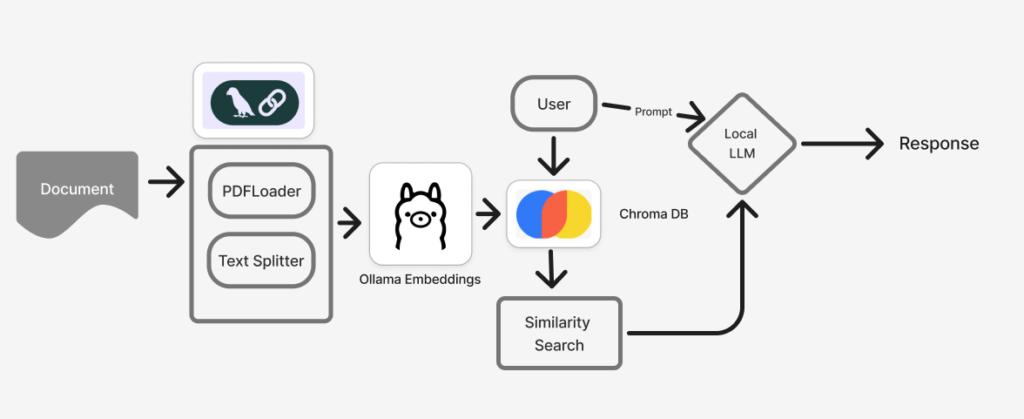
Reading the previous post, you might know that Langchain and Ollama are the go-to frameworks for building llm applications. I will use these two frameworks along with Chroma db to chat with local documents.
Similar to any text-related task, the documents or PDFs need to be loaded first and converted into embeddings, which help the system understand text relationships better. This is performed using Langchain’s text splitter. They are then passed as Ollama embeddings to the Chroma DB, which stores the embeddings along with their metadata for retrieval. Notice how the chroma database reads the user’s prompt, and based on this prompt, a similarity search is performed on the stored documents.
The relevant documents and the user’s prompt or question are passed to the local language model to produce a response.
Why Do LLMs Need RAG Anyway?
There are two main reasons to use RAG with large language models. One, when these chat models are asked questions they don’t know, often hallucinate and provide false or non-existent information.
Since Retrieval augmented generation stores the data as chunks or embeddings, they can be used to provide context to the large language models. This context or information makes the models smarter, and more aware of the information.
In the following sections, I will provide a detailed explanation for each segment shown in the workflow.
1. Ollama Setup
Ollama is the middleman of this entire framework. To make it work, I had to ensure that an Olama model(Llama3.2 here) was always running locally via a terminal or command prompt.
Follow this command to run an Ollama model locally in the terminal.
ollama run llama3.2
In a new jupyter file install these libraries preferably in a virtual environment.
pip install langchain_community
pip install pymupdf
pip install chromadb
Now, we need to integrate the local model with the Python environment. This can be done by importing ChatOllama from the langchain community.
from langchain_community.chat_models import ChatOllama
localmodel = "llama3.2"
llm = ChatOllama(model = localmodel)
I used the code snippet below to check if the integration is successful. I have passed a prompt/query asking to tell me about itself. The response is as follows:
from langchain.schema import HumanMessage
response = llm([HumanMessage(content="Tell me about yourself")])
print(response)

Which means, the setup is successful!
2. Document Setup
In this section, I’m going to describe how to load a document, convert the text into embeddings, and pass it to Ollama. Firstly, make sure these magic commands are installed.
%pip install --q "unstructured[all-docs]"
%pip install --q unstructured langchain
%pip install --q chromadb
%pip install --q langchain-text-splitters
These magic commands install the additional dependencies required for document processing and retrieval.
I will use the “Attention is All You Need” document for this example. Notice the block of the Langchain part in the workflow. It consists of a Document Loader and a Text Splitter. I’ve used the PyMuPDFLoader from Langchain’s Document Loaders. The other options are UnstructuredPDFLoader and OnlinePDFLoader. Their functionality is the same – to load the PDF from the given path.
from langchain.document_loaders import PyMuPDFLoader
local_path  = "llm/NIPS-2017-attention-is-all-you-need-Paper.pdf"
loader = PyMuPDFLoader(file_path=local_path)
data = loader.load()
I have defined the path to the paper in local_path which is then passed to the PyMuPDF loader instance. The loaded PDF is stored in data.
data[0].page_content
The above line prints the content on the first page of the document.

The next step is to split the document, store it in a vector database(here, it is chroma db), and pass the embeddings to Ollama. Like document loaders, there are many options to select from text splitters. But as suggested by Langchain, I’m going to use RecursiveCharacterTextSplitter.
from langchain_community.embeddings import OllamaEmbeddings
from langchain_text_splitters import RecursiveCharacterTextSplitter
from langchain_community.vectorstores import Chroma

#splitting the document into chunks
text_splitter = RecursiveCharacterTextSplitter(chunk_size=7500, chunk_overlap=100)
chunks = text_splitter.split_documents(data)
These document chunks are stored in a vector store and converted to Ollama Embeddings.
#initalize a chroma instance with the doc
vector_db = Chroma.from_documents(
    documents=chunks,
    embedding=OllamaEmbeddings(model="llama3.2",show_progress=True),
    collection_name="local-rag"
)
This is where the retrieval of related documents based on a similarity search begins. When we send a prompt or query, the vector store will search and retrieve the top 5 relevant chunks.
def retrieve_relevant_chunks(query, vector_db, k=5):
    docs = vector_db.similarity_search(query, k=k)
    return docs
3. Querying
This is the last and important section where we ask the large language model a few questions related to the document.
The standalone function I’ve used here is called QnA. QnA puts together the functionality of retrieving relevant docs(the previous function), the query by the user, and formatting the response provided by the llm.
def QnA(question, vector_db, llm):
    relevant_docs = retrieve_relevant_chunks(question, vector_db)
    context = " ".join([doc.page_content for doc in relevant_docs])
    prompt = f"Context: {context}\n\nQuestion: {question}\nAnswer:"
    response = llm([HumanMessage(content=prompt)])
    formatted_output = response.content.replace("\n\n", "\n").strip()
    return formatted_output
It is time to ask some questions!
question = "summarize this pdf in 300 words"
formatted_output = QnA(question, vector_db, llm)
print(formatted_output)
question = "How does this PDF describe attention?"
formatted_output = QnA(question, vector_db, llm)
print(formatted_output)
The model seems to do well in answering the questions, but it takes a lot of time to process the function and is a bit computationally expensive.
Here are a few suggestions to take this application to the next level!
- Try with another large language model or open-source vendor
- Build a frontend app around this function
- Extend the functionality to process multiple queries at once
Conclusion
In this extensive tutorial, I have explained what retrieval augmented generation is and why large language models need this mechanism for better-quality responses. For demonstration, I have used the Attention is All You Need paper and the Lllama 3.2 model from Ollama. While this is a basic tutorial on rag, it will help you to get started and eventually scale up from here.
References