🚀 Supercharge your YouTube channel's growth with AI.
Try YTGrowAI FreeConverting Alphabet Letters to Numbers Using Python


Turning letters into numbers, with A as 1 through Z as 26, is a small task you can do in a few lines of Python. Python’s ord() gives each character’s Unicode number, and subtracting the number for A and adding one turns that into an alphabet position.
Below, I’ll convert single letters, then encode a whole phrase with clear breaks between words.
What does A=1 mean in Python?
I ran A through both calculations and got 1 for its A1Z26 position and 65 for its Unicode code point. Python’s ord documentation identifies the second value as a code point.
| Letter | A1Z26 position | Unicode code point |
|---|---|---|
| A | 1 | 65 |
| z | 26 | 122 |
A phrase uses spaces between letter positions and a slash between words because each position can have one or two digits.
Prerequisites
The examples use only Python’s standard library, so there is no package to install.
- Use a Python 3 interpreter.
- Choose A=1 through Z=26, with uppercase and lowercase letters sharing positions.
- For the phrase example, use English letters with whitespace between words. Punctuation and other characters are rejected.
Step 1: Map one English letter to its position
Check the original character against A to Z or a to z before calling upper(). That keeps a Unicode character with an unusual uppercase form outside this English-letter mapping.
def letter_to_number(letter):
    if len(letter) != 1 or not (
        "A" <= letter <= "Z" or "a" <= letter <= "z"
    ):
        raise ValueError("Expected one letter from A to Z")
    return ord(letter.upper()) - ord("A") + 1

print(letter_to_number("A"))
print(letter_to_number("z"))
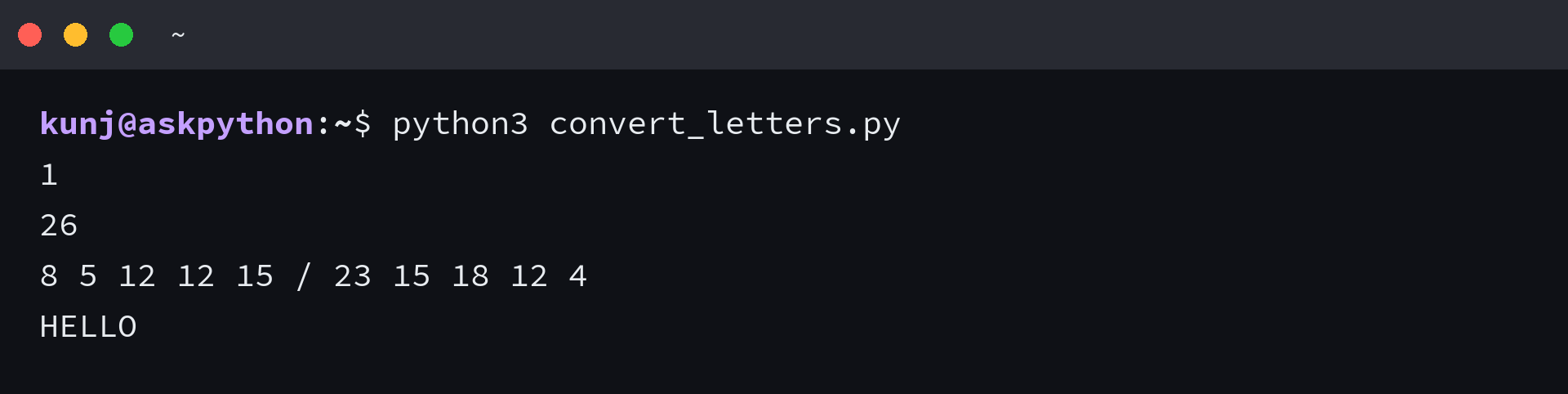
The function prints 1 for A and 26 for z, then gets each position by subtracting ord(“A”) and adding one.
Use a dictionary when positions change
The ordinal formula fits positions that follow alphabet order. Parallel lists pair letters and numbers by index, and a dictionary keeps each value under its letter.
alphabet = "abcdefghijklmnopqrstuvwxyz"
mapping = {
    letter: position
    for position, letter in enumerate(alphabet, start=1)
}
mapping["e"] = 100
print(mapping["e"])
The dictionary prints 100 for e while its other entries keep their one-based positions.
Step 2: Encode a phrase with word boundaries
Add text_to_numbers below letter_to_number so the same validator processes each character and the output keeps spaces between letters plus a slash between words.
def text_to_numbers(text):
    words = []
    for word in text.split():
        positions = [str(letter_to_number(letter)) for letter in word]
        words.append(" ".join(positions))
    return " / ".join(words)

print(text_to_numbers("Hello World"))
I ran the assembled functions and got the slash-separated groups 8 5 12 12 15 / 23 15 18 12 4. The slash marks the boundary between Hello and World.
Write the encoded text to a file
Create input.txt with Hello World on one line. Choose an output filename you can replace because Path.write_text() overwrites existing contents.
Hello World
Keep the earlier conversion functions in file_io.py, then append these file operations. They read input.txt as UTF-8 and write the encoded string to output.txt before reading it back.
from pathlib import Path

input_path = Path("input.txt")
output_path = Path("output.txt")
source = input_path.read_text(encoding="utf-8")
encoded = text_to_numbers(source)
output_path.write_text(encoded, encoding="utf-8")
result = output_path.read_text(encoding="utf-8")
assert result == encoded
print("input.txt:", source)
print("output.txt:", result)
I ran python3 file_io.py with Hello World in input.txt and saw the encoded sequence read back from output.txt.

Step 3: Convert positions back to letters
The inverse uses Python’s chr() function to convert a position back to an uppercase letter. It accepts only integer values from 1 through 26.
def number_to_letter(number):
    if type(number) is not int or not 1 <= number <= 26:
        raise ValueError("Expected an integer from 1 through 26")
    return chr(ord("A") + number - 1)

print("".join(number_to_letter(number) for number in (8, 5, 12, 12, 15)))
| Position | Letter |
|---|---|
| 1 | A |
| 8 | H |
| 12 | L |
| 26 | Z |
The example prints HELLO because the forward mapping folds case. Keep a separate case marker if you need to reproduce the exact capitalization of the input.
Verify the input contract
Python’s str.isalpha documentation describes a Unicode-aware check that can accept accented letters. The A-to-Z range checks reject those characters before applying the offset.
The accepted characters are the 26 English letters represented by the American Standard Code for Information Interchange (ASCII). AskPython’s ASCII character detection example covers a related input check.
| Input | Result | Reason |
|---|---|---|
| A | 1 | First position |
| z | 26 | Last position |
| é | ValueError | Outside A to Z |
| ! | ValueError | Punctuation is rejected |
| AA | ValueError | One character is required |
I tested accented letters and punctuation, and the guard rejected them. If your input includes those characters, use an explicit alphabet mapping instead of applying English-letter offsets.
- For character code points, call ord() without subtracting an alphabet offset.
- For a different alphabet or a custom order, define the allowed letters and their positions directly.
Choose the mapping before you store it
Keep the number convention and word separator with the encoded text, or a decoder cannot tell where one word ends. This example uses one-based English alphabet positions and a slash between words.
Test both endpoints before storing the output by running this line.
print(text_to_numbers("AZ"))
Letter-to-number FAQ
Your input policy determines whether a character can be mapped, while the position formula determines which number each accepted letter gets.
Does ord() return an alphabet position?
No. ord() returns a Unicode code point. Subtract ord(“A”) and add one to get the one-based English alphabet position after the input passes the letter check.
Can I convert accented letters?
This function rejects them because it maps only A to Z. Define an order or a dictionary for the alphabet your application needs.
Why does the phrase use a slash?
Letter positions can have one or two digits, so spaces separate letters and a slash separates words. Pick a delimiter your receiving format can reserve, then use the same rule when decoding.