🚀 Supercharge your YouTube channel's growth with AI.
Try YTGrowAI Free15 Simple Steps to Vibe Code an App (No Coding Required)


I recently vibe coded an entire web app just by using vibe coding, and it is going pretty well. In just a month, we were able to get 1k new users, no ads, nothing.
Another recent example of vibe coding is this simple AI automation workflow tool just like n8n, but it is browser-based.
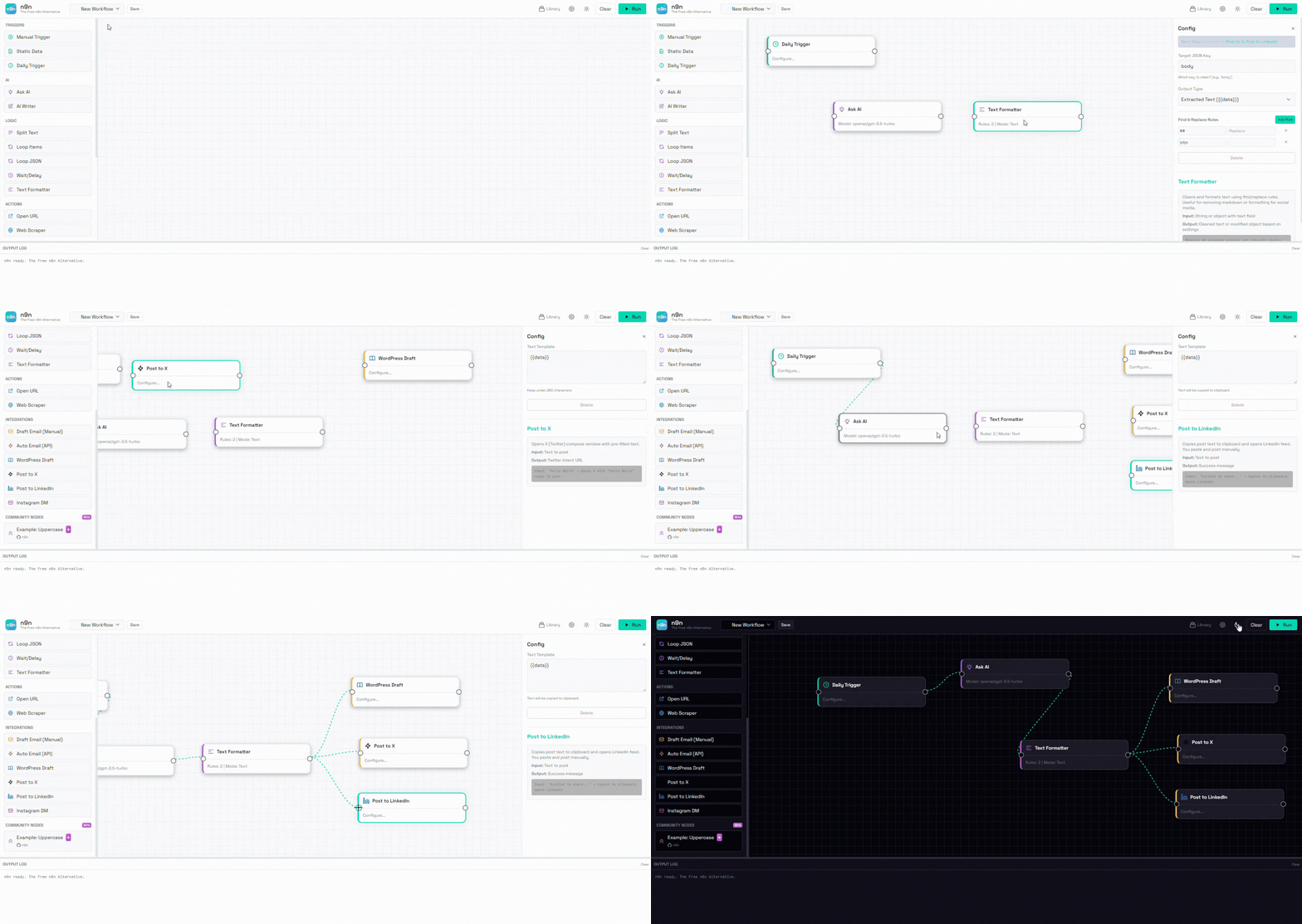
Project link: https://github.com/adityagupta29/n9n
And let me tell you, I created this in just one single day. The professional README.md file you see, the process to put it on GitHub, and the process to make it a live URL so that you can test it out. All by vibe coding. And you can do that too.
In this blog post, I am going to share my secret steps to help you vibe code apps without any coding knowledge, faster and more scalable, so you can push them online and build your very first startup. And all of this does not require you to write a single line of code.
What is Vibe Coding?
Vibe coding is a fancy term, but if I tell you its simple synonym, you will understand it easily.
Vibe coding means AI coding. Yes, it simply means AI writes the code and you just give instructions. That’s it.
You tell ChatGPT, “Create me an alarm app that wakes me up at 6 AM and plays my favorite song,” and you just provide the song name.
ChatGPT gives you code for your app and tells you the steps to run it or install it on your phone, and boom, you become a coder without even coding.
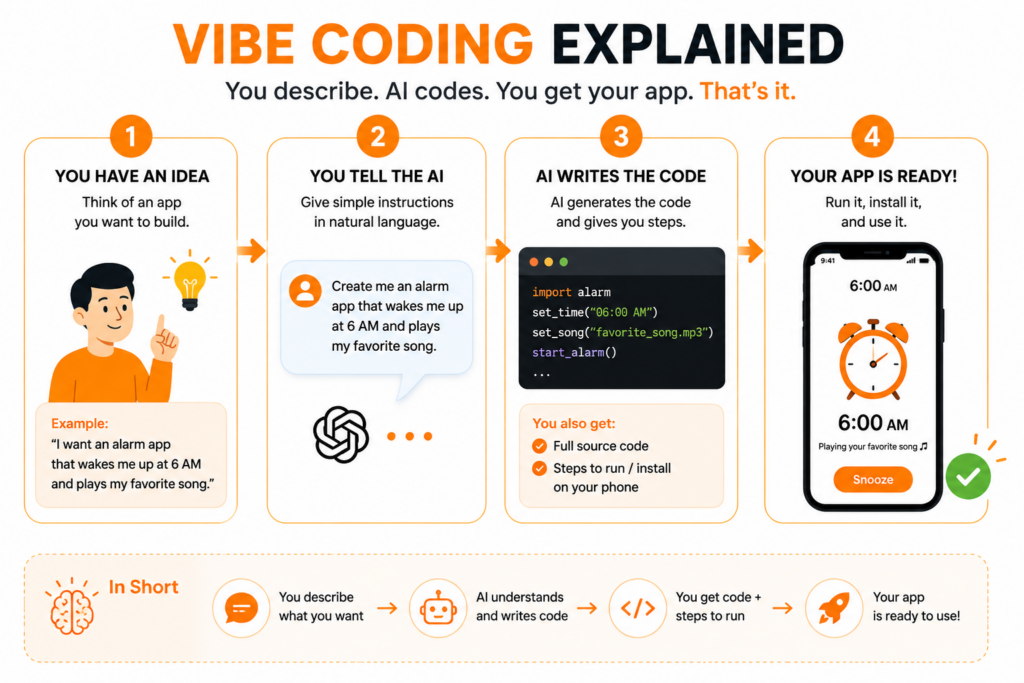
Example Prompt:
“Create an alarm app that wakes me up at 6:00 AM and plays my favorite song. Give me complete code and explain step-by-step how to run it.”
Which Tools or Software Do I Need for Vibe Coding?
All you need is:
- A laptop
- Internet connection
- A browser
You can use Chrome if you are using Windows or Safari if you are using Mac.
That’s literally enough to start vibe coding.
Which AI Tools Should We Use for Vibe Coding?
If you are willing to pay, you can use Kimi (its CLI version is pretty good). I usually go for free tools, so I use the Z.ai chatbot.
Yes, some people say using a chatbot is not an ideal way for vibe coding and that you should use coding agents. But hey, this is one of the biggest myths. Yes, we will use AI agents, and I will tell you their use case, but to start, a chatbot is a great option to talk deeply about what you want to create.
For that, Z.ai is the best free option available at the time I am writing this article.
Steps to Vibe Code an App
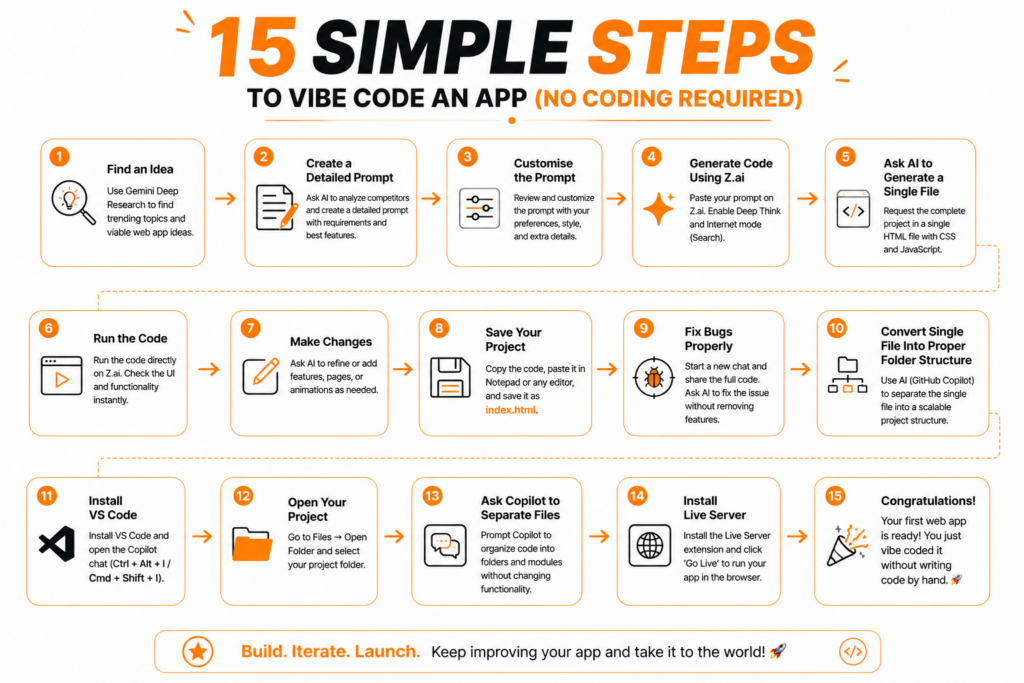
1. Find an Idea
If you don’t have an idea in mind, use Gemini Deep Research and ask it to analyze trends and market gaps and give you web app ideas that can go viral.
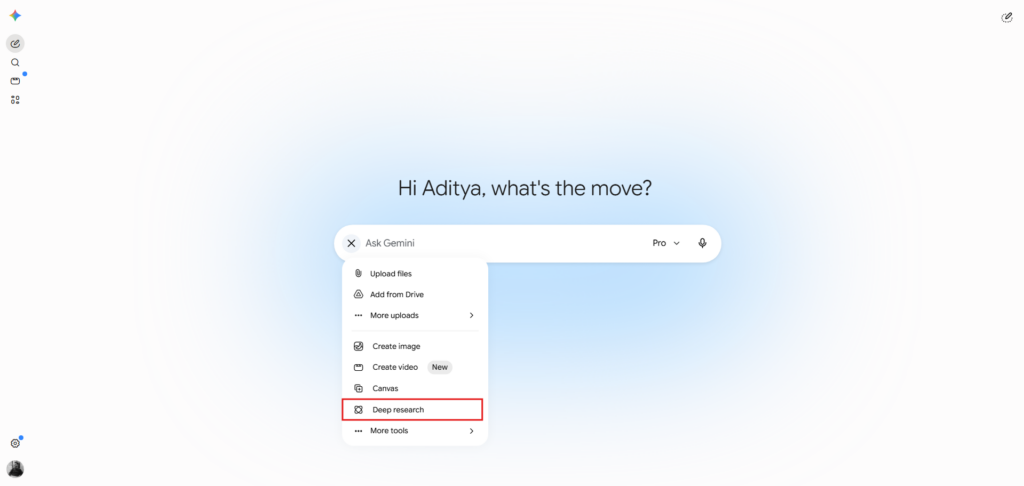
Example Prompt:
“Analyze current internet trends, startup ideas, and market gaps. Suggest 10 web app ideas with viral potential that solve real-world problems.”
2. Create a Detailed Prompt
Next, we will ask it to create a detailed prompt to create that tool.
For the first tool, make sure you create it just by using JavaScript (no big framework like React). You can also use Python, but JavaScript is the one that doesn’t require you to install anything to make it work.
You can add this prompt:
“I picked this idea: [Your Web App Idea]
Create a modern web application for this idea using only HTML, CSS, and JavaScript without using React or any large frameworks.
Before writing code, first analyze existing apps and competitors in the same niche/domain. Study their UI, UX, features, strengths, weaknesses, and common design patterns.
Requirements:
Make the application fast and optimised.
Make this app look more modern and visually better than existing competitors.
Analyse competitor features and include the most useful features from different competitors.
Create a feature set that acts like a super set of competitors while still keeping the interface simple and beginner-friendly.
Improve user experience and remove common frustrations users face in existing apps.
Make the design clean, modern, premium, responsive, and mobile-friendly.
Use smooth animations and modern UI elements where needed.”
3. Customise the Prompt
Once you have your prompt, see if the list has all the features you want or not.
If not, make sure to copy-paste the prompt into Notepad and edit it, customize it. You can also tell additional details like use my favorite color and give a color code or name, use this font, etc.
For Example:
“Use dark mode with #0F172A as the background color, use Poppins font, add glassmorphism design, etc”
4. Generate Code Using Z.ai
Once you have your prompt ready, go to Z.ai, sign up for free, and paste that prompt.
Make sure to enable Deep Think and Internet mode (Search) both.
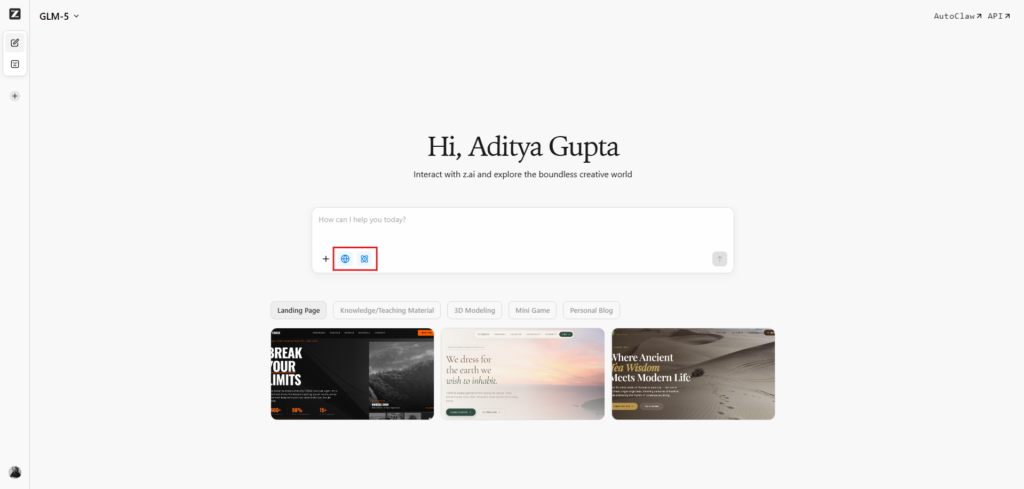
The Thinking mode helps AI reread the code again and again, making sure that the code you get is bug-free.
5. Ask AI to Generate a Single File
Make sure to ask it to produce code in a single file.
I know this is really bad coding practice, but I will tell you a hack later. For now, giving code in a single file helps you debug it or change it to add features.
Add this line:
“Generate the complete project in a single HTML file with CSS and JavaScript included internally.”
6. Run the Code
Once your code is ready, the best advantage of JavaScript code is that you can run it directly on Z.ai with no copy-paste.
But don’t panic if functions or buttons don’t work. Sometimes your browser blocks them due to security reasons.
You can still see the UI and all functionality.
7. Make Changes
If you want any changes, just tell it directly and ask it to generate new code.
Example Prompt:
“Add a pricing page, dark mode toggle, login page, and smooth animations without changing existing functionality.”
8. Save Your Project
Now once you know the code is working as expected, copy it, open any code editor or just open Notepad.
Paste the code and save it as: index.html
Now close Notepad and double-click the file.
Boom, your app is ready!
9. Fix Bugs Properly
If anything does not work, do not ask Z.ai in the same chat.
This is one of the biggest tips new developers miss.
If you keep asking AI chatbots to generate new code in the same chat, they reduce code length and your app may lose some features.
Instead, create a new chat and use this prompt:
Example Prompt:
“I have a bug in my application. Here is the complete code. Fix only the issue without removing or changing any existing features.”
10. Convert Single File Into Proper Folder Structure
The final tip is that we still have the code in a single file, which is fine if you just want to use this app or host it online.
But if you want to show it in interviews or college projects, you need proper folder structure.
It means separating one single index.html file into:
Example Structure:
Project Folder
- index.html
- style.css
- script.js
- assets/
- components/
- etc
Use AI Agent for This
Here comes our AI Agent: GitHub Copilot.
11. Install VS Code
Install VS Code. It is a coding notepad where you write code, not normal text.
Once installed, on the right-hand side you will see the Copilot option.
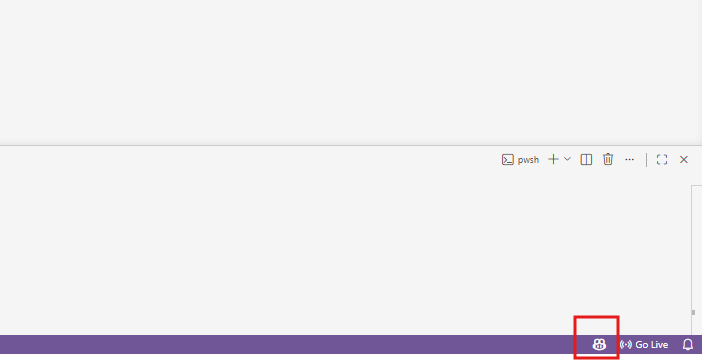
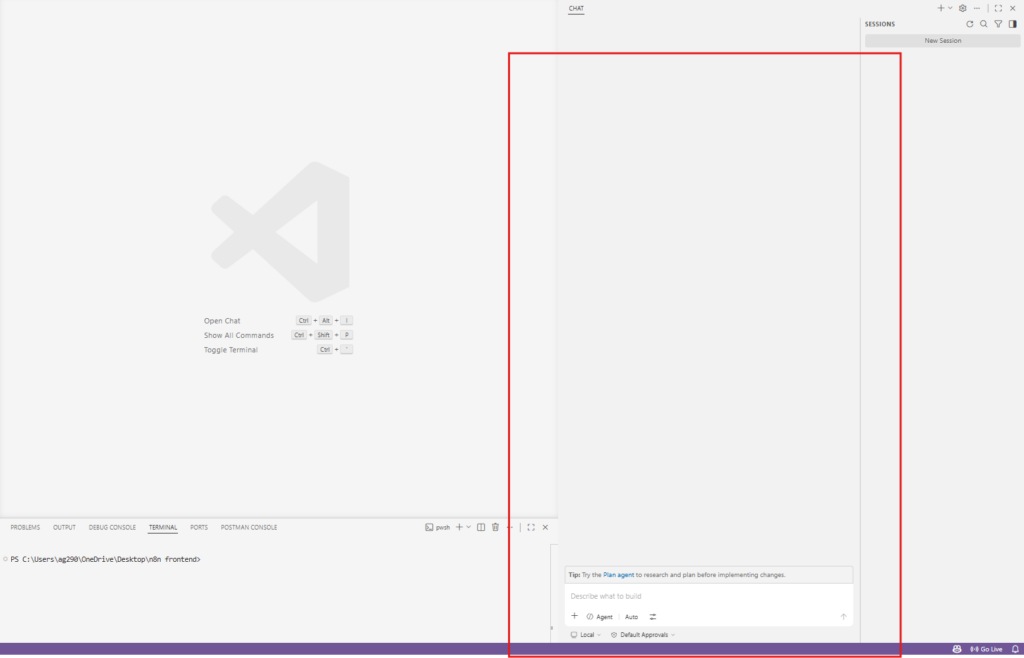
This means that Copilot is ready for use. To open the chat window, simply press Ctrl + Alt + I (Windows/Linux) or Cmd + Shift + I (Mac).
12. Open Your Project
Go to:
Files → Open Folder → Select your project folder.
13. Ask Copilot to Separate Files
Prompt:
“Separate this single HTML file into a proper scalable project structure. Do not modify functionality, only organise code into folders and modules.”
14. Install Live Server
You do not need to click your index.html file again and again.
In VS Code, click the Extensions icon in the left sidebar.
Search:
Live Server
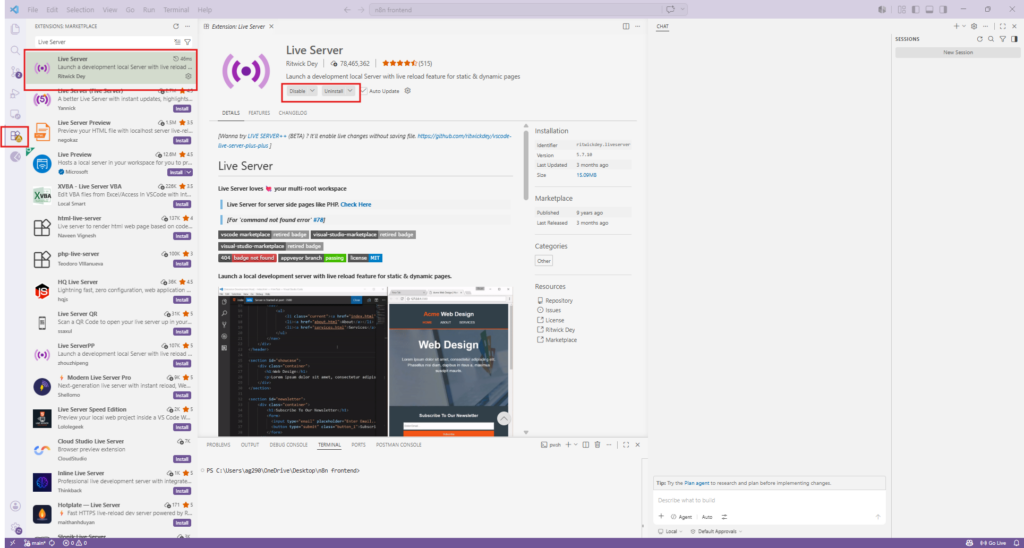
Install it. Then, on the bottom-right side of VS Code, you will see a Go Live icon. Click on it.
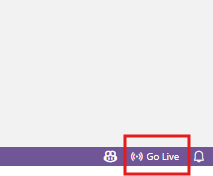
Your app will instantly open in your default browser.
15. Congratulations
Gosh, you have done it.
Your first web app is created.
Now how do you make it live?
Well, this tutorial got a little bigger, so I will tell you that in the next one and link it here.
While vibe coding, you need a wide range of programming tools. We have all those tools that you can use for free. Bookmark it for future: Free Online Tools
Summary
Today you just thought, let’s go on the internet and search “What is vibe coding?” and you found our article.
You ended up creating your own app without any coding knowledge.
The reason you were able to do that is we write content in a very simple style that is easy to go through.
You can also share this page with your friends so they can learn vibe coding too, and both of you can show off your prompting skills.
Thank you for reading guys, see you in the next one.
Happy Coding!
Frequently Asked Questions About Vibe Coding
Can I use ChatGPT for vibe coding?
ChatGPT output is decent, but if you try to generate a complete large project in one go, it breaks in half. When you ask it to continue, it forgets parts of the previous code. When you merge the code later, things may not work as expected.
Can I do vibe coding without VS Code?
Yes, you can even use Notepad for that. But it has limitations. You can mainly run HTML, CSS, and JavaScript files because they work directly in the browser. Even then, editing becomes difficult because there is no live server, no code highlighting, no auto-save, etc features. That is why VS Code is recommended.
Can I get a job if I know vibe coding?
Vibe coder demand is increasing day by day in startups and AI-related projects. If you are good at thinking through problems, understanding users, and writing better prompts, you can definitely get hired. The main skill is not only using AI tools. The skill is knowing what to build and how to explain it to AI.
Is vibe coding really easy?
To be honest, vibe coding is easy when you are creating small projects. But when projects become bigger, things become harder because you need to understand the project structure, features, debugging, and how different parts connect together.