🚀 Supercharge your YouTube channel's growth with AI.
Try YTGrowAI FreeColon in Python: Every Place It Appears and What It Does

I kept tripping on the colon in Python, where every few lines something refused to run over one character. The colon plays five different roles in the language, each with its own failure mode.
Knowing which role is on screen is most of the job.
Starting a code block
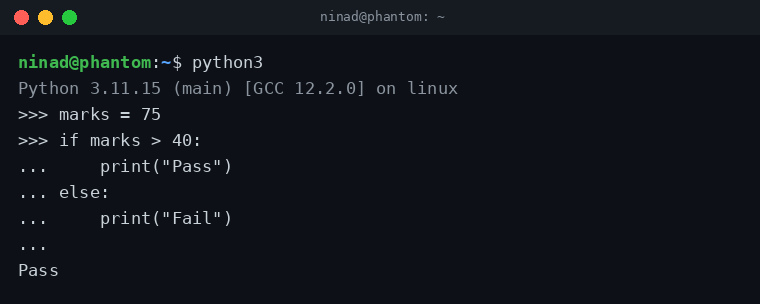
The most common position is at the end of an if line. The same rule covers every compound statement: else, elif, for, while, def, class, try, except, finally, with, and match all end their header line with a colon, and the colon tells the interpreter an indented block follows.
marks = 75
if marks > 40:
    print("Pass")
else:
    print("Fail")

# Output: Pass
Type a colon in the REPL and hit Enter: the prompt changes to … and waits for the indented body.
Loops and function definitions follow the same rule I described above. One colon, one indented block, no braces:
for i in range(3):
    print(i, end=" ")
# Output: 0 1 2

def area(r):
    return 3.14159 * r * r

print(area(2))
# Output: 12.56636
Slicing strings and lists
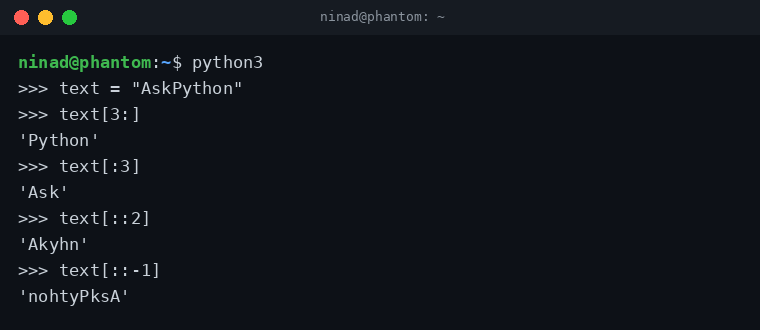
The second colon I ran into lived inside square brackets, where it works as the slice operator: sequence[start:stop:step]. Leave any part out and Python fills in a sensible default. The stop index is always excluded.
text = "AskPython"

print(text[3:])    # Python  (index 3 to end)
print(text[:3])    # Ask     (start to index 2)
print(text[3:7])   # Pyth    (index 3 up to, not including, 7)
Add a second colon and you control the step. A step of 2 takes every other character, and a step of -1 walks backwards, which is a string-reversal trick worth remembering:
Lists slice exactly the same way:
nums = [10, 20, 30, 40, 50]

print(nums[1:4])   # [20, 30, 40]
print(nums[::2])   # [10, 30, 50]
The double colon you sometimes see, like nums[::2], is not a separate operator. It is a normal slice with the start and stop left empty.
Separating keys and values in dictionaries
Dictionaries were where the colon stopped surprising me and started feeling consistent: it pairs each key with its value, both in literals and in comprehensions:
prices = {"apple": 40, "banana": 10}
prices["cherry"] = 80
print(prices)
# {'apple': 40, 'banana': 10, 'cherry': 80}

squares = {n: n**2 for n in range(1, 6)}
print(squares)
# {1: 1, 2: 4, 3: 9, 4: 16, 5: 25}
Type hints and annotations
Type hints were the use I discovered last, mostly because nothing forces you to write them. Since PEP 484 the colon annotates variables and function parameters with expected types.
The interpreter ignores these at runtime. Editors and type checkers like mypy use them to catch bugs before the code runs, and they show up in any function signature another person will read.
def greet(name: str, times: int = 1) -> str:
    return ", ".join([f"Hello {name}"] * times)

print(greet("Ninad", 2))
# Output: Hello Ninad, Hello Ninad

age: int = 30
Two lookalikes that are not plain colons
Two symbols share the colon’s shape but follow different rules, and both show up in modern Python code often enough to trip a reader who has just built the five-role mental model.
The walrus operator (:=)
While mapping the real colons I kept bumping into two symbols that look related but play by different rules. Python 3.8 added :=, which assigns a value inside an expression. I reach for it when a computed value needs testing on the same line:
data = [4, 11, 2, 19]
if (n := len(data)) > 3:
    print(f"{n} items, more than expected")
# Output: 4 items, more than expected
The colon in lambda
Inside a lambda, the colon separates the argument list from the single expression the function returns:
double = lambda x: x * 2
print(double(21))
# Output: 42
The error you get when the colon is missing
Most colon bugs come from forgetting it on a block header. Python 3.10+ names the problem exactly:
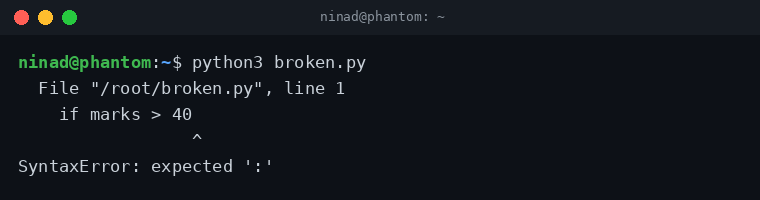
Older versions print the vaguer SyntaxError: invalid syntax pointing at the same spot. Add the colon back to the line above the indented block.
Assigning to a slice
Slices work on the left side of = too. Assigning to a slice replaces that section of the list in place, and the replacement does not need to be the same length:
nums = [10, 20, 30, 40, 50]
nums[1:3] = [99]          # two elements replaced by one
print(nums)
# [10, 99, 40, 50]

nums[len(nums):] = [60]   # append via slice
print(nums)
# [10, 99, 40, 50, 60]
Extended slices (with a step) accept an iterable of exactly matching length. Handy for overwriting every other element in one statement:
letters = list("python")
letters[::2] = "PTO"
print(letters)
# ['P', 'y', 'T', 'h', 'O', 'n']
Strings refuse this because they are immutable. Slice assignment is a list, bytearray, and array trick only.
Quick reference
| Where | What the colon does | Example |
|---|---|---|
| Block headers | Starts an indented block | if x > 0: |
| Square brackets | Slices with start:stop:step | text[1:5:2] |
| Dictionaries | Separates key and value | {“a”: 1} |
| Slice assignment | Replaces part of a list in place | nums[1:3] = [99] |
| Annotations | Attaches a type hint | age: int = 30 |
| Lambda | Separates args from expression | lambda x: x * 2 |
| Walrus (:=) | Assigns inside an expression | if (n := len(d)) > 3: |
What does the colon do in Python?
The colon starts an indented code block after statements like if, for, while, def, and class. It also slices sequences (text[1:5]), separates keys from values in dictionaries, attaches type hints, and separates arguments from the expression in a lambda.
What does :: (double colon) mean in Python?
It is a slice with the start and stop left empty, so only the step applies. nums[::2] takes every second element and text[::-1] reverses a string.
Why am I getting SyntaxError: expected ‘:’?
A statement that opens a block (if, for, def, class, and similar) is missing its trailing colon. Python 3.10 and newer point at the exact spot where the colon should be. Add it and the error goes away.