🚀 Supercharge your YouTube channel's growth with AI.
Try YTGrowAI FreeCredit Card Generator: Test Card Numbers That Validate


Credit Card Generator
Generate random but valid credit card numbers for testing purposes
Generated Cards
Your card number looks right and the gateway still answers that the card number is incorrect. Running checksum-clean numbers through a validator shows that a single-digit difference fails validation. That difference decides whether your number is sent at all.
What a credit card generator produces
A generator of this kind builds an account number from two layers of structure that are genuinely public, and fills everything between them with random digits. The first layer is the prefix, which identifies the network under ISO/IEC 7812.
Visa needs a single digit for its prefix and MasterCard needs a span from 2221 to 2720, so one sample number describes the first network and misleads on the second. Draw from the middle of a reserved range and the number routes to the right network.
| Network | Reserved prefix range | Length | Security code |
|---|---|---|---|
| Visa | 4 | 13, 16 or 19 digits | 3 digits |
| MasterCard | 51 to 55, and 2221 to 2720 | 16 digits | 3 digits |
| American Express | 34 and 37 | 15 digits | 4 digits |
| Discover | 6011, 644 to 649, 65, and 622126 to 622925 | 16 digits | 3 digits |
| JCB | 3528 to 3589 | 16 digits | 3 digits |
| Diners Club | 30, 36, 38 and 39 | 14 to 19 digits | 3 digits |
The second layer is the check digit, and the Luhn formula derives it from the digits in front of it. Both layers are public by design, which is why a generated number clears the validation layer of a payment form. Neither layer gives the number an account, a balance, or any connection to a bank.
Keep the output inside a test environment, because a number with no account behind it belongs nowhere else.
The tool above draws from these ranges, computes the check digit, and pairs the number with an expiry date, a security code of the right length, and a cardholder name in the shape the network prints. The grouping changes with the network as well, since American Express prints 4-6-5 and Diners Club prints 4-6-4.
The name, the expiry date and the security code exist to make the record complete rather than authoritative. A security code runs to three digits for Visa, MasterCard, Discover, JCB and Diners Club, and to four for American Express, and an expiry date is a month and a year somewhere ahead of today. None of the three is checked against anything.
What you need before you generate test cards
The samples below ran on Python 3.14.7, and the first three need nothing installed beyond the interpreter. Faker arrives later for the whole-record sample, installed with pip install Faker.
- Python 3.14.7, or any current Python 3 release
- Faker 40.39.0, only for the last sample
- A decision about whether you need one number or a complete record
The decision worth making before any of it is whether one number is the whole artifact.
A single number is usually enough when the test asserts that your form accepts a well-formed card. A complete record with a name, an expiry date and a security code is what you need when the test covers the payload your code sends onward.
How to generate a test card number in Python
The procedure takes three steps, and the order matters because each one constrains the next. The prefix fixes the length, the length fixes how many random digits sit in the middle, and the check digit closes the number. Jumping to the checksum before the prefix is right only produces a well-formed number that routes nowhere.
Draw the prefix from the reserved range
Write the prefix as a low and a high value rather than a single sample, and draw inside that span. A short list of sample prefixes is how a generator ends up producing the same handful of numbers.
The zero fill is the detail that fails with no symptom until much later. A MasterCard prefix drawn from the 2221 to 2720 span can land below 1000, and without the padding the number loses a digit before the checksum is reached.
PREFIX_RANGES = {
    "Visa": ("4", "4", 16),
    "MasterCard": ("51", "55", 16),
    "MasterCard 2-series": ("2221", "2720", 16),
    "American Express": ("34", "34", 15),
    "Discover": ("622126", "622925", 16),
    "JCB": ("3528", "3589", 16),
    "Diners Club": ("30", "30", 14),
}


def pick_prefix(low, high):
    start = int(low)
    span = int(high) - start
    return str(start + random.randrange(span + 1)).zfill(len(low))
I kept the same padding in the generator above for the Discover range, so a number that loses a leading digit fails the length check long before the checksum is reached.
Build the check digit
The check digit is the single digit that makes the whole number pass the Luhn formula, and the formula only cares about position. Starting at the last digit of the prefix and moving left, double every digit at an even index, subtract nine from any result above nine, and add everything up.
A first attempt at that loop may double the wrong digit. A second implementation confirms the correct approach.
Counting from the right with the check digit as position 0 puts the doubling on the correct digit. The doubling had started one position too early, which is the mistake this step invites.
Counting the check digit as the first position from the right is what puts the doubling on the right digit.
"""Build the check digit a card validator expects."""


def luhn_check_digit(prefix):
    total = 0
    for index, character in enumerate(reversed(prefix)):
        digit = int(character)
        if index % 2 == 0:
            digit *= 2
            if digit > 9:
                digit -= 9
        total += digit
    return str((10 - (total % 10)) % 10)


if __name__ == "__main__":
    print("check digit for 453201511283036 ->", luhn_check_digit("453201511283036"))
    print("full number                   ->", "453201511283036" + luhn_check_digit("453201511283036"))
    print("check digit for 37828224631000 ->", luhn_check_digit("37828224631000"))
    print("full number                    ->", "37828224631000" + luhn_check_digit("37828224631000"))
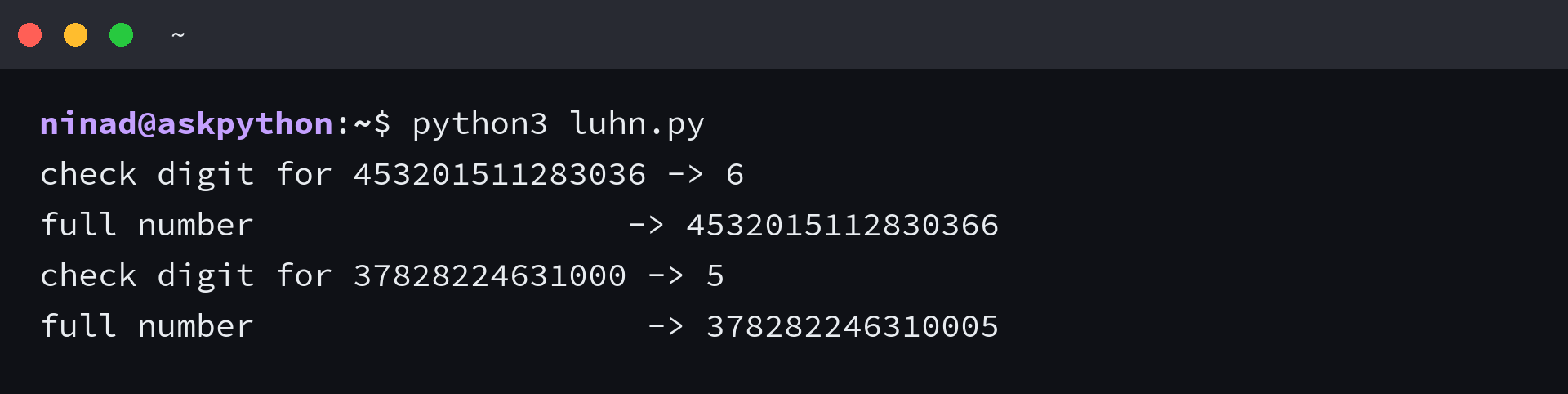
That helper prints the check digit for a fifteen-digit prefix, then the number it completes. Running the result back through a validator is the only way to know the parity is right. Both lines come from the same run.
Generate and validate the number
With the prefix and the check digit settled, the middle of the number is free. Generate those digits, append the check digit, and validate the result with a second copy of the formula so the generator proves its own output.
"""Generate test numbers and prove they survive the validator."""
import random

from luhn import luhn_check_digit

PREFIXES = {
    "Visa": ["4", 16],
    "MasterCard": ["51", 16],
    "American Express": ["37", 15],
    "Discover": ["6011", 16],
    "JCB": ["3528", 16],
    "Diners Club": ["36", 14],
}


def generate_card_number(prefix, length):
    number = prefix + "".join(str(random.randint(0, 9)) for _ in range(length - len(prefix) - 1))
    return number + luhn_check_digit(number)


random.seed(11)
print("five test numbers, one per card type")
for network in ["Visa", "MasterCard", "American Express"]:
    prefix, length = PREFIXES[network]
    print(f"  {network:<18} {generate_card_number(prefix, length)}")

print()
print("every number survives the validator")
first = [generate_card_number("4", 16) for _ in range(1000)]


def is_valid(card_number):
    return luhn_check_digit(card_number[:-1]) == card_number[-1]


print("  generated:", len(first))
print("  passing  :", sum(1 for n in first if is_valid(n)))
Validation is the same helper read backwards, which is why the two functions in the sample share their logic. Generating a thousand numbers and validating each confirms the implementation.
"""Check a card number the way a payment form does."""


def luhn_check_digit(prefix):
    total = 0
    for index, character in enumerate(reversed(prefix)):
        digit = int(character)
        if index % 2 == 0:
            digit *= 2
            if digit > 9:
                digit -= 9
        total += digit
    return str((10 - (total % 10)) % 10)


def is_valid(card_number):
    digits = card_number.replace(" ", "")
    return luhn_check_digit(digits[:-1]) == digits[-1]
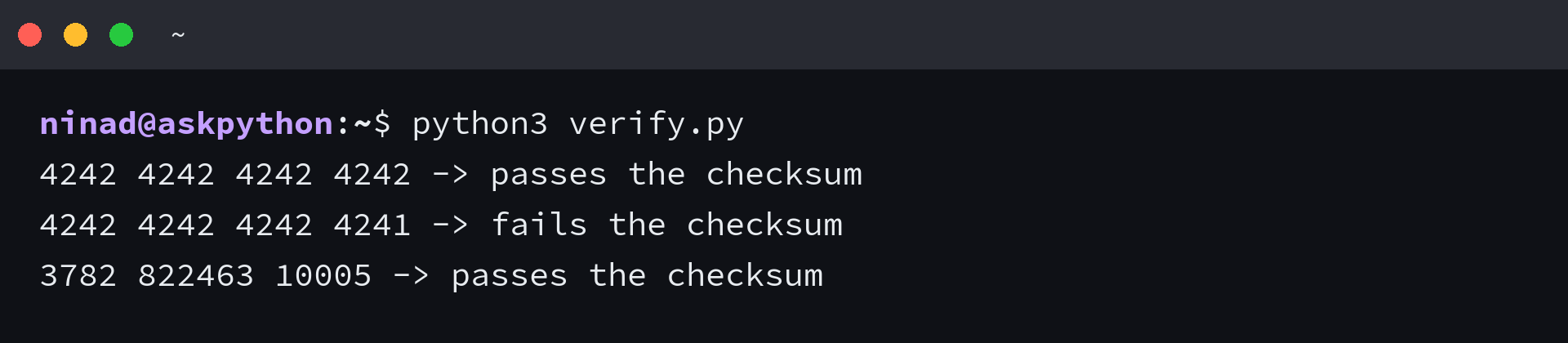
A single digit separates the two numbers the validator prints below. The form reports the failure against the card rather than against your request, which is why a rejected test card reads as though the number itself is at fault. Neither message points at your code.
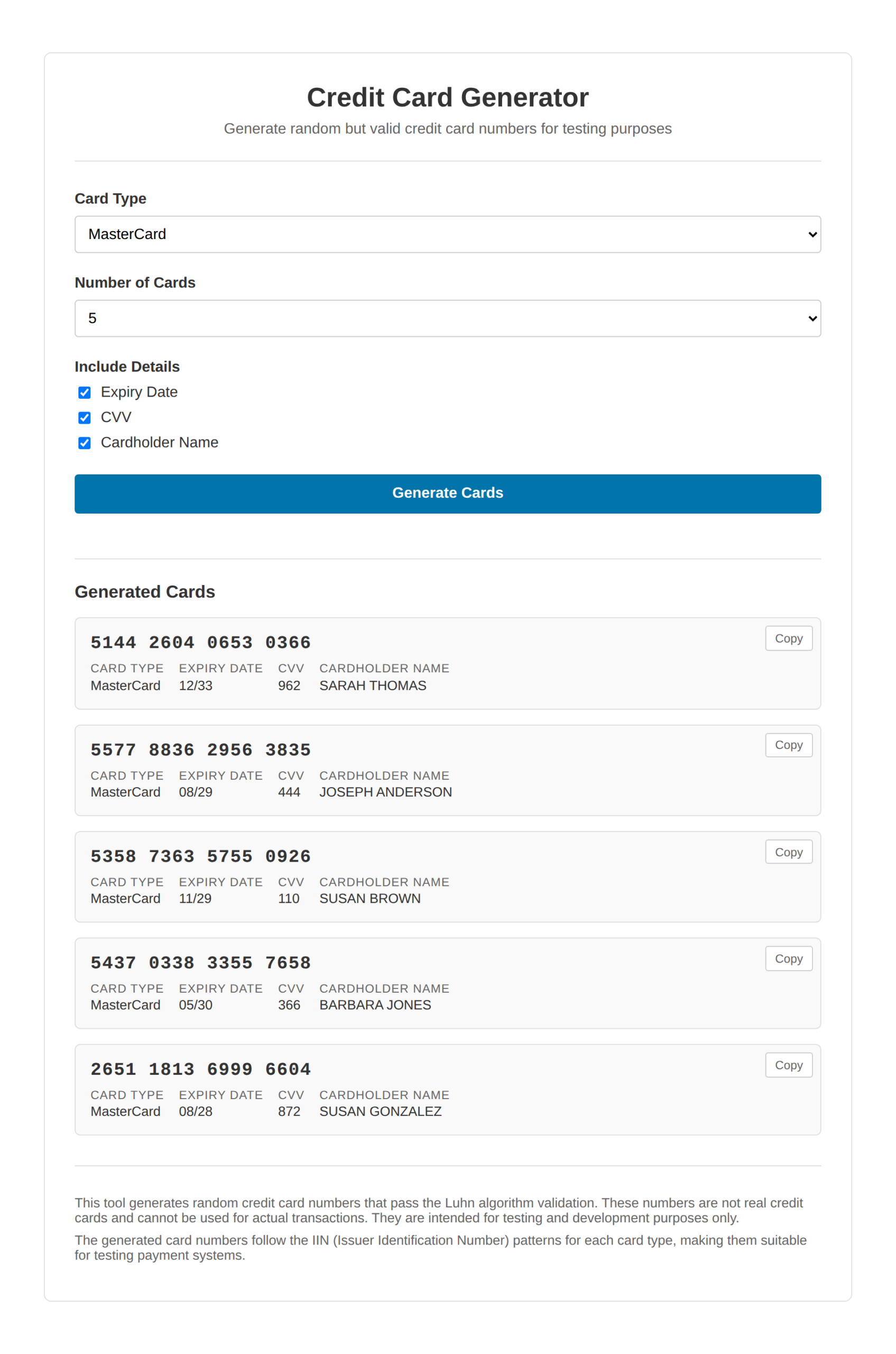
The tool above runs the same three steps in the browser. The five records below are its output, and each number was checked against a second implementation of the formula.
Why a checksum-clean number still fails in a sandbox
Passing the formula is necessary and it is not sufficient, because a processor accepts the numbers it published for its own sandbox and applies its own triggers to everything else. A number you generated can clear the client-side checksum and still come back refused.
| What the gateway says | What produced it | What to change |
|---|---|---|
| Your card number is incorrect | the checksum failed in the browser before any request was sent | rebuild the number with a correct check digit |
| incorrect_number from Stripe | a number that fails the Luhn check, such as 4242 4242 4242 4241 | use one of the cards in Stripe’s test documentation |
| CCREJECT-IRC from PayPal, response code 5180 | the sandbox Luhn Check fails trigger fired | keep the number and assert that your code handles the rejection |
| A decline that names live mode | the request used a live key with a published test card | point the client at the sandbox key |
PayPal documents that trigger by name. The sandbox is telling you the number failed the checksum, and surviving that is the scenario your error handling should cover. It is worth reading before you file the refusal as a bug in your form.
Nothing appears in the dashboard for a number that never reaches the API, because Stripe validates the card in the browser even in test mode. A single wrong digit stops the request before it is sent.
The vendor documentation confirms both descriptions by name. That is also the difference between a checksum failure and a declined payment, and the two need different fixes.
There is a third possibility worth ruling out before either of those, which is that your form never sent the number at all. A client-side validator that fails on format stops the request before it leaves the browser, and the message that reaches you names the card rather than the field. Checking the network tab for the request is the fastest way to tell the two apart.
Point your sandbox tests at the processor’s own list
A number you generate proves that your form handles a well-formed card, and it proves nothing about acceptance. Acceptance is a list the processor publishes rather than a rule you can satisfy from scratch.
Keep the generator for the cases where you need volume, a specific network, or a name and an expiry date that match your own fixtures. Reach for the published list when the test has to travel as far as an authorization response from the sandbox.
The published lists are also the only place to find numbers that trigger specific failures. A card that always declines, a card that fails authentication, and a card that raises a dispute are scenarios the processors picked numbers for, and no generator can invent them. Read the list once and note the three or four your integration has to survive.
When a complete record is what you want, one library call returns it.
"""A whole test card record from one library call."""
from faker import Faker

fake = Faker()
Faker.seed(4)

for _ in range(3):
    print(
        fake.credit_card_number(),
        "|",
        fake.credit_card_provider(),
        "|",
        fake.credit_card_expire(),
        "|",
        fake.credit_card_security_code(),
    )
Read that output the way a test would, since the library mixes networks and lengths across calls. Running with a fixed seed and comparing against the range table shows network assertions need seed pinning. Check the network, the length and the grouping before you assert on any of them.
FAQ
Why do generated card numbers pass validation?
The number carries a network prefix drawn from a reserved range and a check digit that satisfies the Luhn formula, and those are the two things a payment form checks. Neither one gives the number an account, so it passes validation and cannot be charged.
Can these numbers be used to buy anything?
No. A generated number is not issued by a bank and has no balance behind it. Every live processor declines it, and using test data to attempt a transaction against a live system is fraud.
Why does a checksum-clean number still get refused?
A processor accepts the test numbers it publishes and treats the rest as unknown. A number you generated can pass the client-side checksum and still be declined by the sandbox, or in Stripe’s case never reach the API at all.
How many digits does a test card number need?
It depends on the network. Visa issues 13, 16 and 19 digit numbers, MasterCard, Discover and JCB use 16, American Express uses 15, and Diners Club starts at 14. The prefix decides which length applies.
What is the check digit at the end of a card number?
The check digit is the one that makes the whole number pass the Luhn formula. Take the digits before it, double every second one counting from the right of that prefix, subtract nine from anything above nine, and append the digit that brings the total to a multiple of ten.
Do I need a library to generate test card numbers?
No, the three steps above are about twenty lines of Python. A library earns its place when you need a complete record with a name, an expiry date and a security code, which is what Faker’s credit card provider returns.

![Random ZIP Code Generator [Free Online]](https://www.askpython.com/wp-content/uploads/2026/09/zipcode-generator-featured-1-768x432.png)

![Domain Name Generator [Free Online]](https://www.askpython.com/wp-content/uploads/2026/09/domain-name-generator-free-online-featured-768x432.png)