🚀 Supercharge your YouTube channel's growth with AI.
Try YTGrowAI FreePandas Get Dummies: Encode Categories


Turning category labels into indicator columns gives a pandas table one column for each category. pandas.get_dummies() creates those columns, using Boolean values by default or integers when you set dtype=int.
I’ll show how to encode selected columns and align training and test data.
TL;DR
pandas.get_dummies() creates indicator columns, with bool as the default dtype and integer output available through dtype=int.
- Use columns= to choose fields and dtype=int for integer indicators.
- Set dummy_na=True to represent missing values.
- Reuse one category schema across training and test data.
What Is pandas get_dummies?
pandas.get_dummies() creates one indicator column per category. In my three-row city table, Delhi and Pune each receive a column.
| Input city | city_Delhi | city_Pune |
|---|---|---|
| Delhi | 1 | 0 |
| Pune | 0 | 1 |
How to encode categorical columns step by step
Use pd.get_dummies() with explicit columns for mixed tables. I ran examples for selection, missing values, and aligned train/test fields with pandas 3.1.1.
Step 1: Encode selected DataFrame columns
Use columns= to select fields and prefix arguments to name the output.
| Argument | Effect in this example | When to set it |
|---|---|---|
| columns | Selects city and channel, leaving amount untouched. | Name fields explicitly when a table mixes categories and measurements. |
| prefix | Uses city and channel at the start of generated names. | Use a string, list, or mapping. |
| prefix_sep | Separates each source name from its category label. | Change the underscore separator if needed. |
| dtype | Returns integer indicators instead of the current bool default. | Choose int when downstream code expects numeric 0/1 values. |
import pandas as pd

orders = pd.DataFrame(
    {
        "city": ["Pune", "Delhi", "Pune"],
        "channel": ["web", "store", "web"],
        "amount": [120, 90, 140],
    }
)
encoded = pd.get_dummies(
    orders,
    columns=["city", "channel"],
    prefix=["city", "channel"],
    dtype=int,
)
print(encoded)
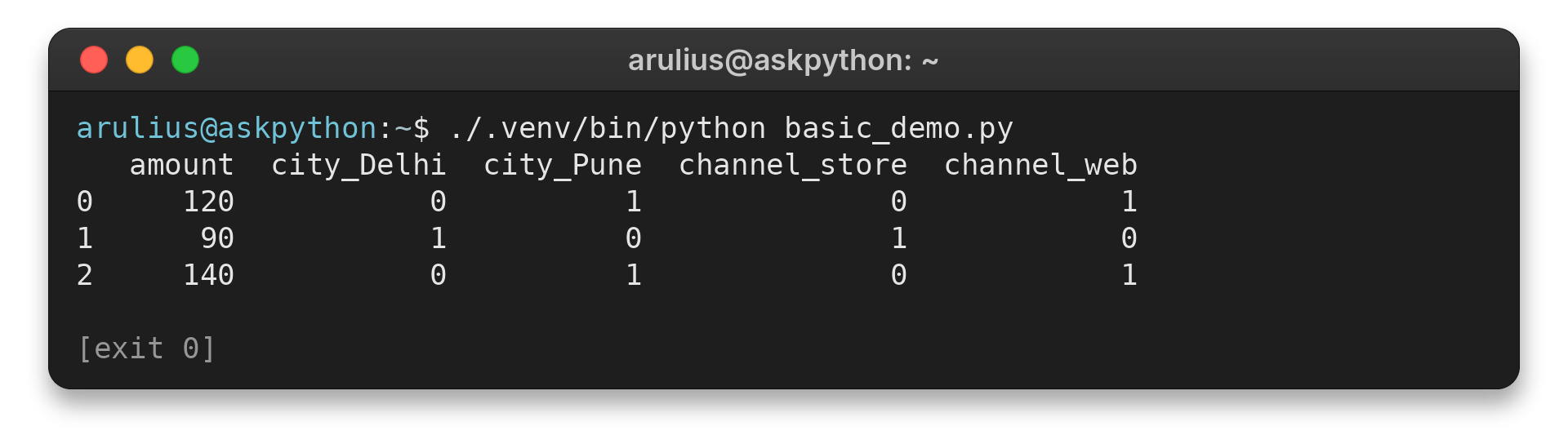
Save the code as basic_demo.py and run this exact command:
./.venv/bin/python basic_demo.py
arulius@askpython:~$ ./.venv/bin/python basic_demo.py
   amount  city_Delhi  city_Pune  channel_store  channel_web
0     120           0          1              0            1
1      90           1          0              1            0
2     140           0          1              0            1
Step 2: Choose how to represent missing values
Without dummy_na=True, a missing value produces zeros in the indicator columns. I ran dummy_na=True and got region_nan for None.
Step 3: Keep train and test columns aligned
Separate calls can produce different columns. I used CategoricalDtype with blue, green, and red to align both schemas.
| Approach | Use it when | Boundary to check |
|---|---|---|
| Shared CategoricalDtype | The allowed category list is documented before the split. | Values outside the list become missing. |
| Category allowed but absent in training | The feature column exists but is zero for every training row. | The fitted model has no examples for that category’s effect. |
| Fitted OneHotEncoder | A model pipeline must reuse categories learned from training. | Pick how handle_unknown treats a new value. |
| Reindex encoded frames | The feature schema is known and already created. | Reindex can discard test-only columns. |
Handle missing values, errors, and train/test columns
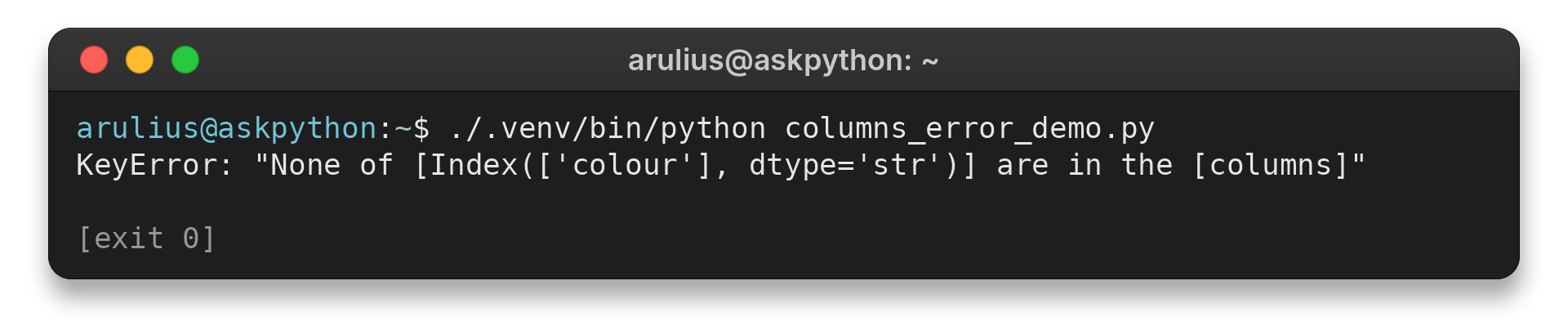
A missing field name raises KeyError. I caused this by requesting colour from a DataFrame containing city.
import pandas as pd

orders = pd.DataFrame({"city": ["Pune", "Delhi"]})
try:
    pd.get_dummies(orders, columns=["colour"])
except KeyError as error:
    print(f"{type(error).__name__}: {error}")
Save as columns_error_demo.py and run the command:
./.venv/bin/python columns_error_demo.py
arulius@askpython:~$ ./.venv/bin/python columns_error_demo.py
KeyError: "None of [Index(['colour'], dtype='str')] are in the [columns]"
Correct the spelling or inspect df.columns before calling get_dummies.
Choose the encoding approach to match the data and estimator:
| Case | What happens | Choice |
|---|---|---|
| Default dtype | New indicator columns use bool. | Set dtype=int for integer 0/1 output. |
| drop_first with an intercept | One category is omitted. | Name the reference level. For penalized models, follow estimator guidance. |
| Numeric labels | Numeric fields stay unchanged by default. | Convert to category only when numbers represent groups. |
| High cardinality | Each label adds a feature column. | Check the number of distinct values first. |
| Several labels per cell | A full string is one category. | Use Series.str.get_dummies() for delimiter-separated labels. |
Conclusion
Use pandas.get_dummies() when its output fits the next step. For model pipelines, define how categories are learned and reused.
- pandas.get_dummies() API documentation
- pandas guide to missing data
- pandas.Series.str.get_dummies() API documentation
- pandas.factorize() API documentation
- scikit-learn OrdinalEncoder documentation
- statsmodels formula and OLS examples
- scikit-learn OneHotEncoder documentation
- AskPython: pandas from_dummies()
- AskPython: pandas factorize()
FAQ
These short answers cover output details worth checking when moving from the example to a DataFrame.
Why does pandas get_dummies return True and False?
The default dtype for indicator columns is bool. Pass dtype=int for numeric 0 and 1 values.
Does get_dummies encode numeric columns by default?
No. With columns=None, pandas selects object, string, or category fields. Include a numeric field in columns= only when it represents category labels.
Can I turn dummy columns back into categories?
Use pandas.from_dummies(). Set default_category when an omitted reference category appears as an all-zero row.