🚀 Supercharge your YouTube channel's growth with AI.
Try YTGrowAI FreeEnvironment Variables in Python: Read and Set

A Python application can use different settings in development and deployment without changing its source code. Environment variables carry those settings into a program when it starts, and Python lets your code read or change them.
I’ll show you how to choose what happens when a setting is missing and how to read or set values in Python.
TL;DR
Python reads environment values through the os module, and os.environ lets your program read or change values for its own process.
- Use os.getenv() with a fallback when a setting is optional.
- Use os.environ[“NAME”] when a missing setting should raise KeyError.
- Convert values such as ports and Boolean flags from strings before using them.
- Python changes do not rewrite the shell that launched it.
What Are Environment Variables in Python?
An environment variable is a named text value supplied to a process by its launching environment. Applications use these values for settings that can vary across the environments where code runs, without editing the source.
Python exposes environment settings through os.environ, a dictionary-like mapping captured when os is first imported.
In the table, NAME stands for the exact key text. Replace it with a value such as APP_PORT, keeping the spelling consistent where the setting is supplied and read.
| Lookup | When to use it | Absent key |
|---|---|---|
| os.environ[“NAME”] | A required value | Raises KeyError |
| os.environ.get(“NAME”) | An optional value | Returns None |
| os.getenv(“NAME”, “local”) | An optional value with a fallback | Returns the fallback |
For the same bracket and get() syntax with ordinary mappings, see AskPython’s dictionary tutorial.
How to Read and Set Environment Variables in Python
The example uses only Python’s standard library, so you can run it without installing a package or editing the shell.
Step 1: Choose how a missing key should behave
For a required key, let KeyError stop startup or catch it at the configuration boundary to add context. If you catch it, include the missing key’s name. For an optional region, os.getenv(“REGION”, “local”) gives the program a clear local-development choice.
Step 2: Convert text values before using them
Environment values arrive as strings, so convert numbers with int() or float() and parse flags with an explicit rule, since bool(“false”) is True for a non-empty string.
Conversion can fail too. Catch ValueError at the configuration boundary and report the variable name and expected type, but do not include a credential or its value in an error message.
Step 3: Set a value and run the example
This example assigns sample values for lookup, fallback, conversion, and update, so it prints only its own values. I ran environment_variables_demo.py as shown in the terminal image. I saw all six output lines in that capture.
import os

# These values live only in this Python process.
os.environ["APP_MODE"] = "staging"
os.environ["APP_PORT"] = "8000"
os.environ["DEBUG"] = "false"

mode = os.getenv("APP_MODE")
missing_region = os.getenv("DEPLOY_REGION")
default_region = os.getenv("DEPLOY_REGION", "local")
port = int(os.environ["APP_PORT"])
debug = os.getenv("DEBUG", "false").lower() in {"1", "true", "yes", "on"}

print(f"mode={mode}")
print(f"missing region={missing_region}")
print(f"default region={default_region}")
print(f"port={port} ({type(port).__name__})")
print(f"debug={debug}")

os.environ["APP_MODE"] = "production"
print(f"mode after update={os.environ['APP_MODE']}")
Run this exact command:
python3 environment_variables_demo.py
The captured output is:
mode=staging
missing region=None
default region=local
port=8000 (int)
debug=False
mode after update=production
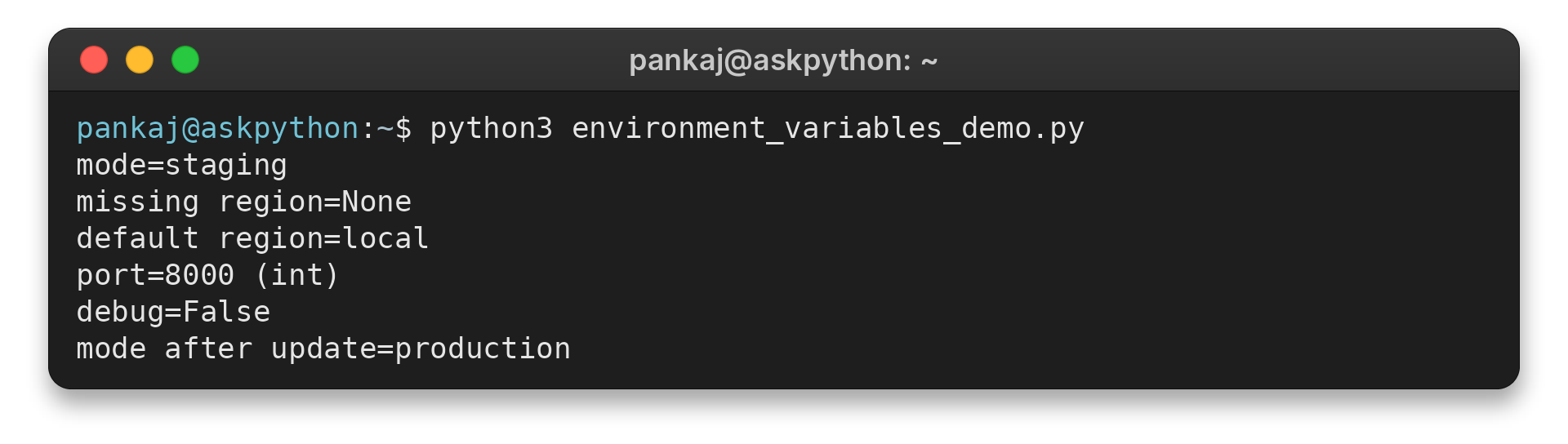
The missing lookup prints None, while the second lookup supplies local. The port is converted from text to an integer, and the accepted-string rule turns false into the Boolean False. The final line shows that assigning the same key again replaces its value in this process.
Use os.environ.items() when you need to iterate over key/value pairs. AskPython’s Python for loop guide explains the loop syntax. Avoid printing the entire mapping because it can contain credentials or other private configuration.
Common Errors: Missing Values, Types, and .env Files
Configuration failures often come from a missing name, a value in the wrong format, or a mistaken expectation about where a change applies. Check these cases before debugging the code that consumes the setting.
| Case | What happens | Safer response |
|---|---|---|
| Required key is absent | Bracket lookup raises KeyError | Fail during startup with the missing key’s name |
| Optional key is absent | get() or getenv() returns None unless given a fallback | Choose a fallback only when it is valid for this application |
| Number contains letters | int() or float() raises ValueError | Validate during startup and explain the expected type |
| Boolean text is “false” | bool(“false”) evaluates to True | Compare lowercase text against an accepted set |
| Code assigns a new value | The change applies to this process and children it starts afterward | Configure the parent process when another app or shell must read it |
| A local .env file exists | Python does not load it automatically | Use a loader such as python-dotenv in development |
A Python assignment changes os.environ for the running process and is inherited by later subprocesses, but it does not rewrite the shell profile or affect unrelated processes.
Check empty values and platform behavior
Settings can look similar in a launch configuration yet behave differently in Python.
| Case | Symptom | Fix |
|---|---|---|
| APP_PORT is unset | os.getenv() returns None without a default | Check for None before conversion, then fail or choose an explicit fallback. |
| APP_PORT is empty text | os.getenv(“APP_PORT”, “8000”) returns an empty string, and int() raises ValueError | Reject empty text or treat it as absent before conversion. |
| Key casing across systems | Windows normalizes environment keys to uppercase. Other systems may treat casing as significant. | Use consistent uppercase names in code and the launch configuration. |
| Direct os.putenv() call | It changes the process environment but leaves os.environ unchanged. | Assign through os.environ when Python code needs to read the updated value. |
| Test runner environment | The runner inherits settings from the process that starts it. | Set required values explicitly and isolate or restore changes during each test. |
Use .env files for local development
Python does not load .env files by itself. The python-dotenv documentation describes how to opt in to loading one.
| Situation | Behavior | Action |
|---|---|---|
| Local .env file | Python ignores it unless a loader is called | Use python-dotenv and call load_dotenv() in local startup code. |
| Value already supplied by the process | By default, load_dotenv() leaves it unchanged | Use override=True only when the local file should intentionally take precedence. |
| Secret-bearing file | Environment variables and .env files are not an encrypted vault | Add .env to .gitignore, commit only placeholders in an example file, restrict runtime access, and keep secrets out of logs, screenshots, and error reports. |
Conclusion: Keep Configuration at the Process Boundary
Use os.environ or os.getenv() to read values, choose strict failure or a fallback deliberately, and convert text before the application relies on it. Keep the distinction between changing one Python process and configuring the process that launches it.
For exact API behavior, see the Python documentation for os.environ and os.getenv. If you meant Python’s executable search path rather than application settings, see AskPython’s guide to PYTHONPATH in the shell.
FAQ
These answers cover nearby setup questions that can be confused with reading application configuration.
Does Python need to be added to environment variables?
Only when you want a shell to find the Python executable by name. That concerns PATH. Python code reads application settings through os.environ or os.getenv().
Why does a setting differ between my terminal and IDE?
Each launcher can give its program a different environment. Check the environment configured for the process that starts the IDE or script, then inspect the specific key without printing unrelated values.
Should I print every environment variable to debug a setting?
No. The mapping may contain passwords, tokens, or private paths. Print only the named setting when it is safe, or report whether it is present without exposing its value.