🚀 Supercharge your YouTube channel's growth with AI.
Try YTGrowAI FreeOne Hot Encoding in Python


Using category labels as features in Python starts with encoding them into a form a model can use. A one-hot encoding gives each category its own binary feature column.
I’ll walk through encoding columns and checking how the fitted encoder handles new category values.
TL;DR
I use OneHotEncoder when later rows must keep the training feature layout, and the fitted category order stays fixed across training and new rows.
- Fit on training features, then call transform() on validation and incoming rows.
- Use Pandas get_dummies() for direct conversion of a DataFrame.
- Choose an unknown-category policy and check the columns added by high-cardinality fields.
What Is One-Hot Encoding?
A one-hot encoding gives each category its own binary feature column. In the run, the red row was [0 0 1] because the fitted category order placed red last.
I chose colors because their labels have no rank. A numeric-looking field such as a postal code can be categorical when its digits identify a place rather than measure an amount.
| Category | Vector in fitted column order |
|---|---|
| blue | [1, 0, 0] |
| green | [0, 1, 0] |
| red | [0, 0, 1] |
Each vector position maps to one category in the displayed order.
How to Encode Categorical Columns in Python
The later rows include yellow, which was absent during fitting. I use the fitted encoder to keep the training feature layout.
| Approach | Use it for | Check before modeling |
|---|---|---|
| Pandas get_dummies() | A direct conversion of the supplied Series or DataFrame | Column names reflect the values in that input |
| scikit-learn OneHotEncoder | Training data followed by validation or prediction rows | Fit once and choose what transform should do with unseen values |
Step 1: Fit OneHotEncoder and transform later rows
Put the category in a DataFrame column, then pass a two-dimensional selection such as train[[“Color”]] to OneHotEncoder. A single-bracket selection returns one dimension instead.
import pandas as pd
from sklearn.preprocessing import OneHotEncoder

train = pd.DataFrame({"Color": ["red", "blue", "red", "green"]})
test = pd.DataFrame({"Color": ["green", "yellow"]})
encoder = OneHotEncoder(sparse_output=False, handle_unknown="ignore", dtype=int)
encoded_train = encoder.fit_transform(train[["Color"]])
encoded_test = encoder.transform(test[["Color"]])
print("Categories:", encoder.categories_[0].tolist())
print("Training rows:")
print(encoded_train)
print("New rows:")
print(encoded_test)
dummies = pd.get_dummies(train["Color"], dtype=int)
print("Pandas columns:", dummies.columns.tolist())
print("Pandas rows:")
print(dummies.to_numpy())
new_dummies = pd.get_dummies(test["Color"], dtype=int)
print("Pandas new columns:", new_dummies.columns.tolist())
aligned_new = new_dummies.reindex(columns=dummies.columns, fill_value=0)
print("Aligned Pandas rows:")
print(aligned_new.to_numpy())
print("Feature names:", encoder.get_feature_names_out(["Color"]).tolist())

try:
    strict = OneHotEncoder(sparse_output=False)
    strict.fit(train[["Color"]])
    strict.transform(test[["Color"]])
except ValueError as error:
    print("Default unknown-category error:", str(error).split(". ")[0] + ".")
Run the named file with ./.venv/bin/python one_hot_demo.py. The output shows the fitted order and transformed rows for training and later input.
Categories: ['blue', 'green', 'red']
Training rows:
[[0 0 1]
 [1 0 0]
 [0 0 1]
 [0 1 0]]
New rows:
[[0 1 0]
 [0 0 0]]
Pandas columns: ['blue', 'green', 'red']
Pandas rows:
[[0 0 1]
 [1 0 0]
 [0 0 1]
 [0 1 0]]
Pandas new columns: ['green', 'yellow']
Aligned Pandas rows:
[[0 1 0]
 [0 0 0]]
Feature names: ['Color_blue', 'Color_green', 'Color_red']
Empty batch error: Found array with 0 sample(s) (shape=(0,)) while a minimum of 1 is required.
Default unknown-category error: Found unknown categories ['yellow'] in column 0 during transform.
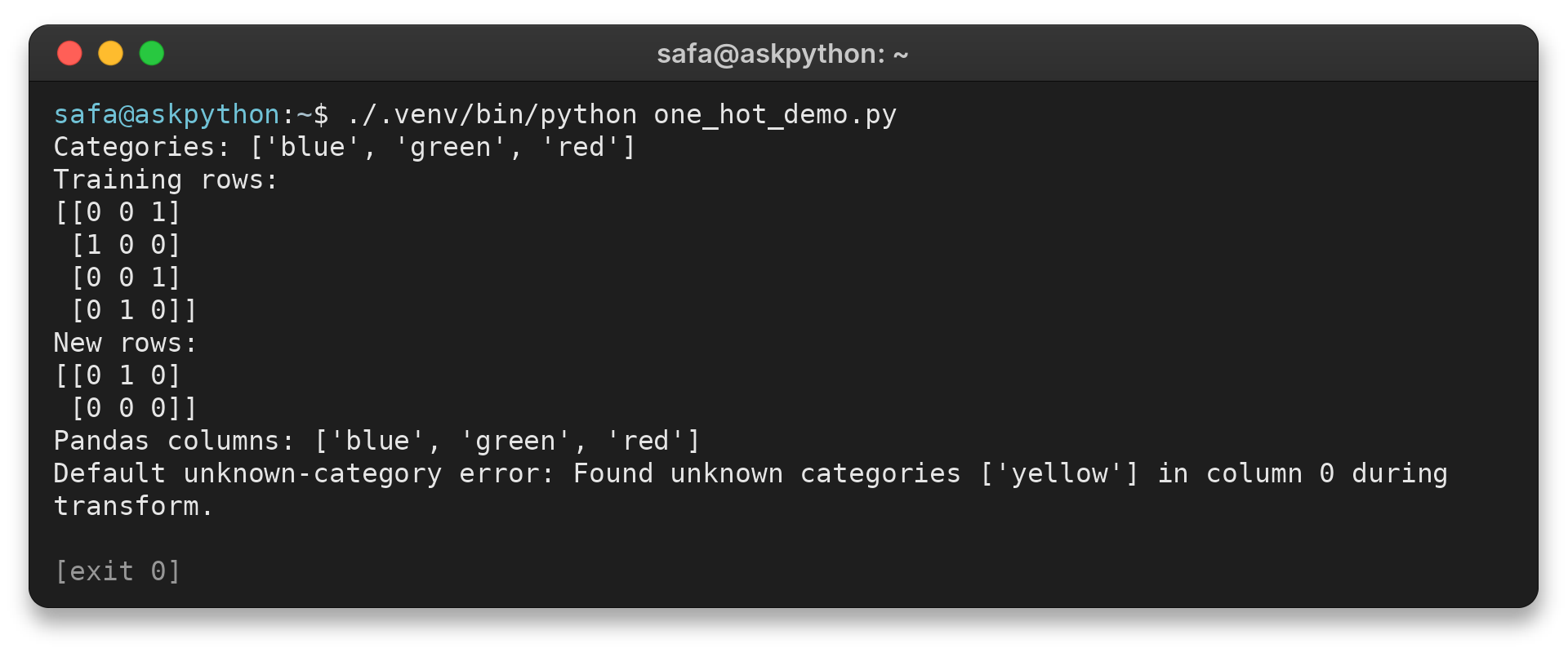
The first training row is red, so its final position is 1.
Step 2: Inspect Pandas dummy columns
The Pandas call returns a DataFrame and keeps its source index. NumPy conversion or resetting the index drops those labels. Keep a unique record key through filtering or sorting, then join transformed rows by that key rather than trusting equal counts.
Pass a Series to convert one field. For a mixed DataFrame, select categorical inputs so numeric fields stay outside the conversion.
| Setting | Effect |
|---|---|
| columns | Restricts conversion to selected fields |
| dtype | Requests integer 0/1 indicators instead of Boolean values when required by downstream model inputs or export formats with strict type requirements |
| prefix | Identifies the source field in generated names when columns share category labels and supports feature audits |
Reindexing aligns the test columns with training. Keep the raw label separately when the application must flag new values.
Pandas offers two options that change the output shape:
- dummy_na adds a column for missing values.
- drop_first omits a reference category.
Choose these settings to match the model and the missing-data policy.
For other options, see AskPython’s Pandas get_dummies guide.
Step 3: Use OneHotEncoder for training and later rows
| Choice | Behavior | Check |
|---|---|---|
| categories | Reserves columns for a known vocabulary | Values outside the list still need an unknown policy |
| handle_unknown | Raises by default or maps unseen values to all zeros when ignored | Confirm an all-zero row is acceptable |
| sparse_output | Returns sparse output by default | Use dense output only for a small readable example |
| min_frequency | Can group infrequent categories | Choose the threshold from training data and validate the result |
| get_feature_names_out() | Returns labels for transformed columns | Keep names with the output when reviewing features |
Use ColumnTransformer when numeric and categorical fields need different preprocessing. Its remainder option controls columns not named by a transformer. Choose passthrough when they should reach the estimator unchanged.
Build cleanup and encoding into a scikit-learn Pipeline or ColumnTransformer. Fit it inside each training fold during cross-validation, keeping validation values out of category discovery.
This example sets sparse_output=False for a small printed matrix. The default is sparse output, so check estimator compatibility before converting a large matrix to dense form.
Save the fitted preprocessing with the model for later prediction.
Limits and Edge Cases to Check
Check the transformed row count and feature width before passing the matrix to an estimator.
With the default setting, I tested yellow and got “Found unknown categories [‘yellow’] in column 0 during transform.” I use handle_unknown=”ignore” only when an all-zero vector is a valid representation for the model.
I passed an empty DataFrame with the Color column and got “Found array with 0 sample(s) (shape=(0,)) while a minimum of 1 is required.”
Normalize null and blank inputs first if they should mean the same missing state. Otherwise, decide whether to impute them or retain a dedicated missing label before fitting.
| Case | Symptom | Fix |
|---|---|---|
| Unseen value | Transform raises a category error | Choose ignore or define the allowed categories |
| Missing category | Blank, null, and sentinel text differ | Set one imputation or missing-category policy before fit |
| Empty batch | Transform rejects zero rows | Skip the call or return a deliberate empty result |
| Different split columns | Train and test arrays have different features | Reuse a fitted encoder or align to training feature names |
| Nominal categories | Integer labels imply an order or distance that does not exist | Use separate binary indicators |
| Production mapping in Python or R | Refitting or rebuilding design columns changes feature meaning | Persist the fitted pipeline or training terms and contrasts |
| Missing factor | Null entries are dropped or represented differently than intended | Choose imputation or an explicit missing indicator before fitting |
| Many unique values | Encoded matrix grows very wide | Review the feature’s purpose and compare alternatives |
The encoding does not create interactions with numeric features. Add an interaction separately when the model should represent a category-specific numeric effect, then compare it on held-out data.
An identifier with a new value on every row may not help prediction. A rare label can still carry signal, so assess meaning before grouping it.
With an intercept, a linear model can use one omitted reference category to avoid redundant coefficients.
Remember that an ignored unknown then shares the all-zero representation with the omitted category.
Set min_frequency or max_categories using training data. Check held-out performance because grouped values no longer have separate feature names.
Multi-label data can activate several indicators for one row.
Split delimited text into labels before encoding. Trim spaces and decide whether duplicate labels count once or more than once.
Why one-hot encoding can fail
| Failure source | What goes wrong | Response |
|---|---|---|
| Category absent during fit | Default transform rejects it, or an ignored value becomes all zeros | Choose a documented unknown policy and monitor new labels |
| Many distinct values | Each value adds a feature and the matrix grows wide | Review whether the field is an identifier. Consider supported frequency grouping or another encoding when appropriate |
| Different cleanup rules | “NY” and “NY ” become separate categories | Normalize consistently before the fitted encoder |
| Refitting on each batch | Column sets or order change between requests | Load the training-fitted preprocessing artifact |
| Missing values treated inconsistently | Null, blank, and a text sentinel can become separate states | Choose imputation or a missing label before fit |
These are different failure modes, so one setting does not solve all of them. A wider sparse matrix still has many feature names. An all-zero unknown also does not tell an application which new label arrived.
For new categories, decide whether the service should reject the record, map it to an unknown bucket, or continue with an all-zero representation. These choices have different meanings. Rejection protects a strict schema, while an unknown bucket gives the model a feature it can learn if such examples were included during training.
Monitor values outside the training vocabulary and retain raw values only under the service privacy policy. A rising count can signal a source change, so keep the running model fixed because refitting changes its expected columns.
High cardinality needs its own decision. Many labels can create a broad matrix, even when sparse. Inspect training frequencies before grouping rare values, then test the grouping on held-out rows because it can remove category-specific signal.
Sparse output stores nonzero entries and their locations rather than each zero. Keep it through preprocessing when the estimator accepts it. Convert to dense only when the downstream API requires that form and the matrix fits available memory.
Feature names matter when code interprets coefficients or compares model versions. Store the names beside the fitted estimator. Matching matrix width alone cannot catch columns built in a different order.
In R, factor levels determine labels available to model.matrix. Confirm prediction factors use compatible levels. Keep the training terms and contrasts with the fitted model, not with a request-specific data frame.
For missing values, decide whether absence is informative, should be imputed, or makes a record invalid. A missing indicator preserves that absence, while imputation supplies an input value. If missingness becomes a category, choose a label that cannot collide with an ordinary value.
Conclusion
The feature names identify which category each output column represents. Keep that mapping with the model output.
For API details, read the scikit-learn preprocessing guide and the Pandas get_dummies documentation. For a related AskPython example, see Label Encoding in Python.
FAQ
These answers address common choices that come up after the first encoding step.
Does one-hot encoding increase dimensionality?
Yes. It adds one feature column per category unless a category is dropped. High-cardinality columns can expand the feature matrix substantially. Sparse output may reduce storage, but it does not reduce the number of feature names.
Should I use get_dummies or OneHotEncoder?
Use get_dummies for direct DataFrame exploration. Use OneHotEncoder when fitting on training data and transforming later data with a stable column layout.
What happens to an unseen category?
OneHotEncoder raises an error by default. With handle_unknown=’ignore’, the unseen value is represented by all zeros for that feature.
Do I need to drop one encoded column?
Only when the model setup benefits from a reference category, such as some linear models with an intercept. The appropriate choice depends on the estimator and the task.