🚀 Supercharge your YouTube channel's growth with AI.
Try YTGrowAI FreePython String Template: How to Use It

When the same wording needs different values, Python’s string.Template lets you fill named fields from a mapping or keyword arguments. It replaces dollar-sign placeholders with the values you provide.
This article shows how to create a template and choose between strict and safe substitution.
TL;DR
Use Python’s string.Template when reusable text needs named fields supplied by a mapping or keyword arguments.
- A dollar sign followed by a name inserts its value, while a doubled dollar sign produces one literal dollar sign.
- Choose strict substitution when every value must exist, or safe substitution when unresolved fields should remain visible.
- Python 3.14 t-strings are a separate feature that creates structured template objects.
What Is a Python String Template?
The string.Template class in Python’s standard library replaces named fields in text. It keeps reusable wording separate from values supplied in a dictionary or as keyword arguments.
Import Template from the string module when placeholder names should come from data rather than Python expressions. Its dollar-sign syntax is narrower than the expression syntax accepted in f-strings.
A field starts with a dollar sign and an identifier made from letters, digits, and underscores, beginning with a letter or underscore. Braces mark the end of a name when literal letters follow it.
Doubling the dollar sign includes one literal symbol in the result. With strict substitution, a dangling or malformed marker raises a value error.
Python 3.14 also introduced t-string literals with a t prefix. Unlike string.Template, a t-string returns a structured object containing literal text and interpolation values instead of immediately producing an ordinary string.
How to Use Python Template Strings Step by Step
Create a Template object from reusable wording, then provide its named values when producing each result.
Step 1: Create a template with named fields
Pass reusable wording to the constructor. Descriptive field names make the required mapping values clear.
Step 2: Substitute values and literal symbols
I ran python3 template_demo.py with a named file. The program shows a completed value, an intentionally missing value, and a malformed placeholder.
from string import Template

source = Template('Hello, $name. The total is $$${amount}.')
print(source.substitute(name='Mira', amount='18'))
print(source.safe_substitute(name='Mira'))

try:
    print(source.substitute(name='Mira'))
except KeyError as error:
    print(f'Missing key: {error.args[0]}')

try:
    print(Template('Price: $').substitute())
except ValueError as error:
    print(f'Invalid template: {error}')
The output is:
Hello, Mira. The total is $18.
Hello, Mira. The total is $${amount}.
Missing key: amount
Invalid template: Invalid placeholder in string: line 1, col 8
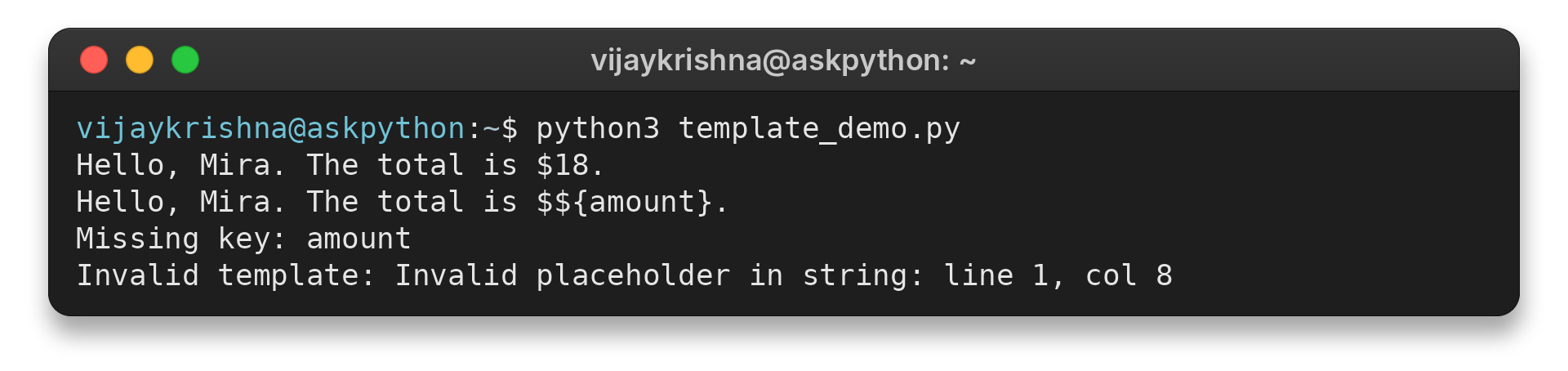
The first output line contains a literal dollar sign before the supplied amount. The next line preserves the missing field, and strict substitution reports its missing key. A dangling dollar sign produces the final invalid-placeholder error.
Step 3: Choose strict or safe substitution
Strict substitution returns a new string and raises KeyError when a required name is missing. Values may come from a mapping, keyword arguments, or both, with keyword arguments taking precedence for duplicate names.
Safe substitution leaves missing fields in its result. It also tolerates malformed dollar markers instead of raising ValueError.
This behavior can preserve a partly filled message while concealing a typo. Check required values before using the result.
Step 4: Inspect fields before filling the template
Python 3.11 and later provide validation and identifier-inspection methods on Template. They check syntax and show which names the text references before substitution.
For templates assembled from editable text, validate the syntax and compare its identifiers with the keys the application can provide. The public template attribute exposes the original string, but constructing a new object is clearer than changing that attribute later.
The default placeholder grammar begins with a dollar sign and an ASCII letter or underscore, followed by letters, digits, or underscores. Braced fields use the same identifier rule, and punctuation such as a period ends an unbraced name.
Use braces around name when the following literal letters, such as plate, should remain outside the field.
For a literal dollar amount, double the sign before the braced amount field.
Replacement values can be any object converted to text as the result is assembled. Format numbers or dates before passing them in when presentation matters, because Template handles lookup rather than locale-specific formatting.
Template String Errors and Limits
Substitution failures come from a missing key or invalid dollar syntax. Choose the method based on whether the program should reject incomplete input or preserve it for later completion.
| Case | Result | What to do |
|---|---|---|
| Missing name with substitute() | KeyError | Provide the mapping key or deliberately permit an unresolved field. |
| Missing name with safe_substitute() | The placeholder remains | Check the output when every field must be filled. |
| Dangling dollar sign with substitute() | ValueError | Write $$ for a literal dollar sign or correct the placeholder. |
| Adjacent name characters | The placeholder may consume them | Use braces, for example ${name}plate. |
The class does not evaluate Python expressions inside placeholders. It performs name-based replacement, so a placeholder such as $user_name needs a matching key. When the template syntax itself needs customization, the documentation supports subclassing Template to change its delimiter or identifier expression.
Do not confuse this class with Python 3.14 t-strings. A t-string uses f-string-like brace expressions but produces a string.templatelib.Template object whose parts can be processed before rendering. The two APIs differ in syntax, input model, and result type.
For formatted values inside Python code, compare this class with Python strings and formatting. For logging messages, see how to configure logging in Python. Pass values to the logging call so it can format the message when needed.
Conclusion
Use string.Template for named, data-driven substitutions with a compact dollar-sign syntax. Pick strict substitution when missing values indicate a problem, and use safe substitution only when preserving unresolved fields is intended.
For the authoritative reference, read the Python string.Template documentation. The separate string.templatelib documentation describes t-strings introduced in Python 3.14.
FAQ
These answers distinguish the two template APIs and their substitution behavior.
What does string.Template do in Python?
It replaces named dollar-sign placeholders in a string with values supplied through a mapping or keyword arguments.
What is the difference between substitute() and safe_substitute()?
substitute() raises an error for a missing placeholder or malformed dollar marker. safe_substitute() leaves missing fields and tolerates malformed markers, so check its result when complete output is required.
Are Python template strings and t-strings the same?
No. string.Template uses dollar-sign placeholders. Python 3.14 t-string literals use brace interpolations and produce a structured string.templatelib.Template object.