🚀 Supercharge your YouTube channel's growth with AI.
Try YTGrowAI FreePython Beautiful Soup: Extract Links from a Page

An empty `soup.select(…)` result leaves you with no tags to turn into records, even if the page looks full in a browser. I like that it sends attention back to the actual HTML instead of making the selector a guessing game.
Knowing what markup reaches the parser helps you interpret what Python can search. The useful starting point is what Beautiful Soup does with page HTML.
What Beautiful Soup does with page HTML
Beautiful Soup turns supplied HTML or XML into a searchable tree of elements, while Requests fetches a page over HTTP and supplies its response body.
A scraper fetches a page over HTTP, then parses the returned markup before selecting the fields your task needs. Keeping that boundary clear helps you diagnose an empty result without changing the wrong library.
HTML nests tags, so a product card contains a heading link and other fields. Beautiful Soup keeps the parent-child structure, letting you select one card before searching its child tags. The Beautiful Soup documentation covers CSS and tag-based searches against the same tree.
| Stage | Input | Result |
|---|---|---|
| Fetch | Page URL | Requests response and HTML body |
| Parse | HTML bytes and a named parser | Beautiful Soup tree of tags |
| Select | CSS selector and a tag | Text, attributes, and links |
What you need before requesting a page
Use a page you are allowed to request. Books to Scrape labels itself a scraping practice site and says its prices and ratings are randomly assigned.
Install the beautifulsoup4 distribution and Requests in the same virtual environment that runs your script. Python imports Beautiful Soup through the bs4 module, and html.parser comes with Python, so this example needs no extra parser package.
- Python with virtual-environment support
- The beautifulsoup4 and requests packages
- A permitted static HTML page to practise on
The sample ran under Python 3.14.7 with Beautiful Soup 4.15.0 and Requests 2.34.2. For the HTTP request details on their own, see AskPython’s Requests tutorial.
Scrape the Books to Scrape catalogue
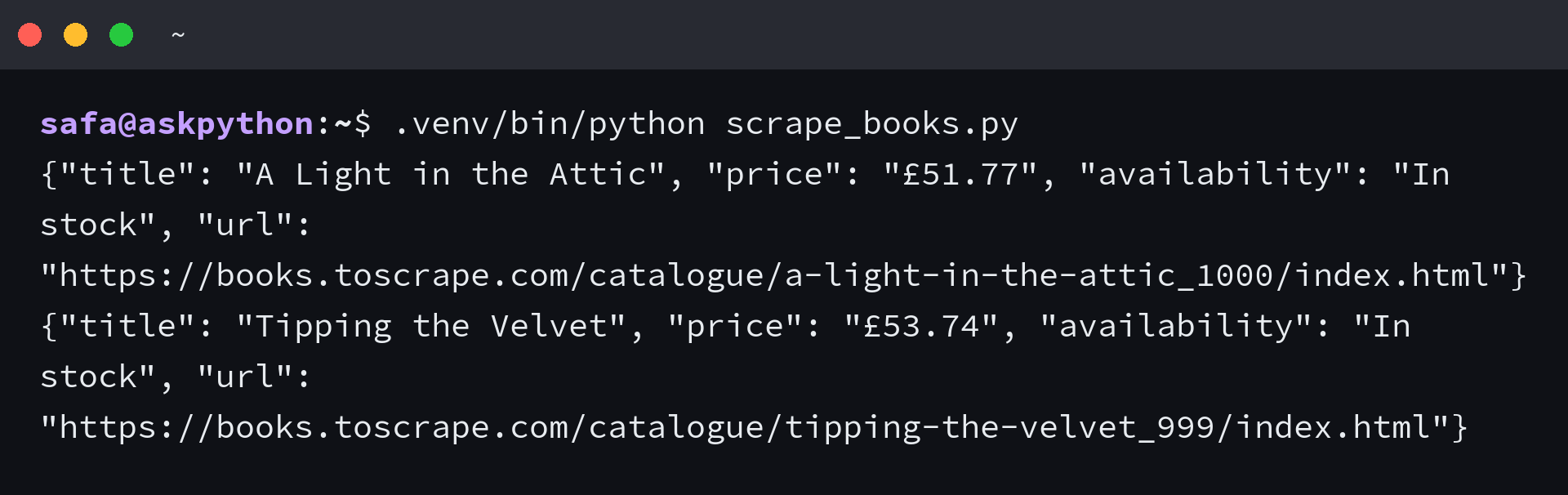
The script makes one GET request, checks the status, and parses the returned bytes before it selects product cards. It prints two records so you can compare each extracted field with the page.
1. Install Beautiful Soup and Requests
Create the environment inside the project directory. Install the packages there so the script can import them.
python3 -m venv .venv
.venv/bin/python -m pip install beautifulsoup4 requests
The package on PyPI is named beautifulsoup4, while the import in Python is bs4. Its project page lists version 4.15.0 and the supported Python versions.
2. Fetch the catalogue and parse its response
This example uses the site’s catalogue page, which is meant for scraping practice. The request has a timeout and raises on an HTTP error, so an error response does not get mistaken for a page with no matching products.
import json
from urllib.parse import urljoin

import requests
from bs4 import BeautifulSoup

PAGE_URL = "https://books.toscrape.com/catalogue/page-1.html"


def text_at(node, selector):
    element = node.select_one(selector)
    return element.get_text(" ", strip=True) if element else None


response = requests.get(PAGE_URL, timeout=20)
response.raise_for_status()
soup = BeautifulSoup(response.content, "html.parser")
product_cards = soup.select("article.product_pod")

if not product_cards:
    raise SystemExit("No product cards matched the selector.")

for card in product_cards[:2]:
    link = card.select_one("h3 a")
    if link is None:
        continue

    relative_url = link.get("href")
    product_url = urljoin(response.url, relative_url) if relative_url else None
    product = {
        "title": link.get("title") or link.get_text(" ", strip=True),
        "price": text_at(card, ".price_color"),
        "availability": text_at(card, ".availability"),
        "url": product_url,
    }
    print(json.dumps(product, ensure_ascii=False))
Missing price or availability tags return None through text_at, while urljoin resolves a relative href against the response URL. The selector article.product_pod identifies each card, and h3 a picks its title link.
3. Read the extracted fields
I tried response.text first, and the sandbox price came out as £51.77. I found the mismatch in the response metadata: Requests reported ISO-8859-1 while the page declares UTF-8, so parsing response.content bytes preserved £51.77.
The output contains a title and resolved link for each book, with price and availability kept beside them.
I limited the loop to two cards to keep the terminal output compact. Remove the slice when you want every card on this page.
get_text with a space separator joins text nodes cleanly, and strip removes surrounding whitespace. The link’s title attribute carries the full product name, while the anchor text provides a fallback when that attribute is absent.
When a selector returns nothing
An empty selection means the selector found no tags in the response, so compare it with the returned markup before changing tools.
| Symptom | What to check | Next move |
|---|---|---|
| No product cards | The response body and the article.product_pod selector | Check that the request reached the expected page, then match the selector to its current markup |
| A selected tag is missing | Whether select_one returned a tag | Keep the None check and adjust the selector only after inspecting the parent element |
| A link is relative | The value of href and the final response URL | Resolve it with urljoin before saving or following it |
| Data appears after JavaScript runs | Whether the response HTML contains the data | Use a documented data endpoint or a permitted browser tool |
| The server returns an HTTP error | The status raised by Requests | Stop before parsing and check the site’s access rules |
When select finds no tags, it returns an empty list rather than raising an exception. The explicit guard turns that silent miss into a useful stop, so compare the selector with the markup in the response before changing the parsing library.
Beautiful Soup only parses the markup it receives. A selector cannot find content that the server has not included in its HTML response.
Check a site’s terms and crawler policy before sending requests, and keep request volume within its stated limits. The IETF’s Robots Exclusion Protocol describes crawler rules, but robots.txt does not grant permission to access a site.
To exercise the empty-selection guard, replace article.product_pod in the sample with article.no_such_card and run the same command. The script stops with the message shown here rather than printing an empty scrape as success.

Let the returned markup set the boundary
Use Beautiful Soup when the fields you need are present in the HTML response. If a page fills them only after JavaScript runs, inspect a permitted data endpoint or switch to browser automation instead of adding selectors for elements that are not there.
After changing one selector, run the script again and compare its output with the product card in the response.
.venv/bin/python scrape_books.py
Beautiful Soup scraping questions
Interaction and package setup prompt two common questions. The answers follow from the parser’s boundary and the package names above.
Can Beautiful Soup click a button?
No. Beautiful Soup parses supplied markup, so use a browser automation tool when the task requires a click and script execution, if your access terms allow it.
How do I check whether Beautiful Soup is installed?
Run .venv/bin/python -m pip show beautifulsoup4 in the same virtual environment as your script. The distribution is named beautifulsoup4, while Python imports it through bs4.