🚀 Supercharge your YouTube channel's growth with AI.
Try YTGrowAI FreePython String Functions: Methods by Task

Text in a program may need a small change or check before you use it. Python string methods are operations you call on text to trim its edges or split it into parts.
I’ll show how to choose a method by the result you need and how to use common methods in a short text-cleaning sequence.
TL;DR: Choose a Python string method by task
Python string methods handle common text work, and the method you choose depends on whether you need to clean, change, search, test, split, or combine text.
- Use strip() to remove edge whitespace, replace() to substitute text, and lower() or upper() to change case.
- Use find() to search, startswith() to test a prefix, and split() to make a list.
- Use join() on a separator to combine strings, and len() to count characters.
- Methods return values. Assign the result when you want to keep a changed string.
What are Python string functions?
Python string functions usually means methods on the built-in str type, such as strip() and split(). A method is called on a value with dot notation, while len() and str() are built-in functions called around a value.
A string stores Unicode text and is immutable. Its characters stay unchanged when a method returns a transformed value. Assign that value if later code should use it.
Methods and functions differ in call shape. text.lower() calls a method on its value, while len(text) calls a built-in function. The string module also has ASCII constants such as ascii_letters and digits, useful for checks limited to ASCII characters.
| Task | Choose | Result |
|---|---|---|
| Remove edge whitespace | strip() | New string |
| Change a substring | replace(old, new) | New string |
| Find text | find(sub) | Index or -1 |
| Check a prefix | startswith(prefix) | Boolean |
| Split into parts | split(sep) | List of strings |
| Join parts | sep.join(parts) | New string |
| Count characters | len(text) | Integer |
How to choose and use Python string methods
Start with the output your next line needs: a modified string, a test result, a position, or a collection of parts. The following steps show a small text-cleaning path and where the common methods fit.
Step 1: Clean the edges with strip()
strip() removes whitespace at both ends and returns a new string. Use lstrip() or rstrip() when only one side should be trimmed. Passing characters changes the meaning: strip(“,”) removes commas from the ends, not every comma in the text.
Step 2: Split text into values
split(“, “) separates at that exact delimiter and returns a list. With no separator, split() groups runs of whitespace and ignores whitespace at the edges. Choose an explicit separator when the input format defines one, such as comma-space separated values.
Step 3: Join values with a separator
Call join() on the separator string to place it between items. Convert non-string values with str() before joining. See Python String join() function for another example.
Step 4: Run the cleaning sequence
This example trims a string, splits it, and joins the pieces with a different separator. I ran the named file shown here. Its output also confirms that the original value stays unchanged.
from pathlib import Path

text = "  red, green, blue  "
clean = text.strip()
colors = clean.split(", ")
label = " / ".join(colors)
print(clean)
print(colors)
print(label)
print(text == "  red, green, blue  ")
red, green, blue
['red', 'green', 'blue']
red / green / blue
True
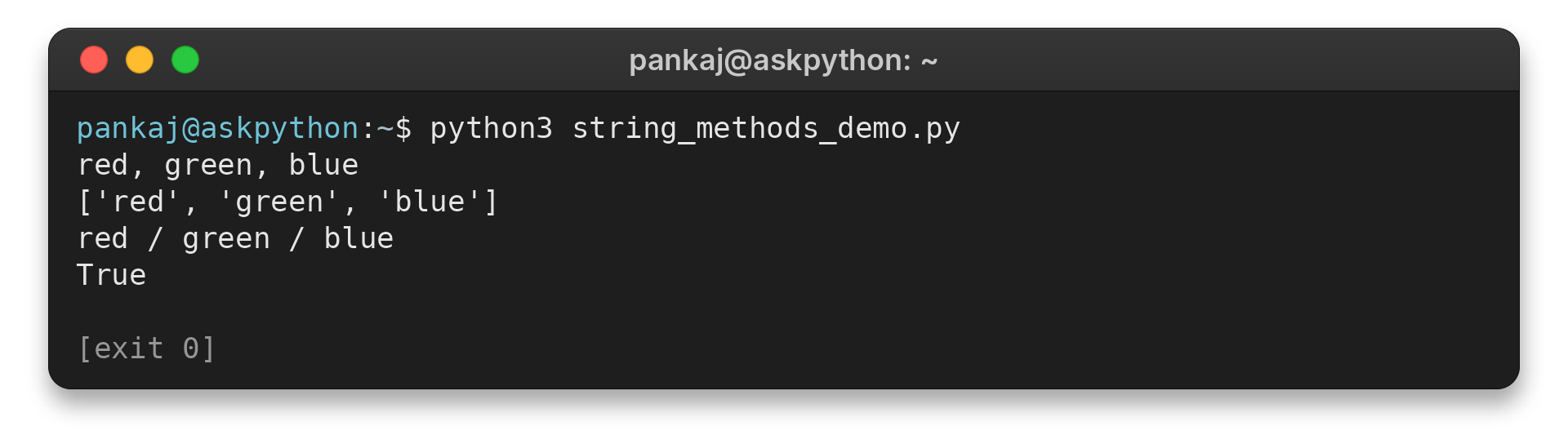
The final True records that text still has its original spaces. Assign clean, rather than expecting strip() to edit text in place.
Step 5: Select search and formatting methods
Search for text and decide how missing matches should behave. Format values when you build display text. A template can use named fields and a format specification for display precision.
Pass a string to a function as an argument and return one with return. input() provides text, and you can convert it to a number when arithmetic is intended.
Python string method edge cases
The method result and the input format determine common surprises. Check delimiters, Unicode characters, and the expected result type before chaining operations.
| Case | What happens | What to do |
|---|---|---|
| Whitespace after comma split | split(“,”) keeps a leading space in later items | Use split(“, “) for that exact format, or strip each item |
| Substring missing | find() returns -1, while index() raises ValueError | Choose based on whether absence is expected |
| Empty string test | Methods such as isalpha() return False on empty text | Check for an empty value separately if it matters |
| Digit checks | isdecimal(), isdigit(), and isnumeric() accept different Unicode characters | Use isdecimal() for decimal digit characters, then parse with int() when validating a number |
| Counting characters | len() counts Unicode code points, not user-perceived grapheme clusters | Use a Unicode-aware grapheme library for visual character counts |
| Repeated concatenation | Each concatenation creates another string value | Collect pieces and use join() for a sequence of fragments |
To remove spaces around each comma-separated item, split first and strip each part, or use a whitespace-aware parser for richer input. The related Python guide to removing spaces from a string covers trimming choices. Do not use strip(“abc”) to remove the exact word “abc”, because its argument is a set of edge characters.
For the full method list, see the official str reference.
Conclusion: Choose by the result you need
Choose a Python string method from the result your code needs, then assign returned strings and handle missing matches explicitly. This keeps text transformations predictable and makes type changes visible where they happen.
For exact signatures and the full set of methods, use the official str reference. For combining a list of strings, continue with the join() guide.
FAQ
These answers cover common questions about Python string operations.
What are string functions in Python?
The phrase usually refers to methods on str, such as lower(), split(), and replace(). Python also has built-in functions such as len() and str().
Does input() return a string in Python?
Yes. input() returns the entered line as a string. Convert it with int() or float() when you need a number.
How do you reverse a string in Python?
Use slicing with text[::-1] to create a reversed string. The str type has no reverse() method.
Do Python string methods change the original string?
No. Strings are immutable. Methods that transform text return a new value, which you can assign to a variable.