🚀 Supercharge your YouTube channel's growth with AI.
Try YTGrowAI FreePython BeautifulSoup Web Scraping Example

A list of product pages can be hard to work with when the details you need are mixed into HTML. Beautiful Soup turns HTML into a structure your Python code can search, while Requests fetches the page.
I’ll show how to fetch a page and select product details from its HTML.
TL;DR: Fetch HTML, parse it, then select the fields
Python web scraping with Beautiful Soup has two parts: Requests downloads a page, then Beautiful Soup turns its HTML into elements you can search. The division matters because a selector can only find data that arrived in the response.
- Use Requests for the HTTP request, including a timeout and a status check.
- Pass the response body to Beautiful Soup and select the records you need.
- Check the response markup when a selector returns nothing. JavaScript-only content needs another retrieval method.
What Beautiful Soup does in a scraper
Beautiful Soup parses HTML or XML that your program already has. It builds a tree of tags and text, then provides methods for searching that tree. Requests does a separate job: it sends the HTTP request and returns a response containing status information and the page body.
The workflow is fetch, parse, select, then extract. A product card is a tag with child tags for its title, price and availability. The selected card scopes searches to one record, so its title and price stay together.
HTML tags can be nested, so a selector for every price on the page may also match prices in menus or recommendations. Scoping the search to one repeated card makes the relationship explicit. It also gives you a clear unit to validate before collecting a full page of results.
| Stage | Input | Output |
|---|---|---|
| Fetch | Page URL | HTTP response and HTML body |
| Parse | Response body and parser | Beautiful Soup tree |
| Select | Tree and tag name, attributes or CSS selector | Matching tags |
| Extract | Selected tags | Text, links or other attributes |
Beautiful Soup does not make the HTTP request and does not execute page JavaScript. That boundary helps pinpoint a failure: an HTTP status problem belongs to fetching, while an empty match belongs to the response body or selector.
HTML parsers can repair some malformed markup while building the tree. That means the tree is a useful representation, not a byte-for-byte copy of the response. If two parsers produce different results for broken HTML, compare their parsed trees and choose the parser that fits the document you have.
Beautiful Soup exposes tags as Python objects. A tag’s attributes can be read by name, while its text can be gathered with get_text. Prefer those explicit access methods when markup contains nested tags or inconsistent whitespace.
What you need before scraping a page
Use Python, Requests, and the beautifulsoup4 distribution. The package name you install differs from the module name you import: installation uses beautifulsoup4, and Python code imports bs4. The built-in html.parser is enough for the example, so no additional parser package is required.
Install packages into the same virtual environment that runs the script. A virtual environment isolates this project’s packages from other Python projects.
The two dependencies are Requests and beautifulsoup4. pip is Python’s package installer.
Choose a page you are permitted to request. This example uses Books to Scrape, a practice catalogue intended for scraping exercises.
Before targeting another site, read its terms and crawler policy. Keep requests within the site’s stated limits.
A site’s robots.txt communicates crawler preferences, but it does not grant permission by itself. Avoid collecting personal or restricted information unless you have a lawful basis and the site’s rules allow the access.
You also need to identify the data in the HTML, rather than relying on how it looks in the browser. Inspect the page source or browser developer tools and find a repeated element that represents one record.
- Find the parent element repeated once per record.
- Identify each field’s tag, class or attribute inside that parent.
- Check whether the values appear in the returned markup or only after JavaScript runs.
These observations become the selectors in the script, so they should match the response HTML rather than a guess based on appearance.
How to scrape HTML with Beautiful Soup step by step
The sequence below fetches a practice catalogue, validates the response, parses the returned bytes, then reads the first two product cards. The demo script is complete so you can save it as beautifulsoup_scrape_demo.py and run it with Python after installing the two packages.
Step 1: Fetch the page and check its response
Requests sends a GET request to the catalogue URL. A timeout prevents the program from waiting forever for the server to begin responding. Calling raise_for_status stops the script on an unsuccessful HTTP response instead of passing an error page to the parser as if it were the expected catalogue.
The timeout is not a hard cap on the whole download. Requests uses it to limit how long it waits without receiving data. For a longer job, also consider retry policy and an overall job deadline appropriate to the site and task.
Step 2: Parse the body and select product cards
BeautifulSoup accepts response.content, the response body as bytes, and the name of a parser. The html.parser option uses Python’s built-in HTML parser. The CSS selector article.product_pod finds every article element carrying the product_pod class.
CSS selectors can match a tag and its attributes together. Beautiful Soup also provides find and find_all. find returns the first match, while find_all returns a list.
Use select_one for a single field inside a card and select when you need a collection. A selector such as article.product_pod .price_color means “find an element with this class inside a product article.” Inspect a match before extracting it when a selector is new or the page has changed.
Step 3: Read text and resolve the product link
Each selected card is searched independently for its title link, price and availability. get_text with strip=True removes surrounding whitespace from a tag’s text. The title comes from the link’s title attribute, with visible link text as a fallback.
The href value is relative, so urljoin combines it with the response URL to produce an absolute link. Keeping the resolved URL with its title makes the extracted record useful outside the current page.
HTML can change, so each field is checked before use. The example skips a card with no title link and supplies “Not listed” when the price or availability element is absent. For production data, keep missing values distinct from present values and log which selector did not match.
Step 4: Run the scraper and compare the records
I ran the complete script against the practice catalogue with the command shown below. The output contains two records, each with the selected title, price, availability and resolved product URL.
from urllib.parse import urljoin

import requests
from bs4 import BeautifulSoup

page_url = "https://books.toscrape.com/catalogue/page-1.html"
response = requests.get(page_url, timeout=20)
response.raise_for_status()
soup = BeautifulSoup(response.content, "html.parser")

for card in soup.select("article.product_pod")[:2]:
    title_link = card.select_one("h3 a")
    price = card.select_one(".price_color")
    availability = card.select_one(".availability")
    if title_link is None:
        continue
    title = title_link.get("title") or title_link.get_text(" ", strip=True)
    product_url = urljoin(response.url, title_link.get("href", ""))
    price_text = price.get_text(" ", strip=True) if price else "Not listed"
    availability_text = availability.get_text(" ", strip=True) if availability else "Not listed"
    print(f"{title} | {price_text} | {availability_text} | {product_url}")
Run it as python3 beautifulsoup_scrape_demo.py after installing the dependencies. Here is the exact output from that run:
A Light in the Attic | £51.77 | In stock | https://books.toscrape.com/catalogue/a-light-in-the-attic_1000/index.html
Tipping the Velvet | £53.74 | In stock | https://books.toscrape.com/catalogue/tipping-the-velvet_999/index.html
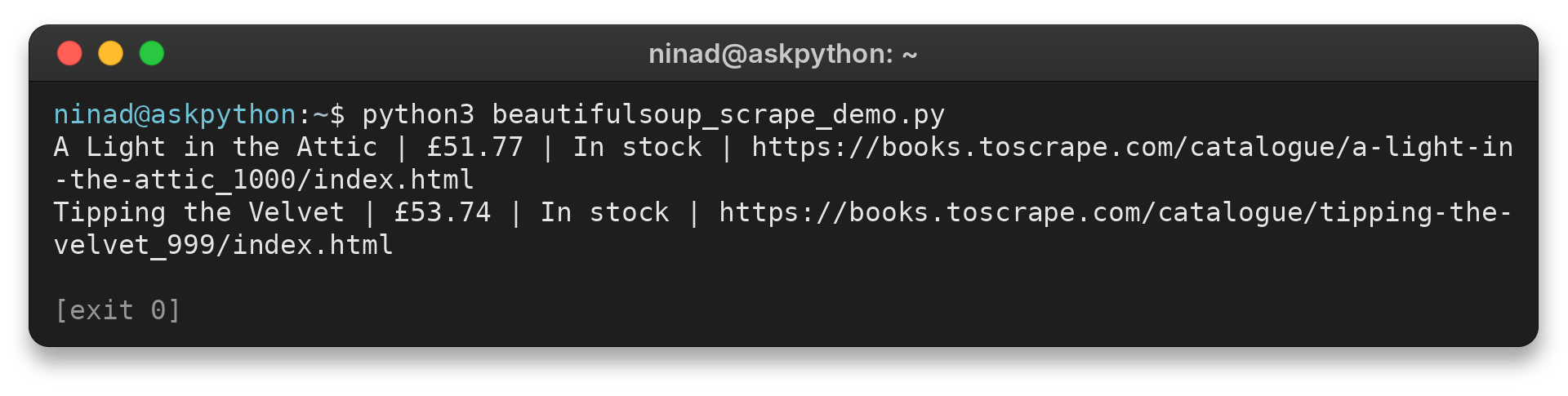
The limit of two cards keeps the terminal output short. Remove the slice to process every card on this page, then validate the extracted records before saving or using them. The values above are the practice catalogue’s current response, not permanent product data.
Common errors with Beautiful Soup scraping
An empty result means the selector matched no tags in the body Beautiful Soup received. It does not by itself show whether the request failed, the markup changed, or the data is added later by JavaScript. Check those layers in order before changing libraries.
| Symptom | Check | Next action |
|---|---|---|
| HTTP error | Response status and final URL | Correct the URL or confirm permitted access. Do not parse the error page. |
| No cards match | Response body and card selector | Compare the selector with current markup |
| A field is absent | Selected card’s child tags | Handle None and revise the field selector if markup changed |
| Browser shows data that response lacks | Whether the data is in the returned HTML | Look for a permitted documented endpoint or use browser automation |
| Text has odd characters | Response encoding and page declaration | Inspect the response encoding and pass bytes to Beautiful Soup |
Beautiful Soup parses the markup supplied to it. If the server returns a shell page and JavaScript fills in products later, those product tags may not exist in response.content. Inspect the Network panel for a documented data endpoint that the site allows you to use.
If the task requires executing scripts or interacting with controls, a browser automation tool may fit better than a parser.
A 403 response is not an invitation to imitate a browser or evade a site’s restrictions. Check access terms and use an official API when one is offered.
A generic User-Agent string cannot guarantee access. It should not be treated as permission. Requests lets you provide headers, but a header does not change what a site permits.
For an allowed page with an empty selection, inspect the actual response body and compare its tag structure to the CSS selector. If a parent card matches but one child does not, keep the missing-field check so the scraper can report partial records without crashing. If the page layout changes, update the selector to fit the new markup and run the script again.
To save records after extraction, place them in dictionaries with stable field names and write them with Python’s csv.DictWriter. Open the output file with newline=”” and an explicit encoding such as UTF-8. Treat this as a separate final stage: confirm the row count and inspect the output before relying on it.
CSV is convenient when another program expects rows and columns, but it does not validate the source data. Normalize fields before writing. For example, remove surrounding whitespace from text and decide how a missing price should be represented, rather than mixing missing values with empty strings without a rule.
For a larger scrape, save a copy of the response used for testing and keep the extraction step separate from the network request. That makes selector changes simpler to test without sending repeated requests. Recheck the site’s request limits before scheduling a recurring job.
Pagination is another distinct task. Inspect how the next page is represented, then stop when there is no next-page link or when you reach a clear page limit. Do not assume that incrementing a query parameter will work across sites.
Resolve a relative next link against the response URL, and track visited URLs or set a page limit so repeated links cannot keep the loop running. Add a delay only when it fits the site’s published guidance. Save progress if a long run could be interrupted.
Conclusion
Keep the fetch-and-parse boundary in view: Requests retrieves the response, and Beautiful Soup searches the markup in that response. Once the response contains the fields you need, selectors can turn repeated elements into records. When it does not, investigate the response or choose an authorized way to retrieve the data before adding more selectors.
For more detail, see the Beautiful Soup documentation, the Requests Quickstart, and AskPython’s guide to extracting links with Beautiful Soup.
Can Beautiful Soup scrape a website by itself?
No. Beautiful Soup parses HTML or XML supplied to it. Use a separate HTTP client such as Requests to fetch a page, then parse the response body.
Why does Beautiful Soup return an empty list?
The selector did not match tags in the parsed response. Check the response status and body, then compare the selector with the current markup. Data inserted later by JavaScript is not present unless retrieved separately.
Is web scraping legal?
There is no single answer for every site and use. Check the site’s terms, applicable law, and access rules before collecting data. A robots.txt file communicates crawler preferences but does not grant permission.
Which parser should I use with Beautiful Soup?
The example uses Python’s built-in html.parser. Beautiful Soup also supports external parsers such as lxml and html5lib. Parser choice can affect how malformed HTML is interpreted.