🚀 Supercharge your YouTube channel's growth with AI.
Try YTGrowAI FreeEnvironment Variables in Python: A Complete Guide

When a Python program needs settings that vary between machines, keeping those values out of its source code lets you change configuration separately. Environment variables are named text values supplied to a running process, and Python reads them through os.environ.
I’ll show how to read and validate settings, then set them for Python from a shell or within the program.
TL;DR: Read a Python environment variable
Use os.getenv(“NAME”) or os.environ.get(“NAME”) to read a variable without raising an error when it is missing. Both return strings, so choose a default deliberately and convert the value before using it as a number or flag.
- Use os.environ[“NAME”] when a missing value should raise KeyError.
- Use get() or getenv() for optional values and defaults.
- Set variables in the shell before launch, or in os.environ for this process and its children.
What is an environment variable in Python?
An environment variable is a named string supplied to a running process by its environment. Python exposes that mapping through os.environ, so a program can read configuration without embedding a machine-specific value in its source.
Think of a process as a running copy of a program. Its environment is the collection of name-value settings it receives when it starts, such as PATH or an application-specific DATABASE_URL. A child process normally inherits a copy from its parent, but a change made inside Python does not rewrite the parent shell’s settings.
The values are strings. Python does not know that “8000” is meant to be a port or that “true” is meant to be a Boolean. Your application defines those meanings and validates the conversion.
| Scope | Meaning | Example |
|---|---|---|
| Operating-system environment | Names and values supplied to a process when it starts | APP_MODE=staging in the launching shell |
| Python os.environ | Python’s mapping for the current process environment | os.environ.get(“APP_MODE”) |
| Child process environment | A copy inherited at launch, or a mapping supplied to subprocess.run() | Pass os.environ.copy() with an override |
How to read and use environment variables in Python
Start with an optional lookup, decide what a missing value means, then convert and validate it before passing it into application code. The following file demonstrates the behavior with controlled values rather than printing this machine’s environment.
Step 1: Read a value with getenv or get
os.getenv(name) and os.environ.get(name) both return None when the name is absent unless you supply a default. They are convenient for optional settings because the caller can handle the missing case explicitly.
The demo assigns APP_MODE within the running process, then reads it using getenv. OPTIONAL_SETTING is absent, so the result is None. APP_PORT gets a string fallback and is converted to an integer before use.
import os

os.environ["APP_MODE"] = "staging"
mode = os.getenv("APP_MODE")
missing = os.getenv("OPTIONAL_SETTING")
port = int(os.getenv("APP_PORT", "8000"))

print(f"APP_MODE={mode}")
print(f"OPTIONAL_SETTING={missing}")
print(f"APP_PORT={port}")
print(f"APP_PORT type={type(port).__name__}")
Run python3 env_vars_demo.py. The captured output is:
APP_MODE=staging
OPTIONAL_SETTING=None
APP_PORT=8000
APP_PORT type=int
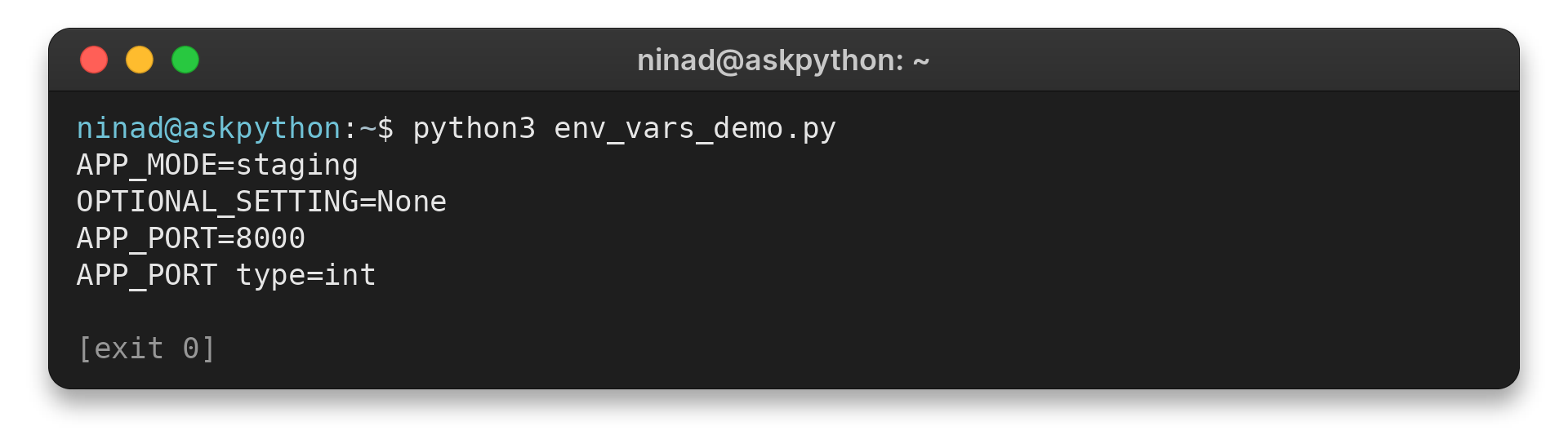
The output shows that getenv returns the configured string and returns None for a missing optional key. The integer conversion happens in the program, not in the environment.
Step 2: Choose behavior for a missing key
Bracket lookup and default lookup express different configuration contracts. Pick the one that matches whether the setting is required. A mapping lookup is useful when absence should stop startup, while a default belongs only where the application has a valid fallback.
| Lookup | When the key is missing | Use it when |
|---|---|---|
| os.environ[“API_URL”] | Raises KeyError | The program cannot run without the setting |
| os.environ.get(“LOG_LEVEL”) | Returns None | You will branch on absence |
| os.getenv(“PORT”, “8000”) | Returns the supplied string default | A documented fallback is valid |
A default can hide a deployment mistake if the setting was meant to be mandatory. For required configuration, check for None and raise a clear error near startup rather than allowing a later database or network call to fail without context.
os.getenv() and os.environ.get() both read the os.environ mapping, so use whichever spelling makes the call clearer in context. A default is not a type conversion.
An integer default is returned only when the key is absent, while a configured value still arrives as text. Use a string default and parse the result explicitly.
When a required key is missing, direct indexing raises KeyError and identifies the key. You can catch that exception near startup and raise a clearer message such as “Set API_URL before starting the service.” Keep the key name in the error, but never include the setting’s value when it could contain a credential.
Step 3: Distinguish unset from empty
A missing variable and a variable set to an empty string are not the same state. get(“NAME”) returns None for the first and an empty string for the second, so test explicitly when empty has meaning.
| State | Lookup result | Possible policy |
|---|---|---|
| Key absent | None from get() | Use a fallback or report a missing setting |
| Key present with empty text | Empty string | Reject it if the setting must contain a value |
| Key present with text | String value | Validate format and allowed range |
A truthiness check merges both states because an empty string is false in a conditional. That may be fine for an optional label, but it is dangerous when an empty password or URL should trigger a configuration error. Use “NAME” in os.environ to test presence, then validate the value separately.
This distinction also affects defaults. The default argument to get() or getenv() is used when the key is absent, not when it is present with an empty value. If empty text should count as missing for a particular setting, make that policy explicit after the lookup rather than assuming the API will apply the fallback.
For example, an optional display label might accept an empty string, while a service URL usually needs a non-empty value. The operating system cannot decide that application rule because it stores values as text. Validate each setting according to the feature that consumes it.
Step 4: Convert strings and validate them
Convert numeric settings with int() or float(), and handle ValueError when the input may be malformed. For Boolean settings, define accepted spellings rather than applying bool() to the string, because bool(“false”) is True.
A small parser can normalize an explicit set of values. Reject anything outside that set so a typo does not silently choose the wrong behavior.
def parse_bool(value):
    normalized = value.strip().lower()
    if normalized in {"1", "true", "yes", "on"}:
        return True
    if normalized in {"0", "false", "no", "off"}:
        return False
    raise ValueError("Expected true/false, yes/no, on/off, or 1/0")
For a required integer, do not provide a fallback that could send traffic to the wrong port. Check presence, convert, and report the variable name in the error without printing a sensitive value.
Step 5: Set a variable before Python starts
Set configuration in the launching shell when it should apply to one run or to processes launched from that shell. The syntax differs by command interpreter, but Python reads the resulting process environment through the same os API.
| Shell | Set for one command |
|---|---|
| Linux or macOS shell | APP_MODE=staging python3 app.py |
| PowerShell | $env:APP_MODE = “staging” then python app.py |
| Windows Command Prompt | set APP_MODE=staging then python app.py |
In the latter two examples the setting remains in that shell session until it is changed or the session ends. A shell’s own persistent profile is a separate choice, and changing it affects later launches rather than a Python process that is already running.
The single-command form on Linux or macOS attaches the assignment to that command invocation. It does not add the name to the shell’s ongoing environment after the command exits. In PowerShell or Command Prompt, the assignment shown above updates the current shell session, so later commands launched from that session can inherit it.
For scripts that run under an IDE, task runner, service manager, or container, set the value in that launcher’s configuration. A terminal command affects only processes started from that terminal. When a variable appears in an interactive terminal but not in the application, check which process launched Python and where that process received its environment.
Step 6: Set a value in Python or for a child process
Assigning os.environ[“NAME”] changes the current process environment and is visible to child processes started afterward. It does not change the parent terminal or persist after the Python program exits.
For subprocess.run(), an env mapping replaces the child’s inherited environment. Copy os.environ first if the child needs the normal environment plus an override. The child receives the mapping supplied at launch, so a later change to the parent Python process does not retroactively change an already-running child.
import os
import subprocess
import sys

child_env = os.environ.copy()
child_env["WORKER_MODE"] = "batch"
subprocess.run([sys.executable, "worker.py"], env=child_env, check=True)
Passing only {“WORKER_MODE”: “batch”} would omit PATH and other inherited settings. That can make the child fail to locate tools or behave differently from a normal launch, so construct the full mapping intentionally.
Common environment variable errors
Environment-variable mistakes often come from treating configuration as typed, permanent, or private. Keep those boundaries clear when the program starts and when it launches children.
- Check required variables early and name the missing key in the error.
- Do not print whole os.environ mappings in logs or support output. They can contain credentials and deployment details.
- Use a secrets manager or protected deployment secret facility for sensitive credentials, and limit which processes can read them.
Environment variables keep values out of source files, but that alone does not make them secret storage. They can be exposed by process inspection, crash reports, diagnostics, or logs depending on the system and access controls. Avoid logging values and rotate a credential if it is exposed.
Python’s os.environ mapping is initialized from the process environment when os is imported. Assign through os.environ to keep Python’s mapping and the process environment in sync.
A direct low-level putenv call does not update the mapping itself. Normal application code should use os.environ rather than trying to reload external changes into a running process.
Names are portable when you use a consistent uppercase convention, but case behavior can depend on the operating system. Avoid relying on mixed-case aliases when software must run on several platforms.
Load local settings from a .env file
A .env file is a local text file of KEY=VALUE settings, often used to avoid retyping development configuration. Python’s standard library does not automatically load that file. An application must load it or receive the variables from its launcher.
| Approach | Where values come from | Good fit |
|---|---|---|
| Shell or deployment environment | Set before the Python process starts | Production and one-off commands |
| python-dotenv load_dotenv() | Reads a project .env file into os.environ | Local development with existing getenv calls |
| python-dotenv dotenv_values() | Returns parsed values as a dictionary | Code that should inspect file settings without mutating os.environ |
For a project that uses python-dotenv, import load_dotenv from dotenv and call load_dotenv() near startup before reading the settings. Install the package in the project’s environment and consult its current documentation for options such as choosing a file path or controlling override behavior.
Use a template such as .env.example with placeholder names, add your .env file to .gitignore, and never commit actual credentials.
Conclusion: Keep configuration outside your code
Use os.getenv() or os.environ.get() for optional values, direct indexing for required values that should fail fast, and explicit parsing for every non-string setting. Remember that a process receives its environment at launch and passes a copy to children unless you provide a replacement mapping.
For exact API behavior, read the Python os module documentation and the subprocess documentation. They describe the mapping and child-process environment parameters.
How do I read an environment variable in Python?
Use os.getenv(“NAME”) or os.environ.get(“NAME”). Both return None when the name is missing unless you provide a default.
What is the difference between os.environ and os.getenv()?
os.environ is a mapping of the current process environment. os.getenv(name, default) is a convenience lookup that reads through that mapping.
How do I set an environment variable in Python?
Assign a string with os.environ[“NAME”] = “value”. The change affects the current process and children launched afterward, not the parent shell.
Are environment variable values strings in Python?
Yes. Read values as strings and convert them explicitly to integers, Booleans, or other types, handling invalid input.