🚀 Supercharge your YouTube channel's growth with AI.
Try YTGrowAI FreePython isdigit: Check Unicode Digits in Strings


Checking whether a string contains digit characters is different from checking whether Python can parse it as an integer. Python’s str.isdigit() method tests whether every character in a non-empty string is a qualifying Unicode digit.
I’ll show how to use isdigit() and when to use int() for conversion.
TL;DR
Use str.isdigit() to test whether a non-empty string contains only Unicode digit characters, not to decide whether Python can parse it as an integer.
- Call value.isdigit() when the input must consist of digit characters only.
- Signs, decimal points, spaces, and empty strings make the result False.
- Use int(value) in a try/except when conversion is the actual goal.
- Use an ASCII range check when only characters 0 through 9 are valid.
What is Python str.isdigit()?
str.isdigit() tests whether a nonempty string contains only qualifying Unicode characters.
Call it on the string value with no argument: text.isdigit(). A minus sign can appear in integer text, but the sign itself is not a digit character.
For a stricter decimal-character test, choose isdecimal(). The broader isdigit() also accepts special digits such as superscripts, while isnumeric() recognizes additional numeric symbols such as fractions.
How to check a string with isdigit() step by step
Use isdigit() for a character-only test, then choose an appropriate conversion or validation rule for the next operation.
Step 1: Call the method on the string
Store the input as text and call isdigit() directly. The following program compares its result with isdecimal() and isnumeric() so the Unicode boundary is visible.
samples = [("ASCII digits", "123"), ("superscript two U+00B2", "\u00b2"), ("fraction one fifth U+2155", "\u2155"), ("fullwidth digits U+FF11 U+FF12", "\uff11\uff12"), ("negative text", "-12"), ("decimal text", "12.0"), ("empty text", "")]

for label, value in samples:
    print(f"{label}: isdigit={value.isdigit()}, isdecimal={value.isdecimal()}, isnumeric={value.isnumeric()}")

try:
    print(int("²"))
except ValueError as error:
    print(f"{type(error).__name__}: {error}")
Run the saved file with python3 isdigit_demo.py. It prints:
ASCII digits: isdigit=True, isdecimal=True, isnumeric=True
superscript two U+00B2: isdigit=True, isdecimal=False, isnumeric=True
fraction one fifth U+2155: isdigit=False, isdecimal=False, isnumeric=True
fullwidth digits U+FF11 U+FF12: isdigit=True, isdecimal=True, isnumeric=True
negative text: isdigit=False, isdecimal=False, isnumeric=False
decimal text: isdigit=False, isdecimal=False, isnumeric=False
empty text: isdigit=False, isdecimal=False, isnumeric=False
ValueError: invalid literal for int() with base 10: '²'
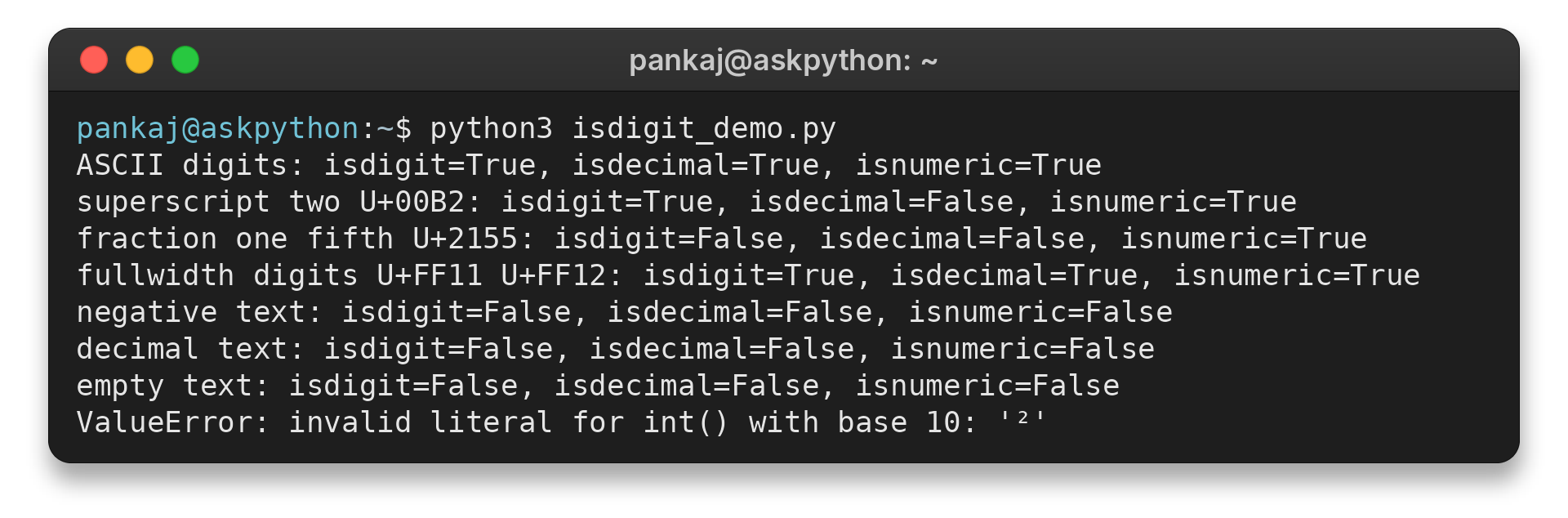
I ran this example and saw the superscript pass isdigit() while int() raised ValueError. A fraction passed only isnumeric() in the comparison. Fullwidth digits passed all three checks.
Step 2: Decide which characters your input accepts
Use an ASCII allowlist only when the input format requires those exact characters.
ascii_digits = "0123456789"
text = "0042"
valid = bool(text) and all(char in ascii_digits for char in text)
print(valid)
The bool call prevents all() from accepting an empty iteration as a successful match.
Step 3: Parse when you need a number
When the next step needs an integer value, call int() and handle ValueError.
text = "-42"
try:
    number = int(text)
except ValueError:
    print("Enter an integer")
else:
    print(number)
Integer parsing accepts forms such as a leading sign. See AskPython’s guide to converting strings to integers for base selection and conversion details.
Edge cases: spaces, signs, decimals, and Unicode
The table compares common inputs. Each row identifies the character that determines the result.
The empty-string row shows the result when the input has no characters.
| Input | isdigit() | Reason |
|---|---|---|
| “123” | True | Every character is a digit |
| “-12” | False | The sign character fails the digit test |
| “12.0” | False | The decimal point fails the digit test |
| “12 34” | False | Whitespace interrupts the sequence |
| “²” | True | Unicode classifies superscript two as a digit |
| “⅕” | False | The fraction is numeric but not a digit |
| “” | False | There is no character to test |
For text that may contain surrounding whitespace, decide whether trimming is part of the input contract before testing or parsing. Do not silently strip characters if spaces are meaningful in the format.
If a value may not be a string, check its type or normalize it deliberately before calling the method. Calling a string method on None or an integer raises AttributeError. For extracting digits from mixed text, see AskPython’s digit extraction examples.
Conclusion
Use the Python documentation below to check the Unicode categories behind these results.
Python’s documentation describes the Unicode categories behind these results. A Boolean result can be compared or used in a conditional, while int and float values represent numbers. A comparison such as value.isdigit() == True tests the same Boolean result again, so use the method call directly in an if statement.
Integer bitwise operators work on integer operands, not string characters. For instance, 5 & 3 is an integer bitwise operation, while value.isdigit() returns a Boolean. AskPython also explains isnumeric().
FAQ
These answers distinguish digit-character checks from common number-validation tasks.
Does isdigit() work for floats in Python?
No. A decimal point is not a digit, so text such as 3.14 returns False. Parse it with float() and handle ValueError when you need a floating-point value.
Does isdigit() accept negative numbers?
No. The minus sign is not a digit, so a string such as -7 returns False. Use int() or float() with exception handling when signed values are allowed.
What is the difference between isdigit() and isnumeric()?
isdigit() accepts Unicode decimal and digit characters, including superscripts. isnumeric() also accepts numeric characters such as vulgar fractions, so it recognizes a wider set.
Why can isdigit() return True when int() fails?
isdigit() tests Unicode character properties. Some accepted digit characters, such as superscript two, are not valid integer text for int(), which raises ValueError.