🚀 Supercharge your YouTube channel's growth with AI.
Try YTGrowAI FreePython String islower() Function


Working with letter case in Python can mean changing text or checking how it is already cased. The str.lower() method returns a lowercase copy of a string, while islower() reports whether its cased characters are lowercase.
I’ll show how to call lower() and use its returned string.
TL;DR
Call str.lower() to return a lowercase copy of a Python string, then assign that value if your code needs to keep it.
- Conversion: text.lower() returns lowercase cased characters.
- Check: text.islower() returns a Boolean about existing text.
- Matching: text.casefold() is intended for Unicode-aware caseless comparison.
What Is str.lower() in Python?
str.lower() is the lowercase conversion method on a string value. It has no required arguments, and Python returns the converted string as the result.
Python strings are Unicode text, so lower() applies Unicode case conversion rather than checking only English letters. It takes no arguments and leaves the value you called it on available as before. Use it when the desired result is lowercase text.
The similar-looking islower() method does a different job: it checks whether cased characters in the current string are lowercase. It returns True or False and does not convert the value.
How to Convert a String to Lowercase Step by Step
Call lower() on a string, and save its return value when you need to use the converted text again. These steps show the method call, assignment, and result.
Step 1: Start with the text you want to convert
Store the original text in a string variable. The mixed-case sample includes punctuation so you can see which characters change.
text = "PyThOn!"
Step 2: Call lower() with empty parentheses
Call lower() with no value inside the parentheses, then assign its returned form for later use.
lowered = text.lower()
print(lowered)
Step 3: Keep or use the returned string
Saving the returned value gives your program lowercase text while the source remains unchanged. I ran python3 lower_function_demo.py and saw these lines:
python!
PyThOn!
straße
strasse
False
True
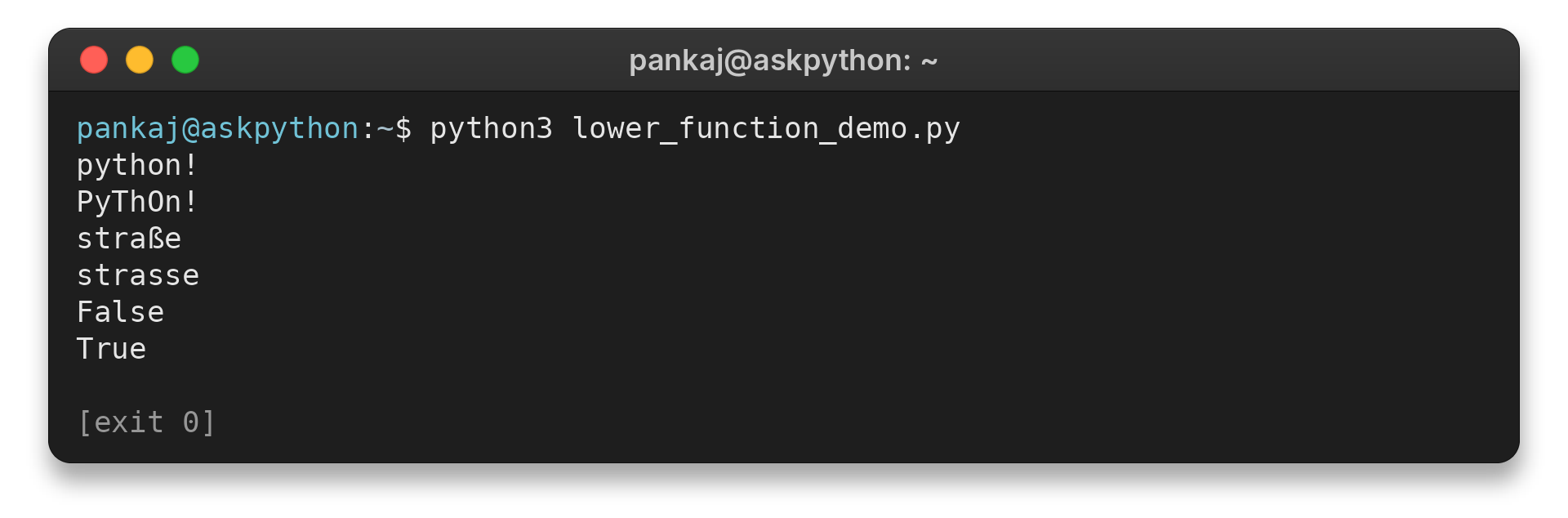
The output shows converted text first and the unchanged source next. The exclamation mark remains because it has no case.
The source file also checks a Unicode comparison. It prints False for equality after lower(), then True after casefold(), which shows why method choice depends on whether you are converting visible text or comparing without case distinctions.
Step 4: Apply lower() to text from a variable
You can use the returned string directly or save it for later work. Assigning it helps when a later operation needs the transformed form again.
message = "I LOVE Python"
normalized_message = message.lower()
print(normalized_message)
print(message)
The values are i love python and I LOVE Python. They follow from lower() returning converted text while keeping the source value intact.
Syntax and return value
The syntax is value.lower(), where value is a string. The method needs no argument and returns a new string value with its cased characters converted. It does not edit the original string in place, so assign the result when later code should use the lowercase form.
A common mix-up is to treat lower as a standalone function. The method belongs to the string object, so write text.lower(), not lower(text). That distinction also explains the error from passing an extra value in the parentheses.
city = "New York"
key = city.lower()
print(key == "new york")
This comparison expression is useful when casing should not affect a match. Keep city for display and use key for the comparison operation.
Examples with user input and collections
For a command prompt or form value, conversion can standardize case before a small set of accepted choices is checked. Preserve the original if the program will later show the spelling the person entered.
answer = "YeS"
choice = answer.lower()
if choice == "yes":
    print("Continue")
Here choice is lowercase while answer retains its initial capitalization. This check handles case variation, but it does not remove spaces, validate other answers, or make a value safe for a database query.
To transform a list of strings, call the method for each item. A list comprehension makes the input-to-output relationship explicit and leaves the original list available.
labels = ["Action", "Drama", "Sci-Fi"]
normalized = [label.lower() for label in labels]
The resulting list contains action, drama, and sci-fi. Each element must be a string for this expression to work. If a collection may contain numbers or missing values, decide how to handle those values rather than applying lower() blindly.
Using str.lower() in Pandas
For a Pandas Series, use the string accessor followed by lower: series.str.lower(). This applies the string operation across the Series, instead of calling Python’s string method on the Series object itself. The Pandas API documents this operation for values in a Series.
import pandas as pd

movies = pd.DataFrame({
    "title": ["The Matrix", "TOY STORY", "Amélie"],
    "genre": ["Science Fiction", "Animation", "Drama"],
})
movies["title_key"] = movies["title"].str.lower()
The new title_key column stores lowercase titles while title retains the source capitalization. Keeping both columns is useful when normalized text is for matching or grouping but the original title belongs in a report.
Use the accessor on the column, not movies.lower() or movies[“title”].lower(). Those expressions treat a DataFrame or Series as though it were a single Python string. The .str accessor is Pandas’ interface for string methods across column values.
For data that may include missing entries, check the Series’ dtype and missing-value behavior before choosing a conversion. Pandas’ string methods handle missing values according to the Series representation. A production cleanup should not replace missing titles with arbitrary text merely to make a comparison run.
Changing case in a movie dataset
Suppose a movie table has title values such as The Matrix and THE MATRIX. A lowercase key lets you group those spellings under the same case-insensitive key while preserving the source column for display. This changes the key used for matching, not the title shown to a reader.
A practical sequence is to inspect the title column, create a derived normalized column, then use that column for comparisons or duplicate review. Do not overwrite the title until you know the source form is no longer needed.
movies["title_key"] = movies["title"].str.lower()
duplicate_keys = movies["title_key"].duplicated(keep=False)
possible_matches = movies.loc[duplicate_keys, ["title", "title_key"]]
duplicated() marks repeated normalized keys, and loc selects the matching source titles beside their keys for review. A shared lowercase key is a candidate match, not proof that two records describe the same film. Titles can differ by punctuation, subtitles, release year, or Unicode spelling, so confirm records with the fields your dataset provides.
This workflow uses only a normalized text column. It does not remove punctuation, accents, leading spaces, or internal whitespace. If those differences matter to your matching rule, define and test each additional transformation separately so the key remains understandable.
Review a normalized column before using it to merge datasets. If one source stores The Matrix and another stores THE MATRIX, lowercasing creates the same key for those forms. A separate title_key column lets you inspect that match and compare other fields such as release year before combining rows.
Unrelated films can share a title, while one film can appear under a title with a subtitle or alternate punctuation. Use additional stable fields from the data when available, and treat a repeated text key as a review signal rather than a final identity decision.
Series.str.lower() also does not trim spaces. A title with a leading blank and the same title without it will not produce identical keys. If whitespace should be ignored, apply a separate trim operation deliberately and retain the original title column so the transformation can be audited.
A wider cleanup pipeline should keep each stage visible. Establish which entries are strings, decide how missing entries behave, create a normalized key, and inspect possible matches. Avoid overwriting a source column with an opaque chain of transformations.
When only one column needs conversion, assign the transformed Series to a new DataFrame column as in the example. For several text columns, select those columns explicitly and apply a string operation to each chosen Series. This keeps numeric fields such as a release year out of the conversion and makes the scope of the change clear.
After creating a normalized field, compare a few original and converted values before using it in a join or duplicate report. That quick inspection can reveal unexpected whitespace, missing entries, or titles whose capitalization differs but whose other identifying fields do not match.
Edge Cases and Method Choice
Choose lower() to produce lowercase text, islower() to test casing, and casefold() when the goal is caseless matching. The distinction matters for empty input and some Unicode letters.
I passed an argument to lower() and got TypeError: str.lower() takes no arguments (1 given). The method accepts no arguments, so remove the value from the parentheses.
An empty string, spaces, or digits alone have no cased character. lower() returns that text unchanged, while islower() returns False because its definition requires at least one cased character. A string with lowercase letters and punctuation can still pass islower(), since uncased characters do not contradict the test.
| Input or goal | Method | What to expect |
|---|---|---|
| Make display text lowercase | lower() | A lowercase copy of cased characters |
| Test whether text is lowercase | islower() | Boolean. At least one cased character is required |
| Compare without case distinctions | casefold() | Unicode-aware comparison form |
The lowercase German letter ß remains ß after lower(), while casefold() converts it to ss. A comparison such as Straße versus STRASSE can therefore need casefold() rather than lower(). Keep the original spelling for display and compare the casefolded forms.
Case conversion does not remove spaces or punctuation. Trim input separately when leading or trailing whitespace should be ignored. Unicode normalization addresses a different question, whether equivalent text uses the same code point sequence.
Read the Python lower() method for conversion, the Python casefold() method for caseless comparison, and string comparison in Python for comparison behavior.
Conclusion
Use lower() when your program needs a lowercase copy, and use islower() when it needs a True-or-False check. For comparisons where Unicode case distinctions should be ignored, use casefold() on both values and keep the source text for display.
The Python str methods reference documents lower(), islower(), and casefold(). The Unicode HOWTO explains text comparison and normalization.
FAQ
These answers distinguish conversion from nearby string operations.
How do I use the lower function in Python?
Call lower() on a string, such as text.lower(). It returns a lowercase copy of the string’s cased characters and takes no arguments.
What does the lower function do in Python?
str.lower() returns a copy of the string with its cased characters converted to lowercase. The original string value remains unchanged.
What is the difference between lower() and islower()?
lower() returns converted text. islower() checks whether all cased characters in a string are lowercase and whether at least one cased character is present.
Should I use lower() or casefold() to compare strings?
Use casefold() when you need Unicode-aware caseless matching. For example, casefold() maps ß to ss, while lower() leaves ß lowercase.