🚀 Supercharge your YouTube channel's growth with AI.
Try YTGrowAI FreePython replace() function

Calling `”Python python PYTHON”.replace(“python”, “Ruby”)` changes only the lowercase match. I appreciate the `count` argument because it caps how many matches change.
Pass the old and new text to `str.replace()` and check the returned string. Compare that returned string with the original to see which text changed.
What str.replace() changes
str.replace(old, new, count=-1) searches a string for an exact substring and returns a copy with matching occurrences replaced.
By default, it changes every match. Set count to limit the number of replacements.
Assign the returned string when later code needs the changed text, because the source string stays unchanged.
python3 -c 'text = "ref-17, ref-28"; result = text.replace("ref-", "INV-"); print(result); print(text)'
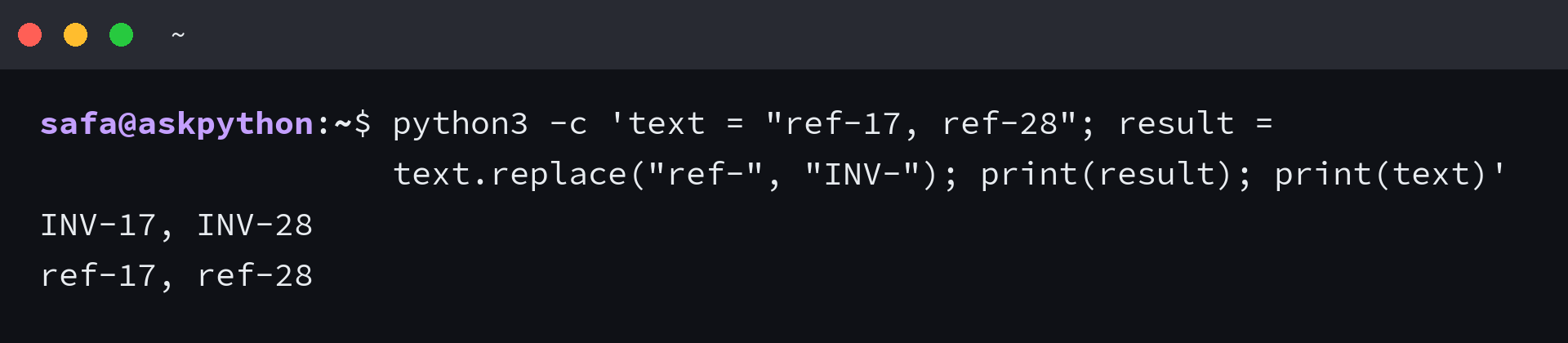
Python strings are immutable, so replace() returns a result instead of changing the original string. Assign that result back to the same name if later code should use the changed text.
What you need before replacing text
Call replace() on the string that contains the text you want to change, then pass the exact substring and its replacement.
| Argument | What it supplies |
|---|---|
| old | The literal substring to find |
| new | The text inserted for each match |
| count | An optional limit, defaulting to every match |
Matching is case-sensitive and literal. Python’s re.sub() handles regular-expression matching and can ignore case with re.IGNORECASE.
Use replace() for exact text changes
Choose the example by the object you have and how many matches you want to change.
Replace every exact match
The method replaces each non-overlapping match, and the replacement can have a different length from the text it finds.
text = "Py and Py"
print(text.replace("Py", "Python"))
Both matches become Python, and the replacement’s greater length does not change the method’s search. The original variable still refers to the unchanged string.
Limit how many matches change
Count limits the number of matches, so I saw the final warn stay unchanged after the first two replacements. A zero count changes none, and -1 keeps the all-matches default.
python3 -c 'print("warn: warn: warn".replace("warn", "hold", 2))'

Match capitalization or a regular expression
str.replace() matches exact capitalization, so re.sub() fits when a regular expression must ignore case.
import re

text = "Python python PYTHON"
print(text.replace("python", "Ruby"))
print(re.sub("python", "Ruby", text, flags=re.IGNORECASE))
The literal call changes lowercase python only, and re.IGNORECASE makes re.sub() match each capitalization.
Replace text inside a list
A list has no string replace() method, so call the method on each string element and collect the results. A list comprehension creates a new list while leaving the input list intact.
words = ["red cat", "blue cat"]
updated = [word.replace("cat", "dog") for word in words]
print(words)
print(updated)
For a list of numbers, use a list comprehension that compares each value with the target number.
Chain replacements in order
Each call receives the previous result, so a later replacement can change text inserted by an earlier call.
python3 -c 'print("cat".replace("cat", "dog").replace("dog", "fox"))'

Use replace() on a pandas column
A pandas Series is a one-dimensional labeled sequence, often a DataFrame column. Its str accessor applies a string operation to each value that supports it, and leaves missing values unchanged.
The pandas accessor accepts case and regex controls. str.replace() takes an optional count argument.
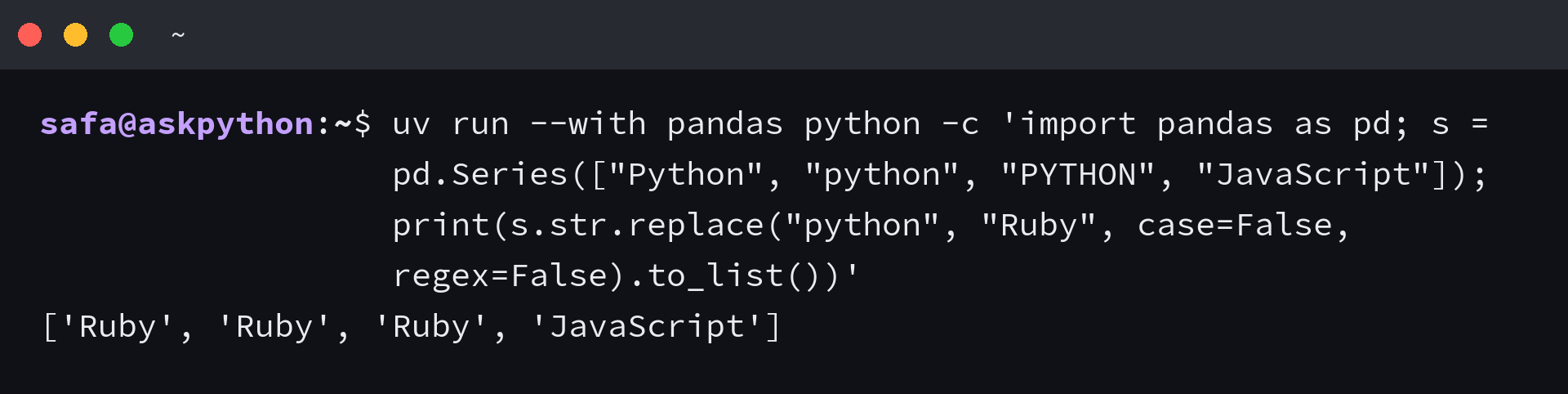
If uv is installed, this command supplies pandas for one run and performs a case-insensitive literal replacement.
uv run --with pandas python -c 'import pandas as pd; s = pd.Series(["Python", "python", "PYTHON", "JavaScript"]); print(s.str.replace("python", "Ruby", case=False, regex=False).to_list())'
| Call | What it changes | Useful option |
|---|---|---|
| str.replace() | Substrings in one Python string | count limits matches |
| Series.str.replace() | Matching text in each Series value | case and regex control matching |
case=False matches each capitalization of Python. regex=False keeps the search literal, so JavaScript stays unchanged.
Where str.replace() stops
The edge cases come from what counts as a match and which object owns the method. An empty old value behaves differently from an empty replacement.
- If old does not occur, the text stays unchanged.
- An empty new value removes each matching substring.
- An empty old value is inserted at both ends and between each character.
I got “ba” when I replaced “aa” with “b” in “aaa”. The second candidate overlaps a character already used by the first match.
python3 -c 'print("aaa".replace("aa", "b"))'

Use a regular expression with lookahead when overlapping matches matter, and use Python’s string find() method when you need a substring’s position.
Choose a method by the match you need
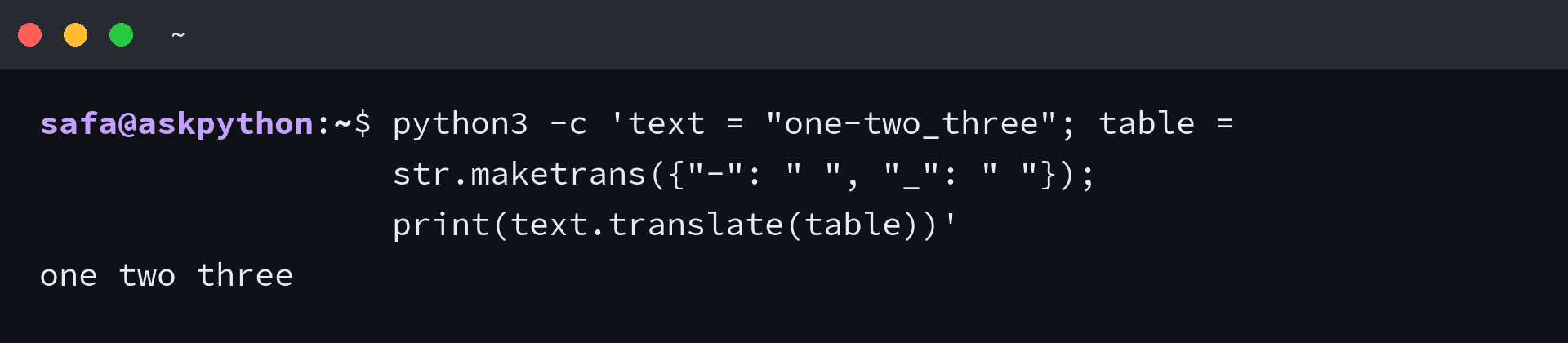
str.translate() applies a mapping to each character in the original text, so output from one mapping cannot become input to the next. Use it when several one-character substitutions act on one string.
python3 -c 'text = "one-two_three"; table = str.maketrans({"-": " ", "_": " "}); print(text.translate(table))'
Frequently asked questions
Is str.replace() deprecated in Python 3?
No. The current Python documentation includes str.replace() in the built-in string API. Call it on a string and use the returned string.
How do I replace only the first occurrence?
Pass count=1, then use the returned string to keep the first replacement.
How do I replace an integer in a list?
Use a list comprehension that substitutes the target number and carries other values forward. str.replace() operates on text inside a string.