🚀 Supercharge your YouTube channel's growth with AI.
Try YTGrowAI FreeHow To Configure Logging In Python?

While checking a Python program’s output, routine updates and failures can be hard to tell apart. Python’s built-in logging package assigns messages severity levels and routes records to places such as the console or a file.
I’ll show you how to set a root level with basicConfig and send records to the console or a file with handlers.
TL;DR: Configure Python logging in one minute
Use Python’s standard-library logging package to set a severity threshold, format each record and route it to a console or file handler. For a short script, basicConfig configures the root logger. Add handlers or dictConfig when an application needs separate destinations.
- DEBUG is the lowest standard level, while CRITICAL is the highest.
- A logger creates records, handlers route them, and formatters render them.
- basicConfig affects the root logger and normally does nothing after handlers have been configured.
What is Python logging configuration?
Python logging configuration controls which events become log records, how those records look and where they go. The built-in logging package gives modules a shared API, so your code and imported libraries can send records through one configured system.
A logger is the named object your code calls, such as a logger named checkout. A LogRecord carries event details such as its logger name, severity and message. A handler sends accepted records to a destination, a formatter turns a record into text, and an optional filter can reject records based on a condition.
| Component | Responsibility | Example |
|---|---|---|
| Logger | Creates records at a named point in the program | logging.getLogger(__name__) |
| Handler | Sends a record to a stream or file | StreamHandler or FileHandler |
| Formatter | Chooses the text layout | Timestamp, level and message |
| Filter | Allows or rejects selected records | Keep records for one subsystem |
These parts form a path rather than competing ways to log. Your call creates a record on a logger, the logger applies its level and hierarchy rules, then one or more handlers decide whether to emit it. A formatter belongs to a handler, which means two handlers can show the same event differently.
The root logger sits at the top of the logger hierarchy. Calls such as logging.warning() use it, while a named logger such as logging.getLogger(__name__) can pass records upward to handlers attached to the root. This propagation lets a library create its own logger without deciding whether the application writes to a terminal, file or another destination.
What you need before configuring logging
The logging package ships with Python, so a basic setup needs no third-party installation. Decide where the application starts, what events should be visible in normal operation, and whether records need to persist after the process exits.
- Put application-wide configuration near the program entry point, not inside every imported module.
- Choose a threshold for the environment. INFO is a common operational baseline, while DEBUG adds diagnostic detail.
- For a file, choose a path the process can write and decide whether the file should append or be replaced.
- Use named loggers in reusable modules. Let the application decide their handlers and output policy.
Configure logging before the first log event when using basicConfig. That function is designed as a convenient root setup, not a command that replaces any handler already installed. If a framework configures logging before your code runs, use that framework’s configuration point or configure explicit handlers.
How to configure Python logging step by step
This sequence starts with the smallest useful root configuration and then adds record fields, destinations and exception context. The examples use standard-library APIs, so they work without installing a logging package.
Step 1: Set a root level with basicConfig
basicConfig sets up the root logger for a simple script. The level parameter sets the minimum severity the root accepts, so DEBUG allows every standard level while WARNING suppresses DEBUG and INFO records.
import logging

logging.basicConfig(level=logging.INFO)
logger = logging.getLogger(__name__)
logger.debug("diagnostic detail")
logger.info("service started")
logger.warning("retrying request")
In a normal standalone run, the DEBUG call is filtered out and INFO and WARNING appear. The default format includes the level, logger name and message. If another part of the program already added a root handler, basicConfig leaves the existing configuration intact unless force=True is deliberately used.
Calling basicConfig in a library is a poor boundary because it changes the host application’s root behavior. Libraries should create named loggers and emit records, leaving output configuration to the application that owns the process.
Step 2: Add timestamps and useful fields
A formatter can include time, severity, logger name and message in each line. Set the format on the root with basicConfig for the simple case, and pass arguments separately from the message so logging can defer interpolation until it needs to emit the record.
import logging

logging.basicConfig(
    level=logging.INFO,
    format="%(asctime)s %(levelname)s %(name)s %(message)s",
    datefmt="%Y-%m-%d %H:%M:%S",
)
logger = logging.getLogger(__name__)
logger.info("loaded %d products", 12)
The percent-style placeholders in the message are supplied as arguments to logger.info(). This keeps the message template and values separate. The formatter’s fields such as asctime and levelname are LogRecord attributes, so a misspelled field can trigger a formatting error when that record is emitted.
Include context that helps identify where and what happened, but avoid secrets such as passwords, access tokens or full payment details. A timestamp is useful for correlating events, and the logger name helps distinguish the module that created a record.
Step 3: Write logs to a file
Pass filename to basicConfig to send root records to a disk file. The path is interpreted relative to the process’s current working directory when it is relative, not automatically relative to the Python source file.
import logging

logging.basicConfig(
    filename="application.log",
    level=logging.INFO,
    format="%(asctime)s %(levelname)s %(name)s %(message)s",
    encoding="utf-8",
)
logging.getLogger(__name__).info("report saved")
By default, a file handler appends to an existing file. Set filemode=”w” only when replacing prior contents is intended.
The encoding option makes the file’s text encoding explicit on supported Python versions. Check the logging reference if an older interpreter is in scope.
The parent directory must exist, and the process account needs write permission.
For a relative path such as logs/application.log, create the logs directory before starting the program. Use a rotating handler when the application needs to limit file size.
Step 4: Send logs to both console and file
Attach a StreamHandler and FileHandler when one record needs to go to both console and disk, then set each handler’s level or format for its destination.
import logging

logger = logging.getLogger("inventory")
logger.setLevel(logging.DEBUG)
logger.handlers.clear()
logger.propagate = False

console = logging.StreamHandler()
console.setLevel(logging.WARNING)
console.setFormatter(logging.Formatter("%(levelname)s: %(message)s"))
file_handler = logging.FileHandler("inventory.log", encoding="utf-8")
file_handler.setLevel(logging.DEBUG)
file_handler.setFormatter(logging.Formatter("%(asctime)s %(name)s %(levelname)s %(message)s"))
logger.addHandler(console)
logger.addHandler(file_handler)

logger.info("stock count completed")
logger.warning("reorder threshold reached")
The logger’s DEBUG level passes both records to handler filtering, where the console starts at WARNING and the file accepts DEBUG.
Clearing handlers makes this standalone example predictable on a repeated run. Do not remove handlers owned by a framework or another part of an application.
StreamHandler writes to stderr by default. Pass sys.stdout when a program specifically requires standard output.
The example disables propagation so the root logger does not emit a second copy through its own handlers. If propagation stays enabled, parent handlers may also process the same record.
Step 5: Use a named logger
Create a module logger with logging.getLogger(__name__) instead of calling the root convenience functions throughout an application. The module name becomes part of the logger hierarchy, which gives an application a way to adjust one package without changing every call site.
import logging

logger = logging.getLogger(__name__)

def load_catalog(path):
    logger.info("loading catalog from %s", path)
    try:
        with open(path, encoding="utf-8") as catalog:
            return catalog.read()
    except OSError:
        logger.exception("catalog could not be read")
        raise
Logger names separated by dots form a hierarchy. A logger named shop.catalog is a descendant of shop, and its records can propagate toward the root. The application can set a level for shop.catalog or attach a handler higher in the tree without adding configuration calls to the module.
Repeated calls to getLogger() with the same name return the same logger object. That makes module-level logger creation safe and lets the logging system share configuration for a name. Do not instantiate Logger directly, because getLogger() is the supported factory for named instances.
Step 6: Configure handlers with dictConfig
dictConfig describes loggers, handlers and formatters in a dictionary and applies them together. It is useful when configuration has multiple destinations or when the application keeps settings in one structured object.
import logging
import logging.config

config = {
    "version": 1,
    "disable_existing_loggers": False,
    "formatters": {
        "brief": {"format": "%(levelname)s %(name)s: %(message)s"}
    },
    "handlers": {
        "console": {
            "class": "logging.StreamHandler",
            "level": "INFO",
            "formatter": "brief",
        }
    },
    "root": {"level": "DEBUG", "handlers": ["console"]},
}
logging.config.dictConfig(config)
logging.getLogger("inventory").debug("record kept below console threshold")
logging.getLogger("inventory").info("catalog loaded")
The root accepts DEBUG records, but this handler starts at INFO, so the debug call does not print. This distinction matters when a message is missing: a record must pass the logger’s effective level and each handler’s level before it can be emitted.
The disable_existing_loggers setting is a policy decision. Leaving it true can disable previously created non-root loggers that are not named in the dictionary. Setting it false preserves them, which is often appropriate when configuring an application that imports libraries before applying dictConfig.
Step 7: Record exceptions with tracebacks
Call logger.exception() inside an except block when the log needs the active exception traceback. It records at ERROR level by default and adds exception information, so the output shows the failure location as well as a short message.
import logging

logging.basicConfig(level=logging.DEBUG, format="%(levelname)s:%(name)s:%(message)s")
logger = logging.getLogger("checkout")
logger.debug("checking stock for SKU-42")
logger.info("order accepted")
try:
    int("not-a-number")
except ValueError:
    logger.exception("could not parse quantity")
DEBUG:checkout:checking stock for SKU-42
INFO:checkout:order accepted
ERROR:checkout:could not parse quantity
Traceback (most recent call last):
  File "logging_basic_demo.py", line 8, in <module>
    int("not-a-number")
ValueError: invalid literal for int() with base 10: 'not-a-number'
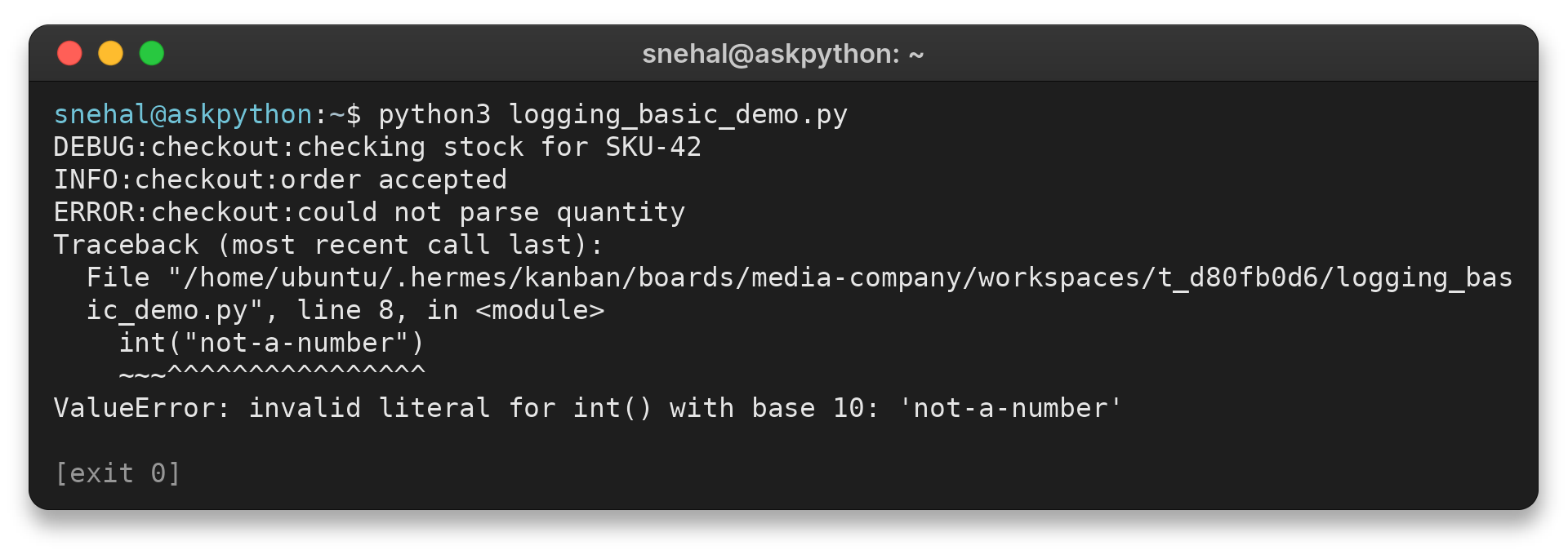
I ran logging_basic_demo.py and saw its DEBUG, INFO and ERROR records followed by the caught ValueError traceback. Because the except block handles the error, the program completes with exit code 0.
Fix common Python logging problems
When an expected message is absent or duplicated, inspect both the logger threshold and the handlers that receive the record. The same message can pass one level check and fail another, or propagate to more than one handler.
| Symptom | Likely cause | Check |
|---|---|---|
| INFO or DEBUG is missing | Root or named logger threshold is higher | Check logger.getEffectiveLevel() |
| Logger calls appear to do nothing | basicConfig ran after a handler already existed | Find who configured root first |
| File is missing | Relative path points at a different working directory, or directory is absent | Print Path.cwd() and verify directory permissions |
| Each line appears twice | A child handler emits locally and propagation reaches a parent handler | Inspect ancestor handlers and propagation |
| File contains old records | FileHandler appends by default | Choose append or deliberate filemode=”w” |
| Formatting raises an error | Formatter field is absent or misspelled | Use documented LogRecord attribute names |
A useful first check is logger.getEffectiveLevel(), which reports the level inherited through the logger hierarchy when the logger has no explicit level. Then inspect handler levels. A DEBUG logger does not guarantee DEBUG output if its only handler starts at INFO.
basicConfig is intended to configure the root once. A notebook, test runner or web framework may add a handler first, in which case a later basicConfig call leaves the existing setup unchanged.
Find the application’s startup configuration instead of adding another setup call at an arbitrary import point.
A relative filename follows the process working directory, which can differ between an interactive shell, an IDE and a service manager. Use an explicit path when the destination must be stable, and create the parent directory before opening a FileHandler. Permission errors occur when the process account cannot write to that destination.
Duplicate records often come from propagation. A child logger sends its record to its own handler and then to ancestor handlers unless propagation is disabled.
Prefer a consistent handler at one suitable level of the hierarchy. Set propagate=False only when the child should stop sending records upward.
Conclusion: Configure logging where the application starts
Configure output once where the application starts and let modules create named loggers. This keeps reusable code from changing the host application’s logging policy.
Start with the Python Logging HOWTO, then read AskPython’s Python Logging Module article and guide to listing existing loggers.
FAQ
These answers cover the default level, file destination and the difference between logger and handler thresholds.
What is the default logging level in Python?
The root logging setup defaults to WARNING, so DEBUG and INFO records are not emitted unless you configure a lower threshold.
Where does Python save a log file?
A relative filename is resolved from the process current working directory. Use an explicit path when the file must have a stable location.
How do I log to a file and the console?
Attach a FileHandler and a StreamHandler to the same logger, then set each handler’s level and formatter for its destination.
Why does basicConfig not change my logging output?
basicConfig normally does nothing when the root logger already has handlers. Configure logging at the application’s startup boundary.