🚀 Supercharge your YouTube channel's growth with AI.
Try YTGrowAI FreePython String isalnum() Function

Choosing a test for a Python string starts with deciding which characters it may contain. Python’s str.isalnum() returns True when a nonempty string contains only alphabetic or numeric characters.
I’ll show how to test a complete string with str.isalnum() and choose a numeric-specific check when the input must represent a number.
TL;DR: Choose the Check That Matches the Input
Use str.isalnum() when every character must be a letter or numeric character, and use a numeric-specific method when the whole string should represent digits.
- Spaces, punctuation, a minus sign and a decimal point make isalnum() return False.
- An empty string returns False because at least one character must be present.
- Unicode characters count, so the result is broader than ASCII letters and 0–9.
- For numeric text, choose isdecimal(), isdigit(), isnumeric(), or parse it according to what your input permits.
What Is Python str.isalnum()?
str.isalnum() returns True when a string has at least one character and every character qualifies as alphabetic or numeric. Its result is a Boolean, and the method takes no arguments. I use it for a character filter because python3.14 isalnum_demo.py printed ‘River 9’: False.
Python uses Unicode character properties for this test. For example, “éclair7” passes, while an underscore makes the whole value fail.
How to Check a String Step by Step
Call isalnum() on the complete input, then decide what a True or False result means for your validation rule. I ran a small set of examples, including an empty value and two Unicode numeric characters, with python3.14 isalnum_demo.py.
Step 1: Test the complete string
The program tries ordinary input, whitespace, punctuation and Unicode characters. Its output gives the Boolean results beside each input.
samples = [
    "River9",
    "River 9",
    "",
    "-42",
    "3.14",
    "²",
    "½",
    "éclair7",
]

for sample in samples:
    print(f"{sample!r}: {sample.isalnum()}")

print(f"'²': decimal={ '²'.isdecimal() }, digit={ '²'.isdigit() }, numeric={ '²'.isnumeric() }")
print(f"'½': decimal={ '½'.isdecimal() }, digit={ '½'.isdigit() }, numeric={ '½'.isnumeric() }")

try:
    value = 42
    value.isalnum()
except AttributeError as error:
    print(f"{type(error).__name__}: {error}")
The command printed these results:
pankaj@askpython:~$ python3.14 isalnum_demo.py
'River9': True
'River 9': False
'': False
'-42': False
'3.14': False
'²': True
'½': True
'éclair7': True
'²': decimal=False, digit=True, numeric=True
'½': decimal=False, digit=False, numeric=True
AttributeError: 'int' object has no attribute 'isalnum'
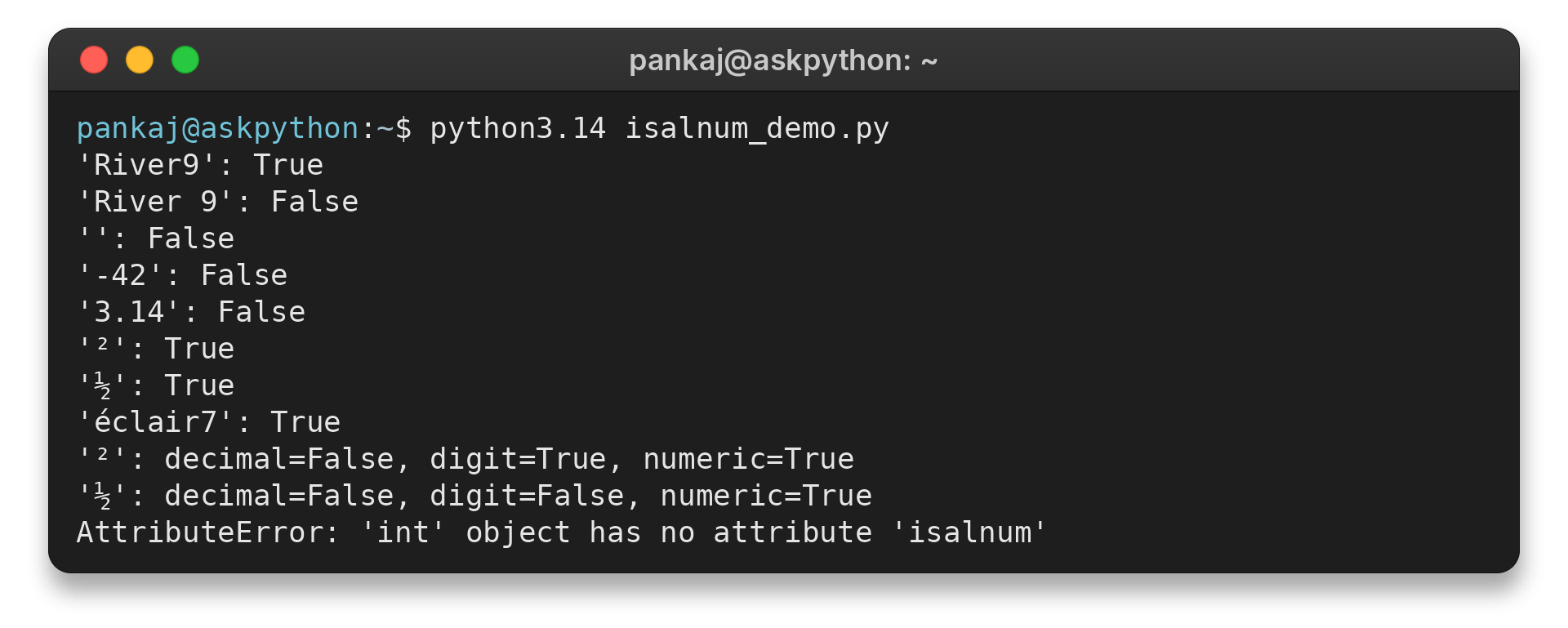
Notice that “River 9” fails because the space is part of the string. Unicode examples also pass for characters outside decimal digits. The result is a Boolean, and the original string stays unchanged.
Step 2: Choose the rule before accepting input
Use the Boolean result as one condition in your own rule. For example, check for an empty value before applying a minimum-length rule, then decide whether whitespace should be rejected or removed before checking.
For an ASCII-only letter-and-digit field, add an ASCII condition to the per-character check. I ran python3.14 ascii_alnum_demo.py on plain text, accented text and empty input.
def is_ascii_alnum(value):
    return bool(value) and all(
        character.isascii() and character.isalnum()
        for character in value
    )


for value in ("River9", "éclair7", ""):
    print(f"{value!r}: {is_ascii_alnum(value)}")
The command printed these results:
pankaj@askpython:~$ python3.14 ascii_alnum_demo.py
'River9': True
'éclair7': False
'': False
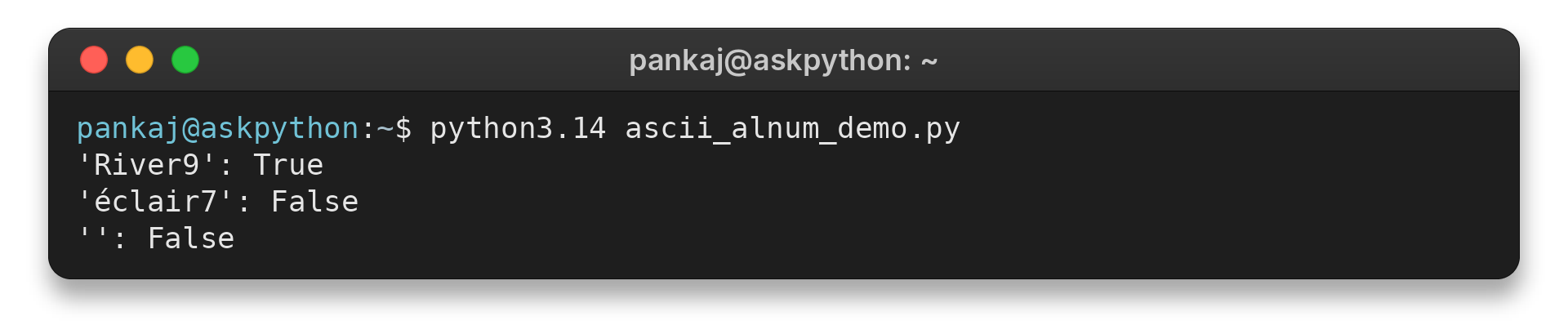
The extra isascii() condition narrows acceptance beyond the Unicode-aware method. The output shows “River9” passes while “éclair7” and the empty string return False.
Edge Cases: Empty, Unicode and Numeric Text
Superscripts and fractions separate the numeric character methods. Compare their results in the table before choosing the check that matches your field.
| Input or goal | Useful check | What it answers |
|---|---|---|
| “River9” | isalnum() | Every character is alphanumeric |
| “42” as decimal digits | isdecimal() | Every character is a Unicode decimal digit |
| “²” as a digit character | isdigit() | Includes superscript digits beyond decimal characters |
| “½” as a numeric character | isnumeric() | Includes numeric symbols such as fractions |
| “-3.5” as a numeric value | float() with ValueError handling | Whether Python can parse the string as a float |
I passed integer 42 to isalnum() in python3.14 isalnum_demo.py and got AttributeError: ‘int’ object has no attribute ‘isalnum’. The value’s type caused the error. Check the input type first, then convert only when the data rule calls for text.
The output above shows “-42” and “3.14” return False for isalnum(). When such forms are valid for a field, attempt float() conversion and catch ValueError.
For the individual tests, see AskPython’s guides to str.isdigit(), str.isnumeric() and str.isalpha(). Each guide explains the method’s own return conditions.
Conclusion
Use str.isalnum() when a field’s rule requires letters and numeric characters throughout. For numeric input, decide whether the accepted form includes Unicode digits, a sign, or a decimal point, then choose a character test or parser.
Read the Python string-method documentation for character categories and the float() reference for conversion behavior.
FAQ
These quick answers cover two common choices when validating text.
Does isalnum() check whether a string is a number?
No. It checks that a nonempty string contains only alphanumeric characters. Use a numeric character method or attempt numeric conversion when the input must represent a number.
Why does isalnum() return False for an empty string?
The method returns True only when every character is alphanumeric and there is at least one character. An empty string has no characters, so it returns False.
Does isalnum() accept Unicode characters?
Yes. Python uses Unicode character properties, so letters and numeric characters outside ASCII may pass. Use an explicit ASCII check when your rule allows only ASCII letters and digits.