🚀 Supercharge your YouTube channel's growth with AI.
Try YTGrowAI FreePython String Capitalize: Method and Examples

Capitalizing a Python string can mean changing its first character, each word, or every cased letter. The capitalize() method titlecases the first character and lowercases the remainder.
You’ll see what capitalize() returns for empty and punctuation-first strings, then compare methods for capitalizing words.
TL;DR
Use str.capitalize() when the first character should be titlecased and the rest of the string lowercased.
- Call it as text.capitalize() with no arguments.
- It returns a new string and leaves the original unchanged.
- Use title() or string.capwords() when you want each word capitalized, with different punctuation and whitespace behavior.
What Is str.capitalize() in Python?
text.capitalize()
Python strings are immutable, so calling the method leaves the source value available for later code. Python 3.8 changed the first character operation from uppercase to titlecase for Unicode characters such as digraphs.
For a map of related operations, see Python string functions and the focused guide to str.upper() in Python.
How to Capitalize a String Step by Step
Call capitalize() on the input, then use or print the returned string. This example also checks what happens to the source value and to empty or punctuation-first strings.
Step 1: Call capitalize() on a string
Save this program as capitalize_demo.py and run python3 capitalize_demo.py. Its first call passes the mixed-case value to the method and prints the returned text.
import string

text = "tHis IS a test"
print(text.capitalize())
print(text)
print("".capitalize())
print("!hello WORLD".capitalize())
print("they're bill's friends".title())
print(string.capwords("they're bill's friends"))
The command prints:
This is a test
tHis IS a test

!hello world
They'Re Bill'S Friends
They're Bill's Friends
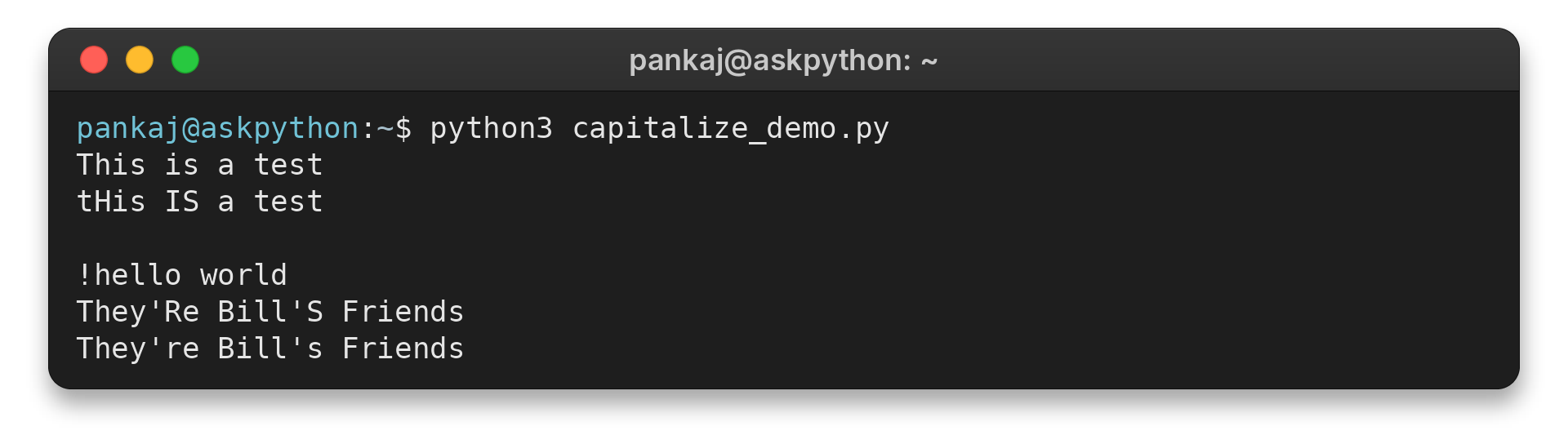
The source still prints as tHis IS a test, because capitalize() returns a new string. An empty string produces a blank output line without an error, while punctuation stays at the front and the later letters become lowercase.
Step 2: Check empty and punctuation-first strings
The same program checks an empty string and punctuation-first text.
print("".capitalize())
print("!hello WORLD".capitalize())
!hello world

The blank first line is the result for the empty string. The punctuation-first input keeps its exclamation mark while the later letters become lowercase.
Step 3: Compare word capitalization methods
The final calls compare title() with string.capwords() on an apostrophe phrase. Their printed outputs show where each method treats a word boundary.
Edge Cases and Choosing Another Method
Choose a casing method by the output you want. I compared two word methods on an apostrophe phrase: title() produced “They’Re Bill’S Friends”, while capwords() produced “They’re Bill’s Friends”.
Use title() for word boundaries, with care
str.title() starts a new word after punctuation as well as spaces, so apostrophes divide contractions and possessives. That behavior explains the capital R and S in the demonstrated output.
"they're bill's friends".title()
It can also change acronyms to mixed case, so inspect the result when names or abbreviations matter.
Use string.capwords() when spaces define words
string.capwords() splits on whitespace, applies capitalize() to each word, and joins them. With its default separator, repeated whitespace becomes one space and leading or trailing whitespace disappears.
import string
string.capwords("they're bill's friends")
Use upper() when every cased letter should change
To preserve interior capitals, use slicing instead of capitalize(), which lowercases the remainder.
text[:1].upper() + text[1:]
text.upper()
Some characters have no uppercase or lowercase form, including digits, spaces, and many symbols. When the first character is uncased, it stays unchanged and later cased characters are still lowercased. That is why the punctuation example keeps its exclamation mark while WORLD becomes world.
Capitalization can damage identifiers and names whose internal capitals carry meaning. Check representative values before applying this conversion to a data column.
text[:1].upper() + text[1:] handles empty input too, while direct text[0] access raises IndexError on an empty string.
For applications that accept text in multiple languages, remember that casing follows Unicode rules rather than a promise to preserve the same number of code points. The standard library documents titlecase behavior for the first character, including a change introduced in Python 3.8. Test representative input from the languages your application supports.
Conclusion
Use str.capitalize() when the first character should be titlecased and the remainder lowercased. Python’s str.capitalize(), str.title(), and string.capwords() documentation describes their behavior.
For method details, consult the Python documentation for str.capitalize(), str.title(), and string.capwords().
FAQ
These answers cover common questions about Python string capitalization.
How do I capitalize all letters in a string in Python?
Call str.upper() to convert all cased letters to uppercase. str.capitalize() uppercases or titlecases only the first character and lowercases the rest.
How do I capitalize every word in a Python string?
Use str.title() for title case, or string.capwords() when words should be split on whitespace. title() treats apostrophes as word boundaries, while capwords() can normalize whitespace.
Does capitalize() work on an empty string?
Yes. Calling ”.capitalize() returns an empty string and does not raise an index error.