🚀 Supercharge your YouTube channel's growth with AI.
Try YTGrowAI FreePython Standard Library Modules for Common Tasks


Before installing a package for a small job, it helps to know what Python already includes. The standard library is a collection of modules that Python distributes for common programming tasks.
I’ll explain how standard-library modules differ from separately installed packages and show how to use them for common tasks.
TL;DR: Python standard library modules by task
Python’s standard library includes modules for common jobs, so check it before adding an external dependency.
- Use pathlib for paths and files, collections for specialized containers, and itertools for iterator operations.
- Use functools, dataclasses, and contextlib for function behavior, data records, and resource cleanup.
- Use statistics for small descriptive calculations and shutil for file copying or archiving.
What are Python standard library modules?
Python ships with modules for common tasks, while packages such as requests and numpy are installed separately.
Module and package are related terms, but they describe different ways Python code is organized. For everyday use, consult the module page for behavior and availability details. The Python standard library reference is the authoritative catalog.
To use a module, import either the module or a name from it. For example, import statistics lets you call statistics.mean(values), while from pathlib import Path makes Path available directly. These imports do not install anything.
Use the module index when you know a name but need its page. The module index helps when you know a name but need its documentation.
Built-in functions such as len() and print() are available without an import. Built-in functions such as len() and print() are available without an import. Modules such as math and json require one.
This distinction helps when a search result calls every reusable feature a library.
When an import succeeds in a terminal but fails inside an editor, check which interpreter the editor selected before installing anything.
For JSON configuration, the json module reads and writes JSON values. For a comma-separated table, csv handles quoting and delimiters that a hand-written split can miss. The argparse module handles command-line options and help text.
How to choose and use a standard-library module
This walkthrough uses modules that match each operation in the example. The executable example combines counting, grouping, path-based file access, a median, cached computation, and a data record.
Step 1: Use pathlib for file paths
pathlib.Path represents a filesystem path as an object. Joining path components with the slash operator is clearer than assembling a path string, and methods such as read_text(), write_text(), and exists() make common operations explicit.
from pathlib import Path

notes = Path("notes") / "week1.txt"
if notes.exists():
    text = notes.read_text(encoding="utf-8")
Text encoding matters when files move between systems, so pass an encoding when text is read or written. For binary files, use the byte-oriented methods instead. The AskPython guides to creating a directory with pathlib and writing a file in Python cover related operations.
Step 2: Count and group with collections
collections.Counter counts repeated values, and defaultdict provides a default value for missing keys. They reduce bookkeeping when data is naturally counted or grouped.
<pre class="wp-block-syntaxhighlighter-code">from collections import Counter, defaultdict

words = ["api", "cache", "api", "worker", "api"]
counts = Counter(words)
groups = defaultdict(list)
for word in words:
    groups[word[0]].append(word)</n
print(counts["api"])
print(groups["a"])</pre>
A normal dictionary raises KeyError for a missing key, while defaultdict(list) creates an empty list on access and can hide a misspelled key.
Step 3: Compose iterators with itertools
With itertools, islice takes a bounded number of values and chain reads several iterables in sequence without building every intermediate result at once.
from itertools import chain, islice

items = chain(["a", "b"], ["c", "d"])
first_three = list(islice(items, 3))
print(first_three)
An iterator is consumed as values are requested. Store a list when later code needs to revisit those values.
Check each function before using it as a group operation. itertools.groupby groups adjacent equal keys, so sort by the same key first when you need all matching records together.
Step 4: Cache repeated function calls with functools
functools.lru_cache stores results from calls so repeated calls with the same arguments can reuse a result. It suits deterministic functions whose arguments are hashable and whose results remain valid while cached.
from functools import lru_cache

@lru_cache(maxsize=128)
def square(number):
    return number * number
Mutable arguments such as lists cannot serve as cache keys. A cache also retains references to keys and results until entries expire or the cache is cleared, so avoid caching functions whose answer depends on changing external state. The decorator is a memory-for-repeated-work trade-off, not a general speed switch.
Step 5: Represent data with dataclasses
dataclasses.dataclass generates common methods for a class whose main purpose is to hold fields. Add type annotations to fields, then create instances with named values.
from dataclasses import dataclass

@dataclass
class Reading:
    label: str
    seconds: int

sample = Reading("batch", 3)
print(sample)
A dataclass does not validate that a value matches its annotation at runtime. Add explicit validation when input comes from a user, a file, or a network response. For richer validation, inheritance rules, or custom behavior, a regular class may make the constraints clearer.
Step 6: Keep resource cleanup in contextlib
Python’s with statement ensures a context manager gets a chance to clean up after its block, including when an exception occurs. Files already support this protocol, and contextlib helps adapt or create context managers for other resources.
from contextlib import closing
from urllib.request import urlopen

with closing(urlopen("https://example.com")) as response:
    first_bytes = response.read(80)
Prefer the resource’s native context manager. closing adapts an object with close() that lacks the context-manager protocol. Use a suitable target for the network request.
A local file is a safer practice case.
Step 7: Calculate summaries with statistics
statistics handles common descriptive calculations for numeric data, including the mean, median, and mode. It is a useful fit for modest lists where a specialized numerical package would be unnecessary.
import statistics

latencies = [12, 18, 20, 42, 60]
print(statistics.median(latencies))
Choose the statistic that matches the question. A mean can shift when a small number of observations are far from the rest, while a median describes the middle after ordering the values. For large arrays, missing values, or specialized statistical methods, use a library designed for that workload.
Step 8: Copy files with shutil
shutil supplies high-level file operations such as copying and moving. Pair it with pathlib so the source and destination are explicit path objects.
from pathlib import Path
import shutil

source = Path("report.csv")
backup = Path("backup") / source.name
shutil.copy2(source, backup)
copy2 attempts to preserve metadata as well as file contents, subject to platform limits. Check that the destination is correct before copying, and decide what should happen if a destination already exists. For deletion, preview the targets because the operation changes the filesystem.
See AskPython’s guide to copying a file in Python for more detail.
The run of python3 standard_library_demo.py produced the following output from its local file operations and in-memory examples.
api count: 3
a-group size: 3
first two lines: ['first line', 'second line']
median: 5
cached square: 16
summary: Summary(label='batch', total=3)
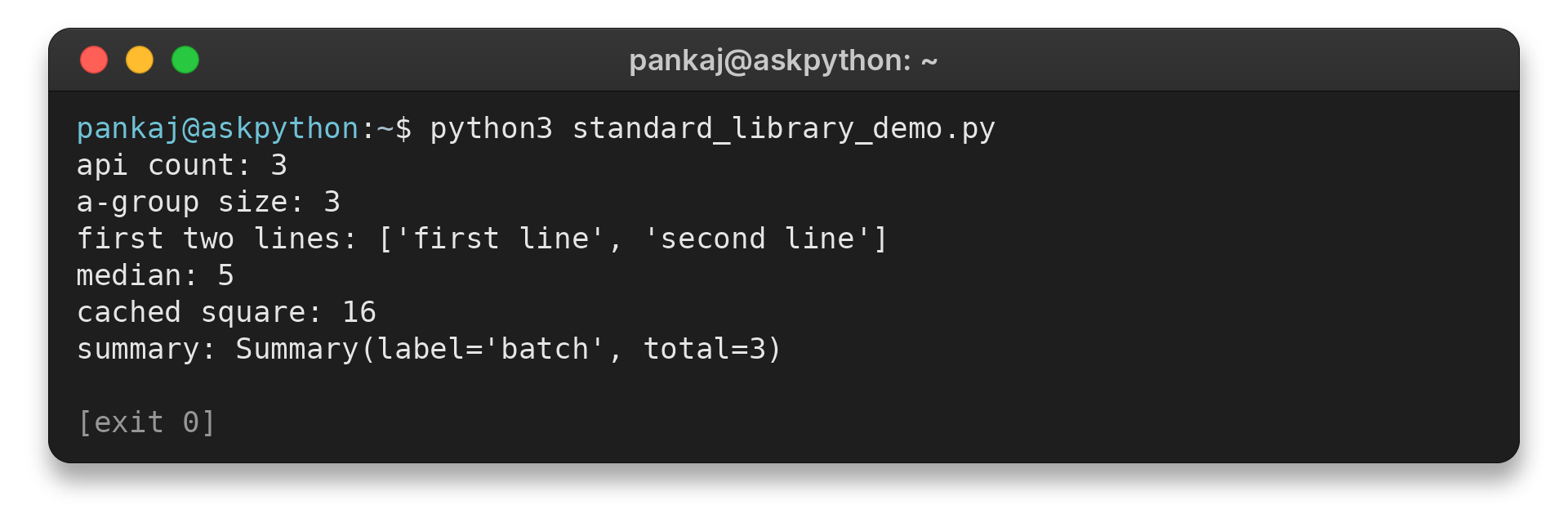
The output shows the counts, grouped entries, two lines read, median, cached value, and data record. The script removes its temporary file after reading it.
Limits and cases to check
Some minimal, mobile, and WebAssembly builds omit modules. Verify availability for the interpreter you deploy.
| Case | What to check | Practical choice |
|---|---|---|
| Import fails | Python version and module availability notes | Confirm the interpreter and build before adding a dependency |
| Iterator seems to omit values | Whether it was already consumed | Create a new iterator or store the values if reuse is required |
| groupby misses matching records | Whether equal keys are adjacent | Sort by the grouping key first |
| Cached call raises TypeError | Whether every argument is hashable | Use immutable keys or a different cache design |
| File operation affects an unexpected path | Resolved source and destination paths | Print or inspect the targets before changing files |
Choose a third-party package when the task calls for capabilities the standard library does not provide, or when the package has a clear maintenance and deployment fit. Account for installation, version management, licensing, and the project’s supported Python versions.
To find a module, search the official Python module index or browse the standard library reference. Avoid assuming a name is built in just because it appears in a Python tutorial.
A useful distinction is whether the operation works on values or changes the outside world. Counter and statistics operate on values in memory. pathlib can read or write a named file, and shutil can copy or move paths, so verify the target before using those methods in automation.
For batch processing, print the candidate paths before applying changes.
Choose a data structure based on whether the next operation needs indexing or another pass.
Treat this selection as a starting point rather than a syllabus. A configuration reader may use pathlib and json, while a small report may use csv and statistics. Test boundary cases with a small input before using the operation in a larger program.
Write down the operation and input shape before adding a package. Document a package when it provides a needed format or algorithm.
Conclusion: choose a module by the job
The standard library covers common operations such as paths, grouping, iteration, and file handling. Add a dependency when your task needs behavior those modules do not provide.
Keep the standard library reference for module availability and platform notes. The AskPython guides on creating directories and copying files show two related filesystem tasks.
FAQ
These answers cover common questions about Python’s built-in library.
What are standard library modules in Python?
They are modules distributed with Python that can be imported by name, such as pathlib and statistics. Some optional modules may be unavailable on particular builds or platforms.
Do I need to install Python standard library modules?
Usually no. Standard library modules are distributed with Python, while third-party packages are installed separately. Check module availability for minimal or platform-specific Python builds.
How can I find all Python standard library modules?
Use the official Python module index for your interpreter version and consult the library reference for each module’s behavior and availability.